

AI Render Studio features
Everything the app does, in one place
From a screenshot, a plan or a photo to a photoreal picture, then edits, video, client feedback and team work.
- Keeps your design, with a free re-run if it does not
- Interior, exterior, facade and floor plan
- Client review links and team threads
- ChatGPT and Claude connector, REST API
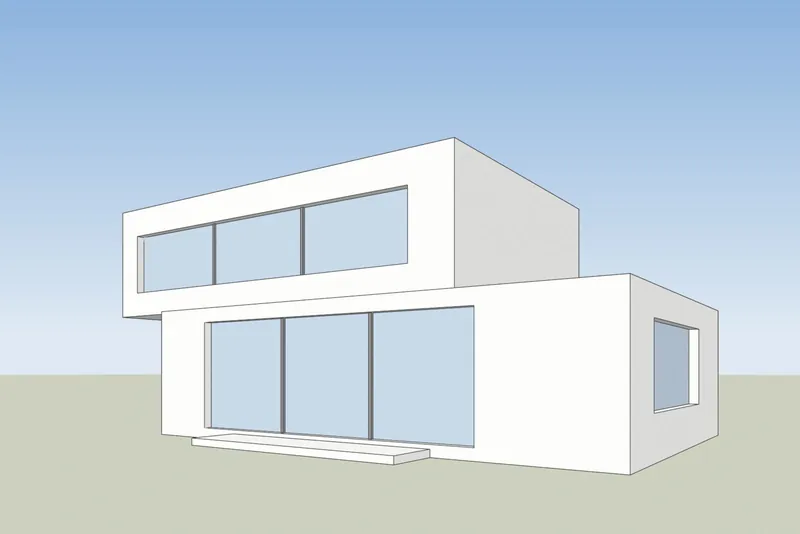
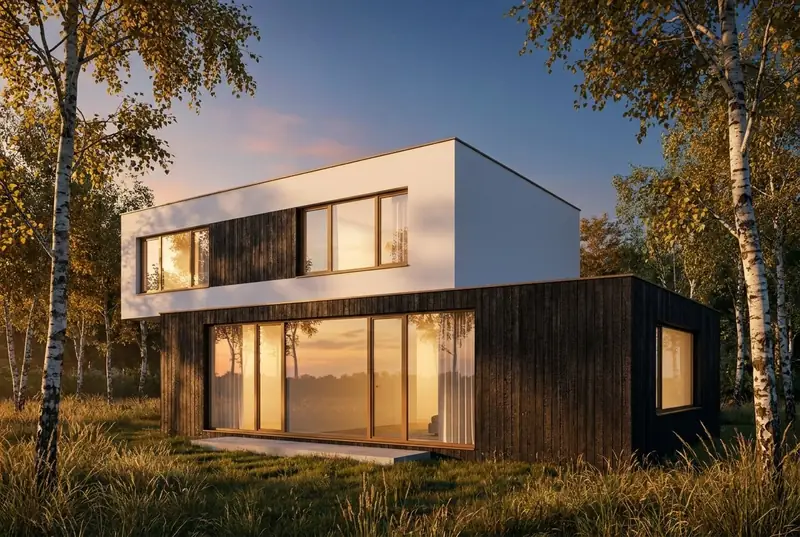 3D viewAI render
Your design
An AI render that keeps your design
The thing architects ask first, and what the app does about it.
Keeps your design
The render aims to keep the shape of the building, the windows, the roofline, the number of floors and the camera.
Automatic quality check
If a render loses your design, the app renders it again once, for free. If the lines drift, the re-run is on us.
Facade elevations stay straight-on
A facade elevation comes back as a straight-on facade with the same layout and no labels.
Keep my materials
Add only light and realism and keep the materials you set in your model.
What you start from
A model, a plan, a render or a photo
Each has its own mode, so the AI knows what it is looking at.
A screenshot of a 3D model
From SketchUp, Revit, Archicad, Rhino, 3ds Max, Blender, Vectorworks or any other program.
AI rendering from a 3D modelA finished render
Enhance a render from Lumion, Enscape, Twinmotion, V-Ray or D5: better light and materials, same building.
Enhance a renderA photo of a room, a house or a garden
Restyle a room, try new exterior colors, or design a garden on your own photo.
AI interior designA photo of the site
Upload a photo of the plot or street and a screenshot of your model, and get the photo back with the building on it.
Place a design in a site photoInterior, exterior and landscape
Separate looks for interiors, exteriors and landscape, and a sketch style for early ideas.
Light and style
Light, weather, season and the view outside
Pick a look before you render, or change it afterwards.
36 looks
Daylight, evening sun, dusk and night, material looks such as brick and stone or timber and render, interior styles and sketch styles.
Weather and season
Change the weather and the season. A season changes the trees, plants and ground, and keeps the light and sky.
The view through the window
For an interior, choose what is seen outside the windows, or keep what your model shows.
One look for a whole project
Lock a look so every view of a project comes out in the same style.
After the render
Fix, relight, change and animate a render
No new render from scratch for a small change.
Fix one area
Brush over a floor, a sofa or the sky, say what it should be, and only that part changes. Add trees, people, furniture, a new floor or a new sky.
Relight a render
Change the time of day of a finished render without starting again.
Change a render with words
Write what to change, for example a dark metal roof, and get a new version.
Larger files
Paid renders have no logo, are upscaled 2x and can be downloaded as a 4K PNG.
5-second video
Turn a render into a 5-second video, with camera moves, on any paid plan or credit pack.
Projects and versions
Projects, tags and favourites, and every version of a view kept together in My renders.
Clients and teams
Client feedback, team threads and white label
For studios that send renders to clients every week.
Client review links
One link per render or for a whole folder. Clients comment without an account, and on a video they comment at a moment in the clip. On Pro and up.
Team threads
Comment on any render, reply in threads, mention a teammate with @ and mark a thread resolved. Every render shows who made it and who edited it.
Shared credits and gallery
Studio has 3 seats and Max has 5, with one credit pool and one gallery for the whole team.
White label
On Studio and Max: your logo and colour on the app and on client review links, and the 3Dstudio.co badge hidden on shared pages.
Connect
ChatGPT and Claude, the API and plugins
Use the studio from the tools you already work in.
ChatGPT and Claude connector
Use the studio from inside ChatGPT or Claude: render, change and relight in the chat, with your normal credits.
Connect ChatGPT or ClaudePlugins
Plugins in beta for 3ds Max and Archicad, and for SketchUp, Revit and Rhino. A screenshot works in every program today.
3ds Max plugin (beta)
Prices and credits
Fair credits and clear prices
The same rules on every plan.
Prices in your currency
Prices are shown in your own currency and include VAT or sales tax where it applies.
Credits never expire
Unused credits stay in your account. Top up with a credit pack, with no subscription.
Failed renders refunded
A failed render is refunded in credits automatically.
Cancel any time
Cancel a plan any time, with a 14-day refund if no credits are used.
Price
AI rendering plans: start free, pay for what you render
Prices in your own currency. Credits never expire, and failed renders are refunded.
Free
For trying one of your own models.
€0
5 free renders
No card needed
- Try 1 render every 24 hours, no account
- Fix any area
Good to know
- Personal use
- Small logo
Pro
One architect or designer on live projects.
€25 / month
80 HD renders a month
€0.31 / HD renderBilled monthly, cancel any time
- 1 user seat
- 1 render at a time
Everything in Free, plus
- Commercial use
- No logo, 2x upscale
- 5-second videos
- 4K PNG downloads (2 credits each)
- Hide the 3Dstudio.co badge on shared pages
- Client review links
- API and MCP access
Prices include VAT or sales tax where it applies.
Top up without a plan
One payment, and the credits never expire. Any purchase also removes the logo, upscales your renders 2x and unlocks 5-second videos.
Features FAQ
Questions about the AI Render Studio features
Free use, design checks, paid features and the connector.
Render your model freeWhat does the AI Render Studio do?
It turns a screenshot of a 3D model, a 2D floor plan, a finished render or a photo into a photoreal picture, then lets you fix areas, relight, make a short video and share it with clients and your team.
Is it free to try?
Yes. Your first render needs no account. A free account gives 5 free renders and 5 free fixes, with a small logo, for personal use. Any plan or credit pack allows client work and removes the logo.
What happens if a render changes my design?
The app checks every render. If it loses your design, it renders it again once for free. You can also fix one area or run another version.
Which features need a paid plan?
Client review links are on Pro and up; team seats, team threads and white label are on Studio and Max; the REST API is on paid plans; video needs any plan or credit pack.
Can I use it inside ChatGPT or Claude?
Yes, through the connector. Renders made there use your normal credits, and a failed render is refunded.
1,200+
Projects completed
13
Years in business
17
Countries delivered to







★★★★★
Rated 4.9 on Clutch · See our reviews
Architects, developers & interior designers
Working for 215 companies since 2013
125 of 220 clients came back
More than half of our clients have hired us again
Try the AI Render Studio
Render your model free now
Your first render needs no account. A free account gives 5 free renders and 5 free fixes.