

House color visualizer
Try new exterior colors on a photo
Upload a photo of your house. Pick a facade finish, a color or a roof, and see the same house with only those surfaces changed.
- Free to try, no account needed
- Facade finish, color and roof
- Shape, windows, garden and sky stay
- Works on a phone photo
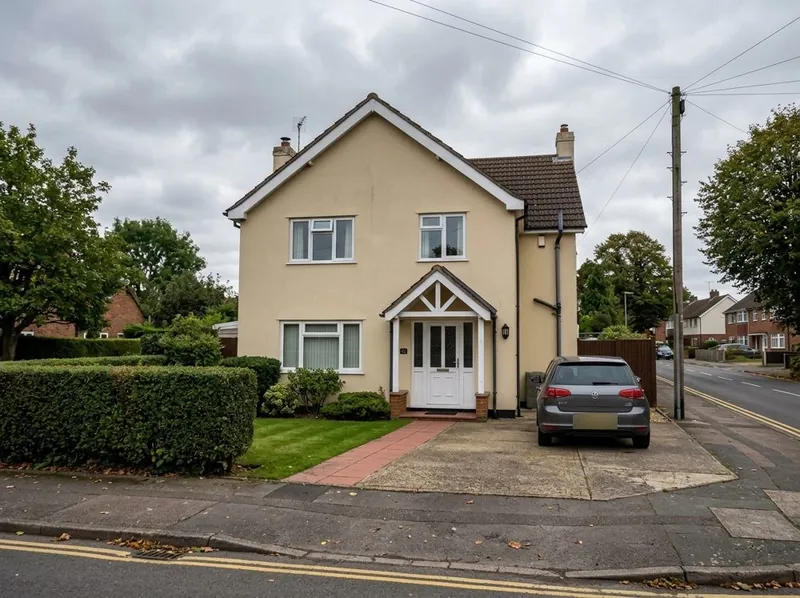
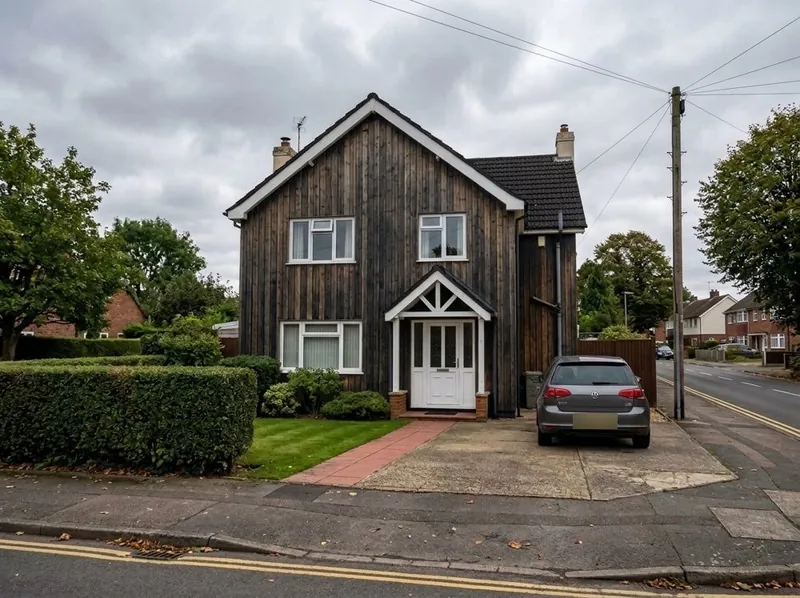 Your photoNew version
What you can change
Exterior paint colors, cladding and roof on your own photo
Pick a finish, a color, a roof, or all three. Only what you pick changes.
Facade finish
White render, grey render, brick, dark timber or black metal.
Exterior paint color
White, cream, sand, light grey, anthracite, black, sage green, navy, terracotta or dark red.
Roof
Dark grey, black, red tile, brown or light grey.
Your own words
Add a note, for example keep the white window frames, or describe a color that is not on the list.
Step by step
How to see your house in a new color
3 steps. Your first picture needs no account.
1. Take a photo of the house
In daylight, from the front or the side, with the whole facade in the picture.
2. Pick a finish, a color or a roof
Choose one, two or all three. Tap a choice again to clear it.
3. Compare before and after
You get the same house back with only those surfaces changed. Try another color in the same way.
What to expect
What the house color visualizer keeps and what it changes
The example pair is a generated sample picture, not a client project.
What stays the same
The shape of the house, the windows and doors, the garden, the street and the sky.
What changes
Only what you pick: the facade finish, the wall color, the roof, or all three.
What can move
The picture is drawn again from your photo, so small details can move. Window frames or a gutter can come out a little different. Compare it with your photo before you rely on it.
What happens to your photo
Your photo is used to make your picture. We do not use your images to train AI, and we do not publish your pictures.
House color visualizer FAQ
Questions about trying exterior colors on a photo
Photos, colors, cladding and accuracy.
Recolor my houseIs the house color visualizer free?
Yes. Your first picture is free, with no account. Create a free account to keep going.
Can I see my own house in a new color?
Yes. Upload a photo of your house, pick a color, and you see the same house with the new color. The shape, windows and garden stay as in your photo.
Can I try cladding or a new roof, not only paint?
Yes. Pick a facade finish such as dark timber, brick or black metal, a roof color, or both.
Are the colors exact paint colors?
No. The colors are close to their names but are not matched to a paint brand. Check a real sample on the wall before you buy paint.
Which photo works best?
A daylight photo from the front or the side, with the whole facade in view. A phone photo is fine.
Is the result exact?
No. The picture is drawn again from your photo, so small details can move. Use it to compare colors, not as a technical drawing.
More from a photo
Other free photo tools
Have a 3D model instead of a photo? Our AI rendering tool turns a screenshot of it into a photoreal render.
1,200+
Projects completed
13
Years in business
17
Countries delivered to







★★★★★
Rated 4.9 on Clutch · See our reviews
Architects, developers & interior designers
Working for 215 companies since 2013
125 of 220 clients came back
More than half of our clients have hired us again
Free to try, no account needed
Try a new color on your house now
Upload a photo and see the new version. Your first picture is free, with no account.