Low Poly vs High Poly Models: Differences, Mid Poly and Triangle Counts
Low poly models use few polygons and run in real time. High poly models use many and hold fine detail. Here are the differences, mid poly and sourced triangle counts.
In this article
- Low poly runs in real time; high poly holds fine detail for renders, sculpts and baking.
- 1,000 triangles is low poly on every platform, and a quad counts as 2 triangles.
- Mid poly skips the bake: beveled edges and tiling textures hold the detail.
- Unreal Engine 5 Nanite draws very dense meshes, but web, AR and mobile still need light models.
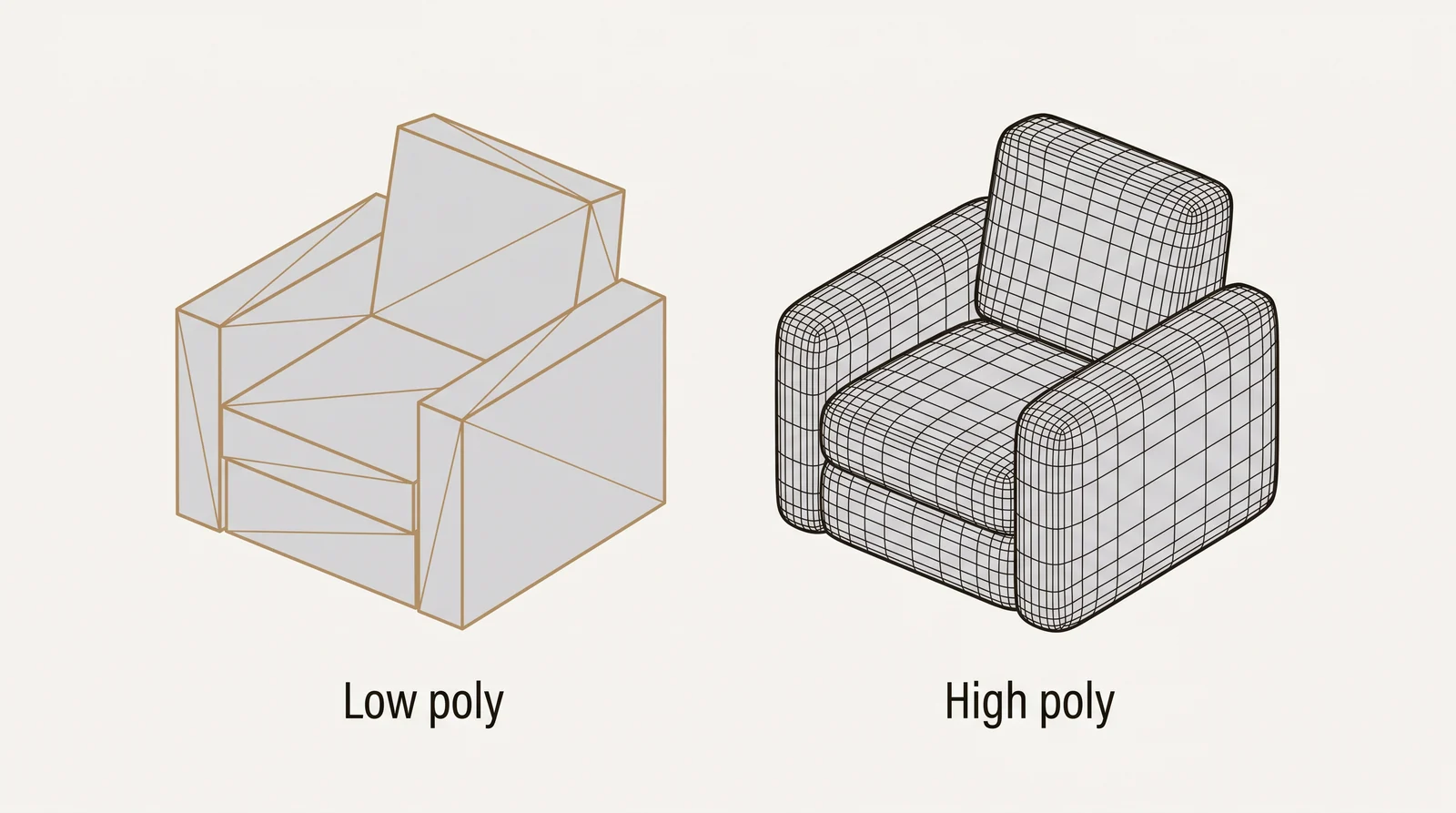
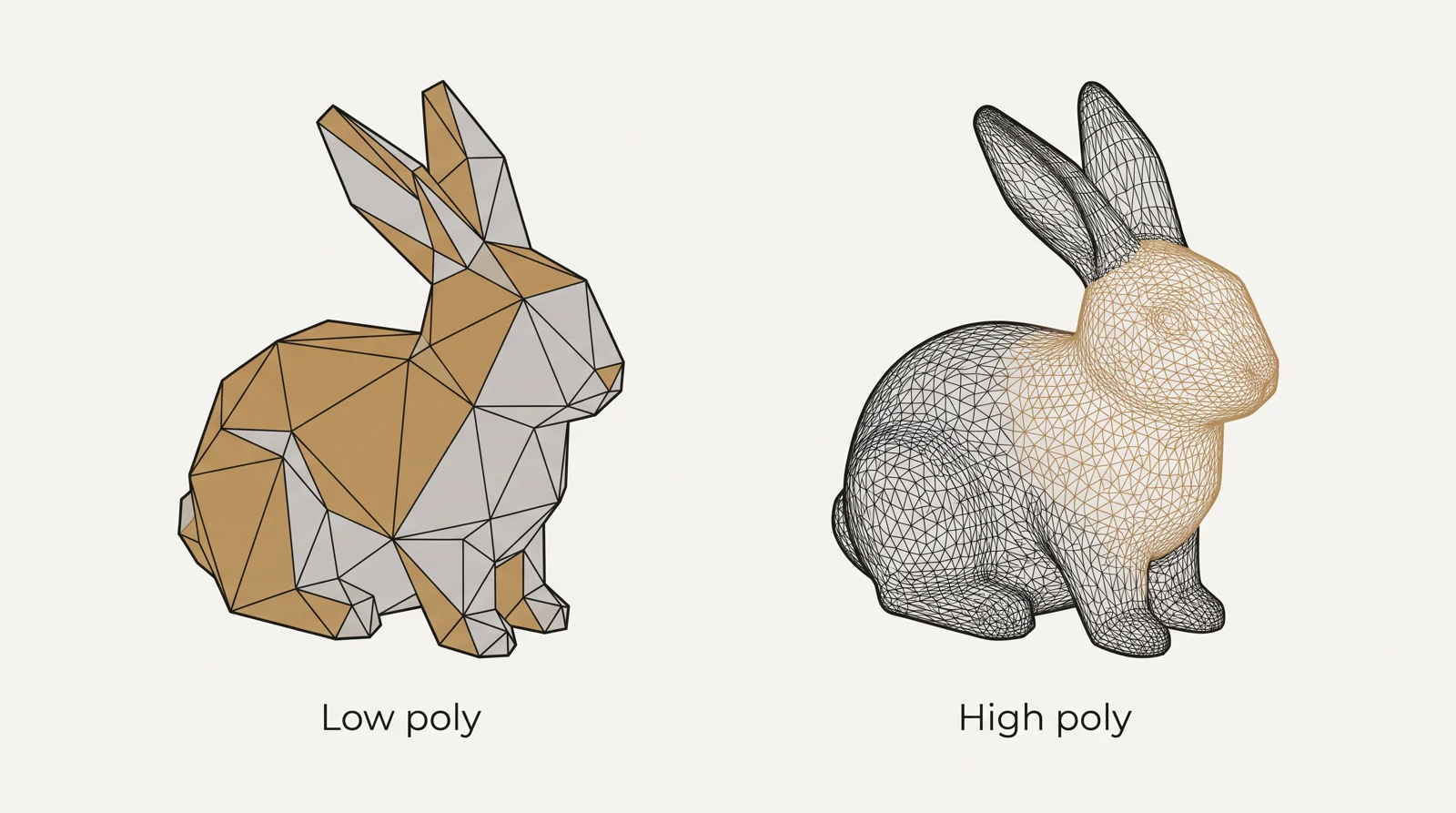
The difference between low poly and high poly is the number of polygons in a 3D model: a low poly model uses few, so it runs in real time in games, AR and web viewers, and a high poly model uses many, often millions, to hold fine detail for still renders, sculpts and baking. There is no fixed line between them, because the limit depends on the platform. 1,000 triangles is low poly on every current platform, while a sculpt made for baking can reach millions.
The same shape can exist at both densities, and many game ready models start as a high poly model and end as a low poly one. Our 3D modeling service builds both, from drawings, CAD files or reference images.
What is low poly modeling
In 3D modeling, a low poly model is built from a small number of flat, simple faces. It has a low polygon count on purpose, so it loads fast, moves smoothly on screen and uses little memory. Curves are approximated with a handful of flat faces instead of many small ones, which is why a low poly object often looks angular up close.
Low poly is the standard for anything that has to run in real time: game props and environments, VR and AR content, product configurators and 3D viewers in a browser. In real time use, the engine draws the whole scene again for every frame, usually 30 or more times per second, so every extra triangle is processed again each time.
What is high poly modeling
A high poly 3D model uses a large number of small faces, which lets it hold fine surface detail: pores, stitching, dents, sharp machined edges, wrinkles in cloth. It looks closer to a real object because the shape itself carries the detail, not a texture standing in for it.
High poly models are built for offline work: sculpting, pre rendered stills and animation, 3D printing, and as the source whose detail is baked onto a game model. In a 3D program a dense model slows the viewport when you orbit, files take longer to save and open, and exports are much larger. Most real time uses cannot draw a model like that. The exception is an engine with virtualized geometry, such as Unreal Engine 5 (see the Nanite section below).
Low poly vs high poly: the key differences
| Aspect | Low poly | High poly |
|---|---|---|
| Where the detail lives | Mostly in the texture and normal map | Mostly in the actual geometry |
| File size and memory use | Small and light | Large and heavy |
| Real time performance | Runs smoothly in a game engine, AR or web viewer | Too heavy for most real time uses, except engines with virtualized geometry such as Nanite |
| Editing speed in 3D software | Orbits and edits quickly | The viewport can lag while orbiting or sculpting |
| Typical output | Game assets, VR and AR content, web viewers | Sculpts, cinematics, prints, source for baking |
Low poly vs mid poly vs high poly
Mid poly sits between the two, and it is a different way of working, not only a middle polygon count. A mid poly model has beveled edges and carefully controlled shading (weighted normals), so its edges catch the light without a normal map baked from a sculpt. Surfaces are textured with tiling materials, trim sheets and decals instead of one unique bake. There is no separate high poly model, so nothing is built twice and changes are quicker.
Mid poly is used for hard-surface props, for large environments with many unique objects, and by teams that want to skip the sculpt and bake steps.
| Aspect | Low poly (game ready) | Mid poly | High poly |
|---|---|---|---|
| Where the detail lives | Baked normal map and textures | Beveled edges and shading | Real geometry |
| Bake needed | Yes, from a high poly source | No | It is the source of the bake |
| Triangle count | Lowest | More than low poly, far below a sculpt | Highest, often millions |
| Texturing | Unique UV layout with baked maps | Tiling materials, trim sheets and decals | Renderer materials, or none for a sculpt |
| Best for | Characters and hero assets, and light models for mobile, AR and web | Hard-surface props and environments | Still renders, sculpts, prints and baking |
How many polygons is low poly and high poly
A polygon can have 3, 4 or more sides. A game engine splits every polygon into triangles before it draws it, so a quad (4 sides) counts as 2 triangles and a cube made of 6 quads is 12 triangles. Engines and web viewers report triangles. 3ds Max shows a Polys count by default and can also show Tris, so a model of quads shows a larger number in an engine than in the Polys line. For the full terms, see our guide to triangles, quads and n-gons.
Is 1,000 polygons low poly? Yes. 1,000 triangles is low poly on every current platform, including phones and web viewers. A model of 1,000 quads is about 2,000 triangles and is still low poly. High poly has no single starting number. It means more than the platform can draw live, so a model that is too dense for a phone can be ordinary on a desktop. These are the reference points we can source:
| Use | Reference point | Set by |
|---|---|---|
| AR on iPhone (AR Quick Look) | About 100,000 polygons and one set of 2048 x 2048 textures, set so that devices down to iPhone 7 load the model well | Apple engineer, Apple developer forums |
| Web shop 3D model | A polycount as low as possible while keeping the product detail, about 4 MB in total, mobile web textures no larger than 2048 x 2048 | Shopify 3D model checklist |
| Mobile or PC game asset | No single number: the team sets a budget per asset class, and mobile is stricter than PC or console | The project’s art and engineering leads |
| Sculpt for baking | No real time budget, often millions of polygons | No limit, not drawn in real time |
| Still render | No real time limit: the render machine memory and render time are the limits | No limit, rendered once |
The Apple and Shopify numbers are ceilings for those uses, not targets. A lighter model loads faster on every device.
What sets a polygon budget
A polygon budget is the ceiling a team agrees on for how many faces an object can use. 4 things set it:
- Platform: mobile hardware allows far fewer faces on screen at once than a current console or PC.
- The object’s role: a hero prop the camera sits close to usually gets a larger share of the budget than a background prop seen from a distance.
- How many copies are on screen: a prop repeated hundreds of times, like a brick or a leaf, has to stay very light on every platform.
- Texture size: this is its own budget. It is set by how close the camera gets, the project’s texel density and the platform, not by the polygon count.
The budget is agreed between the art and engineering leads before modeling starts, because lowering it later usually means rebuilding the model and its LODs.
High poly vs low poly: when to use each
Ask one question: does the model need to run live, or is the image rendered once?
- Low poly fits real time work: game props and environment pieces, VR and AR scenes, 3D product configurators, and web based 3D viewers. A game engine has to draw many objects at once, often at reduced detail once an object is far from the camera, so every model in the scene needs to stay light.
- High poly fits offline work: cinematic renders, marketing stills, product visualization and 3D prints, where the image is rendered once, so render time matters less than detail.
- Mid poly fits real time work that needs crisp edges without a bake: hard-surface props and large environments.
Does Unreal Engine 5 Nanite make low poly obsolete
No. Nanite is the virtualized geometry system in Unreal Engine 5. According to the Epic documentation, it lets artists import film quality source art, such as ZBrush sculpts and photogrammetry scans, and render it in real time. That removes the need to reduce some models by hand. Nanite supports current console and desktop platforms, and Epic states that practical limits remain: instance counts, triangles per mesh, material complexity and output resolution still have to be measured.
Low poly still matters for 3 reasons. Web viewers, AR viewers and web shops have the limits in the table above. Other engines, phones and older hardware do not have Nanite. File size and download time also grow with every triangle.
Low poly vs high poly for 3D printing
A printer reproduces the mesh as it is: a high poly model gives smooth curved surfaces, and a low poly model shows its facets on the print. Some designers want that look. For either, the mesh must be closed (watertight), with no holes. Very dense sculpts make large STL files that slicing programs handle slowly, so sculpts are often reduced before printing. You can convert a model to STL with our free tool.
Low poly and high poly in product and architectural visualization
A still render in Corona or V-Ray can use a dense model, because it is drawn once. The same product in a web configurator or an AR view needs a lighter version of the model. Density is not quality: millions of triangles where thousands would do load slowly or not at all in a configurator, and do not import cleanly into a game engine. The same applies to buildings: an exterior rendering can use dense trees and furniture, but the same building in a real time engine needs light models and LODs. When you order a product model, say where it will be used, so it is built at the right density once. Our 3D product rendering service builds the model from your CAD files or drawings.
The high poly to low poly workflow
Many game ready assets are not modeled at their final low poly count from the start. Simple props, modular kits and stylized assets are often modeled directly at low poly, with no sculpt at all. Assets that need fine detail follow this process:
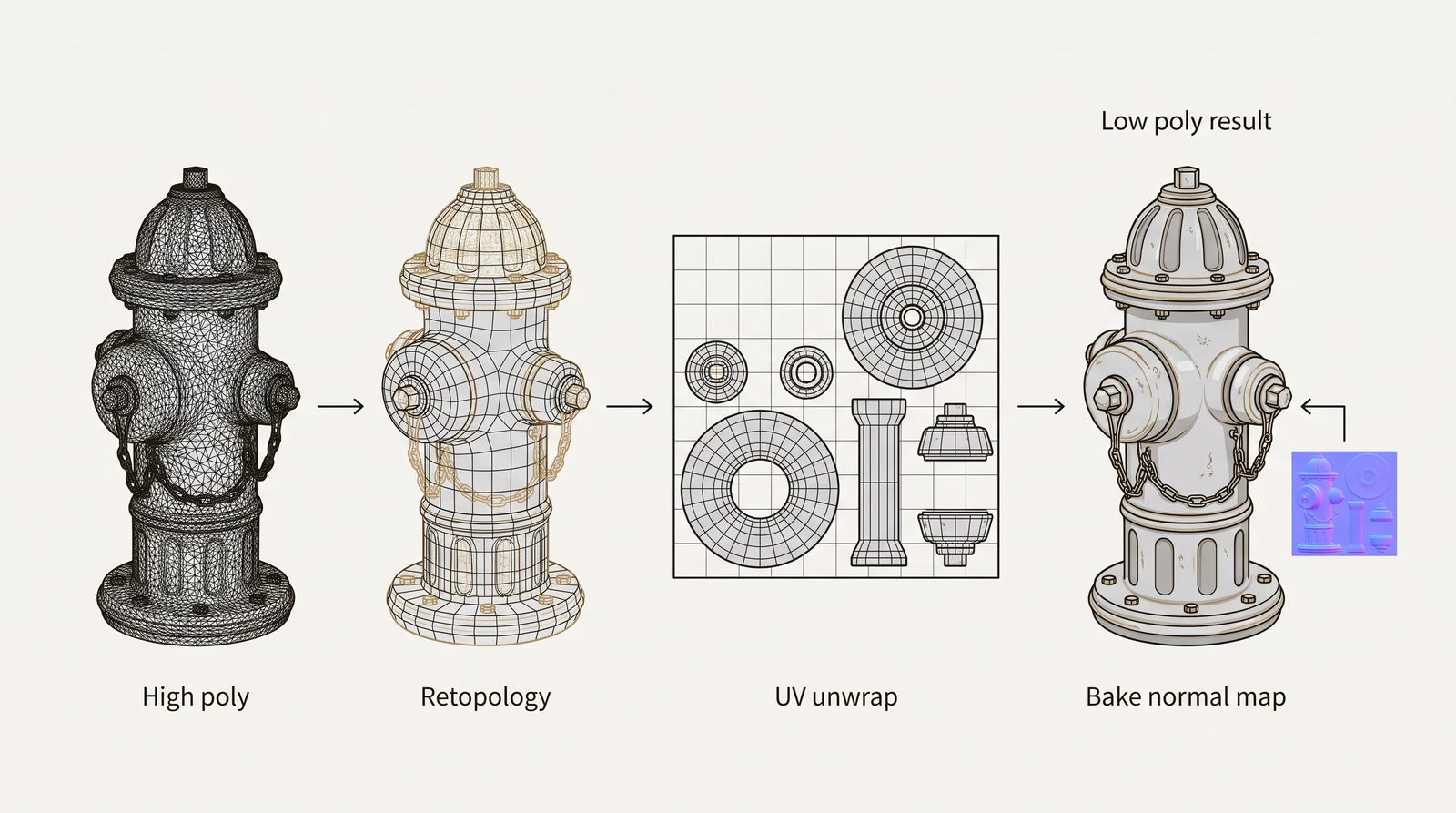
- Build the high poly model. Organic shapes such as creatures and cloth are sculpted in ZBrush or Blender (see our guide to sculpting software). Hard-surface objects such as vehicles, furniture and products are usually built with subdivision modeling and support loops in 3ds Max, Maya or Blender (see hard surface modeling with subdivision).
- Retopologize a low poly version. Build a new, clean mesh over the high poly model. It follows the shape with far fewer, better organized faces.
- Unwrap the low poly mesh. Give it a UV layout so textures and maps know where to sit on the surface.
- Bake the high poly detail down. Generate a normal map from the high poly model and apply it to the low poly mesh. Other common bake maps are ambient occlusion, curvature and ID (see texture maps in 3D modeling).
- Texture and export. Add the materials, then export in the format your engine needs, such as FBX or glTF.
The result is a low poly model that looks much more detailed than its polygon count, because the fine detail is stored in a texture instead of in the mesh.
Retopology vs decimation
Manual retopology builds clean quads and edge loops. It is needed for anything that bends or animates, because the edge flow decides how the surface deforms. Automatic decimation or remeshing is fast and is fine for static props, 3D prints and scans, but it leaves messy topology and weak levels of detail. For a building, a hand built chain of LODs keeps the silhouette, so the building is still recognizable when it is far away.
What a normal map can and cannot fake
A normal map changes the shading of a surface, not its shape. The outline (silhouette) of the low poly mesh stays the same, so detail on the edge of an object, such as bolts that stick out or a jagged rock outline, needs real geometry. Baked detail also breaks down at grazing angles and at close range, where the flat faces underneath become visible. A normal map makes a low poly model look detailed from the distance the camera is meant to be at, and no closer.
Low poly as an art style
Low-poly art is also a deliberate look. It has visible flat facets, flat shading instead of smooth shading, a small palette of colors and a strong silhouette. The colors are often stored as vertex colors or in one small palette texture, and many models have no texture maps at all.
It is made differently from a game ready asset. There is no high poly source and no bake. The artist places the polygons for the look, so the facets are part of the design and are not hidden. There is no fine geometry or detailed texture, so the look comes from the shape, the colors and the lighting.
How to check a 3D model poly count
- Open the file in a free viewer. The 3D viewers on our free 3D tools page open GLB, glTF, OBJ, FBX, STL and other formats and show the triangle count and size under the model.
- In Blender, turn on Statistics in the viewport overlays. Read the Triangles line in the top left corner of the viewport.
- In 3ds Max, press 7 in the viewport to show the statistics. By default they show Polys and Verts. To see triangles, turn on Triangle Count in Viewport Configuration, on the Statistics tab. For a model made of quads, the Polys number is lower than the triangle count.
- Compare the number with the target for the platform in the table above.
Tip: compare triangles with triangles. A limit given in polygons and a count read in triangles are not the same number.
Getting low poly or high poly models built by a studio
A studio can only quote and build to your target if it knows the target. Send these with the brief:
- The asset list, in any form: a spreadsheet, a paragraph or a ticket export.
- The triangle budget per asset class, the texel density, the naming convention and the channel packing.
- The target engine and its version.
- A reference board or an art bible, or existing assets to match.
- Plans, sections, elevations or CAD files, if the subject is a real building or product.
At 3D Studio, a game ready delivery is FBX or glTF with textures, or an Unreal or Unity package, with PBR sets at your resolution in your channel packing. LOD chains are authored, not made by a decimation pass. Collision is simple and separate, and the delivery comes with a short manifest and the source files. We recommend a small paid test piece before a batch. For a still render or a product visualization, the high poly model is built from your CAD files or drawings and checked by a person.
You get one fixed quote within 30 minutes of sending the files. See how 3D modeling work is priced. For game art, see our page for game studios, and for everything else, our 3D modeling service.
Questions about low poly and high poly modeling
Is 1,000 polygons low poly?
Yes. 1,000 triangles is low poly on every current platform, including phones and web viewers. Engines count triangles, and a model of 1,000 quads is about 2,000 triangles, which is still low poly.
How many polygons does a high poly model have?
There is no fixed line. Sculpts made for baking often have millions of polygons. For a real time model, high poly means more than the platform budget allows, which is much lower on mobile and AR than on a PC.
Are polygons and triangles the same thing?
No. A polygon can have 3, 4 or more sides. Engines split every polygon into triangles before drawing, so a quad counts as 2 triangles. The terms are explained above.
Does Unreal Engine 5 Nanite mean you no longer need low poly models?
No. Nanite renders very dense meshes in real time in Unreal Engine 5, but web viewers, AR and other engines still need light models, and Epic states that practical limits remain.
What polygon count does a model need for AR or a web shop?
Apple’s AR Quick Look guidance gives about 100,000 polygons and one set of 2048 x 2048 textures. Shopify asks for the lowest polycount that keeps the product detail, about 4 MB in total, and textures no larger than 2048 x 2048 for mobile web.
What is mid poly modeling?
Mid poly is a way of working that uses beveled edges and weighted normals instead of a baked normal map. Surfaces are textured with tiling materials and trim sheets, so no separate high poly model is needed.
Is low poly or high poly better for 3D printing?
High poly gives smooth curved surfaces. Low poly shows facets, which is a style choice. Either way the mesh must be closed, and very dense sculpts are often reduced first to keep the file manageable.