Difference Between CGI and AI for Architecture Images
CGI is built from a 3D model by a person. An AI image is generated from a prompt or an input image. See the difference for building images, and what to check before you use one.
In this article
- CGI is imagery built from a 3D model by a person. An AI image is generated by a model from a prompt or an input image.
- CGI is not AI, but AI can be one step inside a CGI workflow.
- AI image tools are good for exploring options and early concepts. Nothing in the output is checked against your drawings.
- For images that must match the drawings, a studio builds the model and a person checks it.
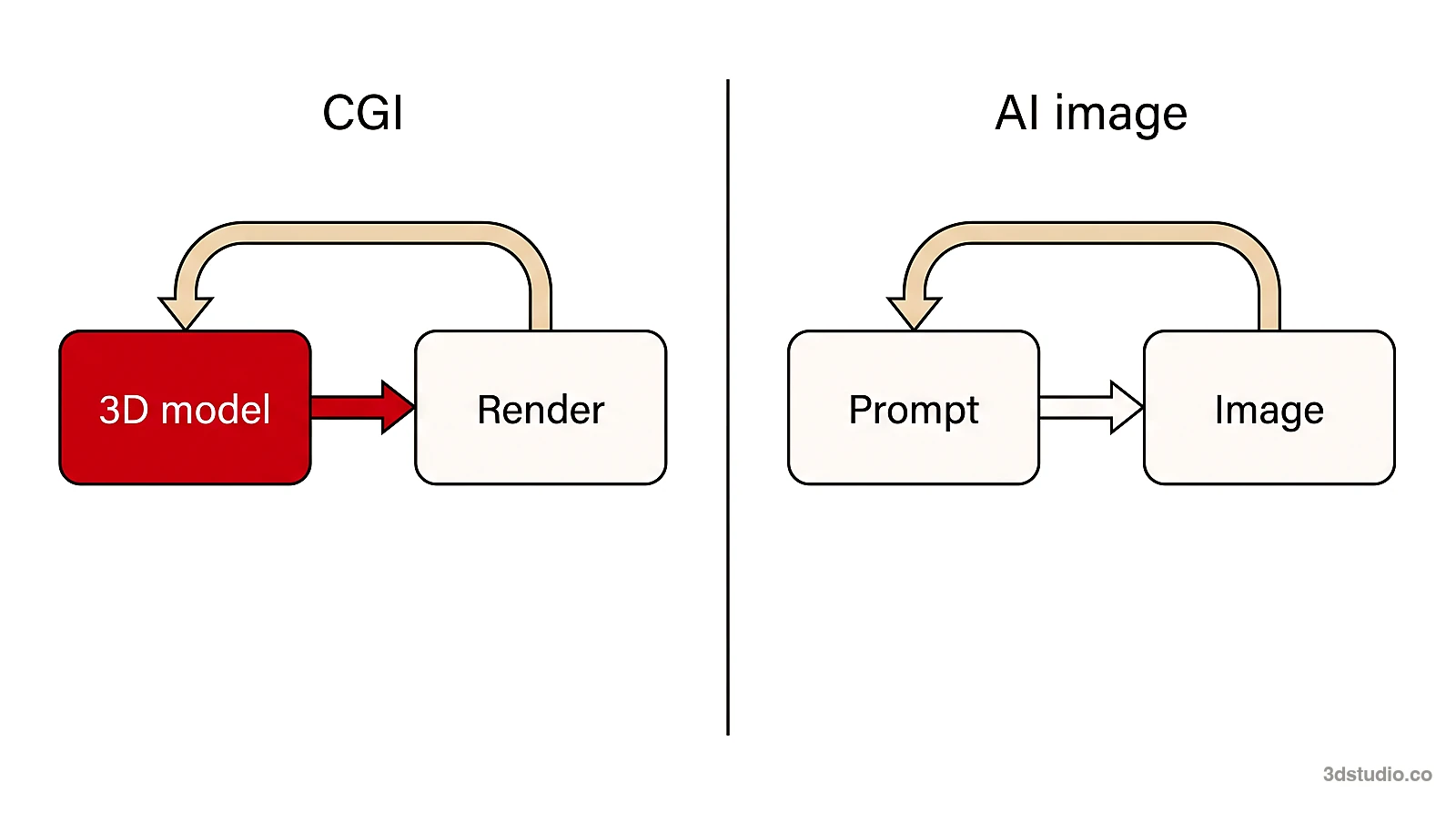
The difference between CGI and AI is how the image is made. CGI is imagery that a person builds with 3D software: a 3D model, materials, light and a camera, rendered into a picture. An AI image is generated by a model from a prompt or from an input image, and there is no 3D scene behind it. So CGI is not AI, although the 2 can look alike and can be used together.
For architecture and property images, the practical question is which one you need. AI image tools are good for exploring options and early concepts. For images that must match the drawings, such as marketing, planning, a client or a jury, a studio builds the model from the drawings and a person checks it. 3Dstudio.co offers architectural visualization built this way. This guide compares the 2 methods, explains the common confusion, and shows what to check in an image.
Difference between CGI and AI at a glance
The table shows the difference between AI and CGI for a building or an interior. Each row is something you can test on your own project.
| Question | CGI (3D model and render) | AI image (generated) |
|---|---|---|
| How is it made? | A person builds a 3D model from drawings, adds materials, light and a camera, and renders it | A model generates an image from a text prompt, or from an input image such as a screenshot of a 3D model |
| What controls the result? | The 3D scene: geometry, materials, light and camera are set one by one | The prompt, the input image and the tool settings. The model decides the details |
| Accuracy to drawings | Built from the drawings, and a person checks it against them | Not checked against your drawings. Depending on the tool, details such as window frames, balconies or the roofline can change or come out simpler |
| How do you edit it? | Change one item in the scene, such as a material, the sun or the camera, and render again | Change the prompt or the input and generate again. Parts you wanted to keep can change too |
| More views of the same building | Move the camera in the same scene | Each view is a new image. Matching details between views needs checking |
| Typical uses | Marketing images, off-plan sales, planning views, competition boards, animations, floor plans | Exploring options, early concepts, mood and material ideas |
Note: This comparison describes the 2 methods in general and was checked in October 2026. AI image tools differ from each other and change often, so test the tool you plan to use on your own model.
CGI and AI: why they are not the same thing
CGI stands for computer-generated imagery. It is the older and wider term, and in architecture it nearly always means a rendering made from a 3D model. AI, short for artificial intelligence, is a group of methods. In imagery it means a model that was trained on many images and draws a new image from the input it gets.
Have a 3D model? Our AI Render Studio turns a screenshot of it into a photoreal image. 11 free renders, no card needed.
Render your model freePeople mix the 2 words up for 3 reasons. Both are made with a computer. Both can look like a photograph. And a post, a brochure or a film credit rarely says which method made the picture. In film and TV, CGI usually means 3D elements that artists build and add to footage. The same split applies there: an artist builds the scene, or a model generates the picture. The rest of this guide is about architecture and property images.
AI can also be one step inside a CGI workflow. For example, the website of Intel Open Image Denoise describes it as a library of deep learning based filters that remove noise from images rendered with ray tracing. The result is still a render of a 3D scene, so it is still CGI. For a longer view of how rendering tools are changing, see our article on 3D rendering trends.
How CGI images of buildings are made
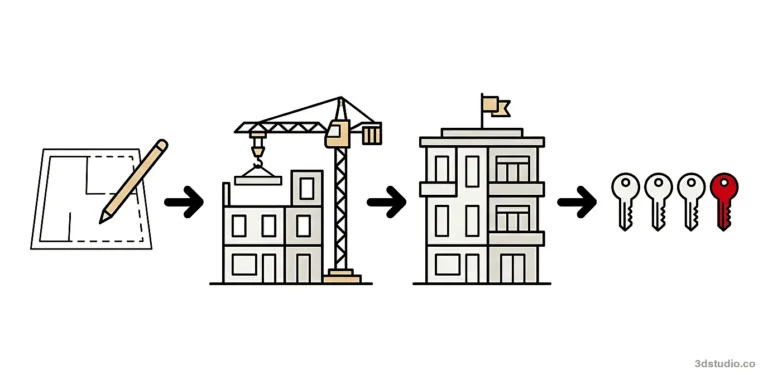
A CGI image of a building follows the same order every time. Each step can be checked and changed before the next one starts.

- Collect the files. Plans, elevations and sections as DWG or PDF, a SketchUp, Revit, ArchiCAD or 3ds Max model, material specifications and reference images.
- Build the 3D model. The building is modeled from the drawings. The first image of a scene carries the cost of building it.
- Agree the camera. On the grey model, with no materials, the camera position, lens, height and time of day are agreed while changes are cheap.
- Add materials, light and surroundings. A photoreal first look of one view shows the result before the final render.
- Render and revise. The final image is rendered and checked against the drawings. At 3Dstudio.co, every project includes 2 revision rounds.
- Reuse the scene. Further views of the same scene cost much less, because the model, materials and light already exist.
Because the scene exists, you can change one thing at a time. See how our process works and our guide to photorealistic rendering for what makes a CGI image read as real.
How AI image tools make images
An AI image tool takes an input and returns a new image. The input can be a text prompt, a reference image, or a screenshot of a 3D model. The model draws the result from patterns it learned in training. It does not read your drawings, and it does not build a 3D scene that you can open and edit.
AI image tools are useful early in a project. You can try a different material, a different light or a different mood in a short time, and decide a direction before detailed modeling starts. Our free AI rendering tool is one example: free AI rendering for architecture, from a screenshot of your 3D model.
The limit is control. When you want a change, you change the prompt or the input and generate again, and the new image can differ in places you did not touch. Nothing in the output is checked against your drawings, so a person has to compare the image with the drawings.
Accuracy to drawings: what to check in an AI image
An AI image of a building can look finished and still differ from the design. The checks below show whether an image is safe to use outside the design team.
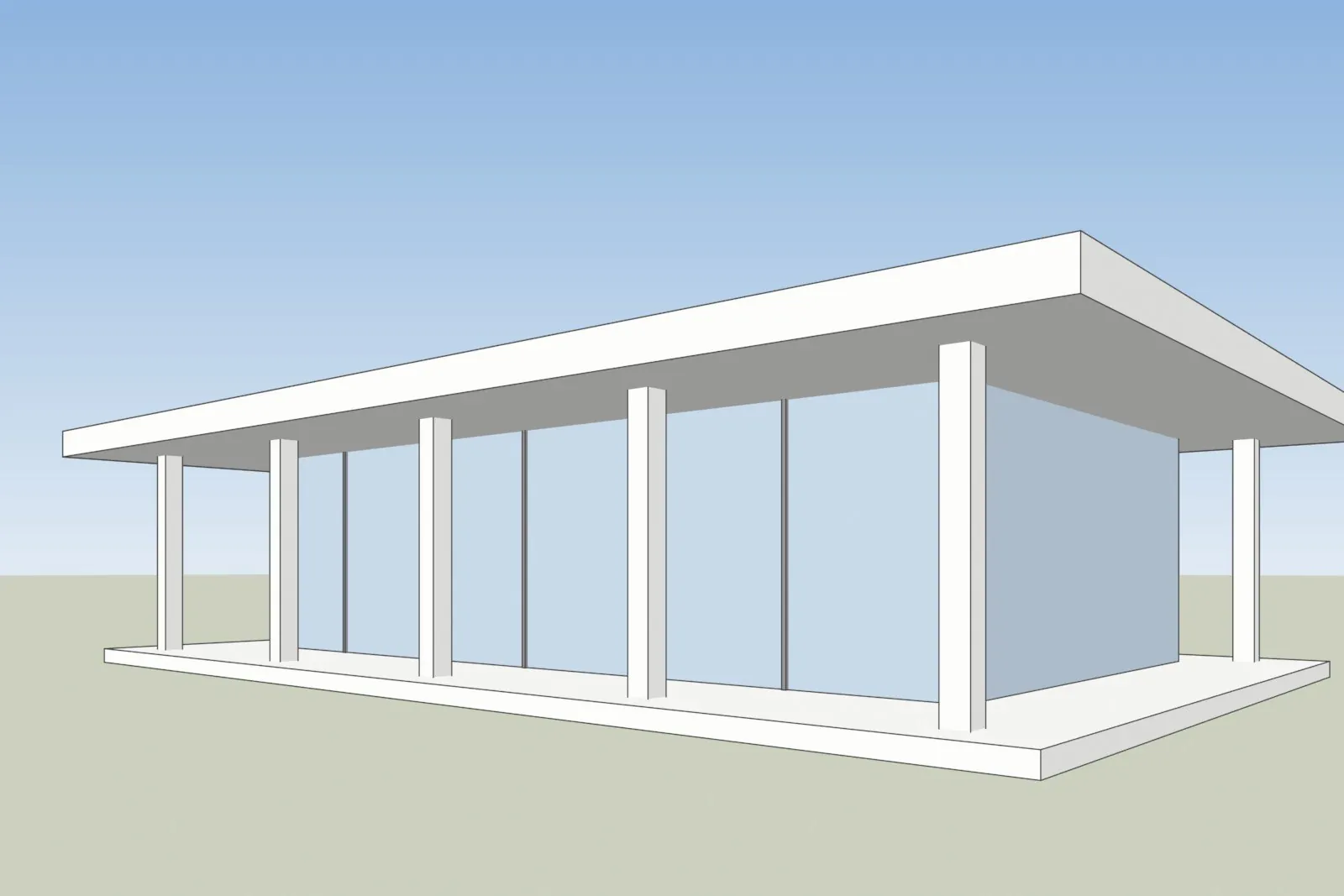
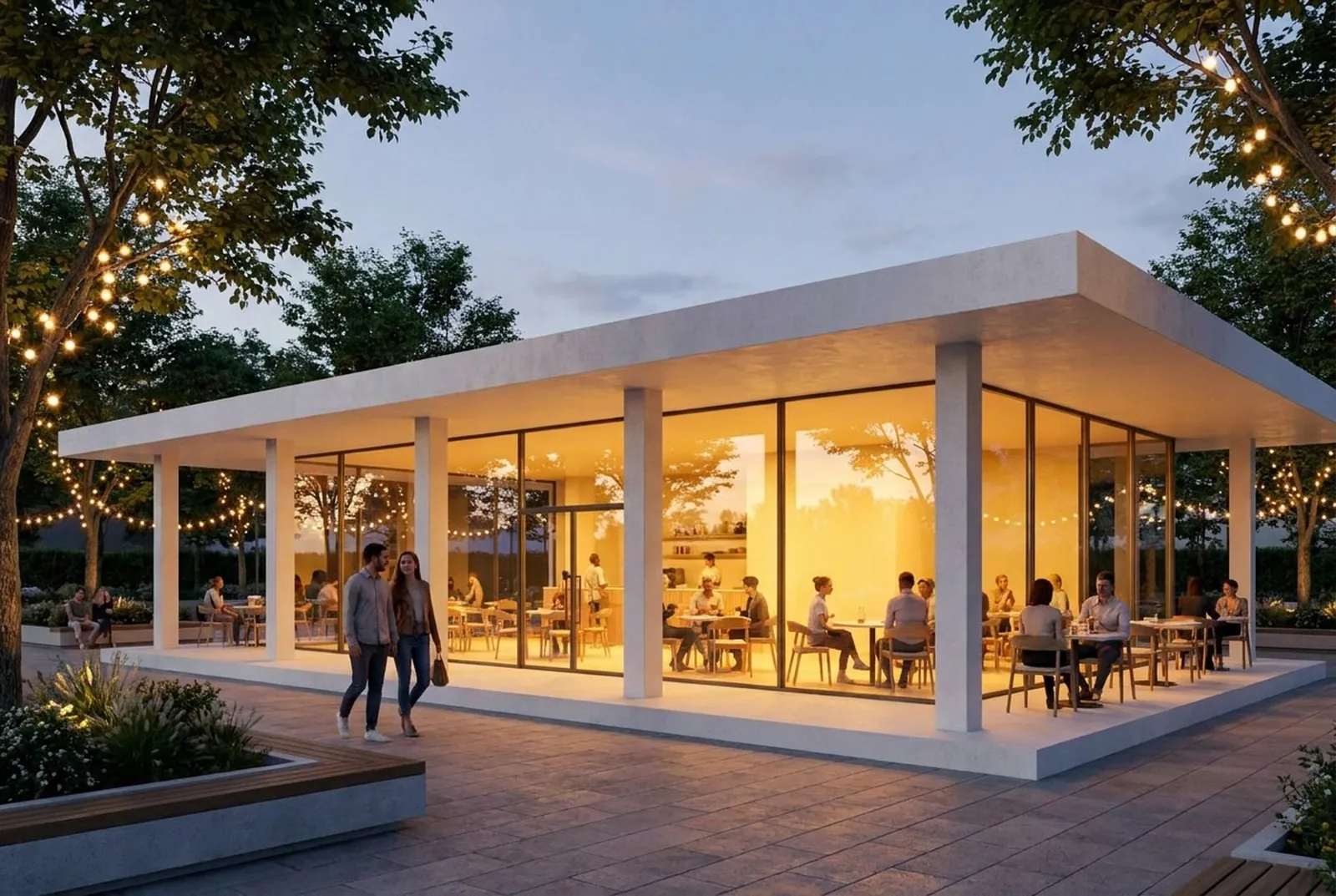
Left: a screenshot of a 3D model of a glass pavilion. Right: the image the free AI render tool made from it. The roof, columns and glass walls follow the screenshot. People, furniture, trees, string lights and a glass door are added.
- Count and position. Windows, doors and balconies on each floor, compared with the elevation.
- Roofline and massing. Roof shape, overhangs, chimneys and the height of each floor.
- Openings and entrances. The position of the front door and any opening that is not in the drawings.
- Materials and cladding. The material and its pattern against the material list.
- Context. Neighbors, trees and street furniture against the site plan and photos.
If a detail is wrong, do not use the image for marketing, planning or a client or jury. Use it as a concept, and label it as a concept.
For images that must match the drawings, send the files to a studio. We build the model from the drawings, and a person checks every view against them. Our guide to writing a 3D rendering brief lists what to include.
When to use CGI and when to use AI for architecture images
Use the method that fits the decision the image supports. Many projects use both, in order: AI for early options, then CGI once the design is fixed.
| Situation | Better fit | Why |
|---|---|---|
| Testing several facade or material ideas | AI image | Quick to try, and nothing is final yet |
| A first concept for an internal discussion | AI image | A mood is enough, and exact details are not needed |
| Off-plan sales and marketing for a development | CGI | The images must match the building that will be built |
| A planning application, a client review or a jury | CGI | The image is checked against the drawings and can be shown to others |
| Several views of one building | CGI | The camera moves in the same 3D scene |
| An animation or a walkthrough | CGI | The route is planned in the 3D scene |
Architects often use both: see 3D visualization for architects for what to render in the office and what to give a studio. Developers who sell before building can read visuals for pre-construction marketing, and our service pages cover exterior rendering and interior rendering.
AI vs CGI for a project: cost, speed and what you get
We offer both, so here is the plain comparison. Our AI Render Studio starts with 11 free renders and no card, and the Pro plan is €19 a month. It is made for exploring ideas, not for final images. Studio CGI is built from your drawings and checked by a person, and projects start at €1,000.
| AI Render Studio | Studio CGI | |
|---|---|---|
| You start from | A screenshot of your 3D model | Drawings, CAD, SketchUp or BIM files, or a photo of a sketch |
| Time to an image | About 20 seconds | About a week for a single view, 2 to 3 weeks for a medium set |
| Cost | 11 free renders, then a Pro plan at €19 a month | One fixed price agreed before work starts; projects start at €1,000 |
| Checked against the drawings | No | Yes, a person checks the model against them |
| Changes | Render again with a new prompt | 2 revision rounds included |
| Best for | Options and early concepts | Marketing, planning, client and jury images, with full usage rights |
Many projects use both: AI images while the design is open, then CGI for the images other people will judge the building by. For a studio set, send your files and you get a reply within 30 minutes: a fixed price and a delivery date, or the 1-2 questions we need answered first.
What to send for a CGI image from your drawings
Send the files you already have: DWG or PDF plans and elevations, a SketchUp, Revit, ArchiCAD, 3ds Max or IFC model, material specifications and reference images. A photo of a hand sketch is enough for a quote. The brief is built from the files, so there is no questionnaire.
You get a reply within 30 minutes: a fixed price and a delivery date, or the 1-2 questions we need answered first. A grey model comes first, then a photoreal first look of one view, and the final images are delivered in 4K with full usage rights. Projects start at €1,000. See how the price is set and what drives the cost of 3D rendering.
Questions about CGI and AI
Is CGI AI?
No. CGI is computer-generated imagery, made from a 3D scene that a person builds. AI images are generated by a model from a prompt or an input image. AI can be used as one step inside a CGI workflow, but the 2 terms do not mean the same thing.
How can I tell a CGI image from an AI image?
Often you cannot tell from one picture, because both can look like a photograph. Ask how the image was made. A CGI image has a 3D model behind it, so the maker can show the grey model and other views of the same scene. For an image of a planned building, compare it with the drawings.
Can AI and CGI be used together?
Yes. A common order is AI for early options and concept images, then a 3D model and a CGI render once the design is fixed. A screenshot of a 3D model can also be the input for an AI image tool.
Is CGI being replaced by AI?
AI image tools are useful for early options and concepts. For images that must match the drawings, a studio still builds the model from the drawings, and a person checks the result. The 2 methods do different jobs.
Which is better for a property marketing image?
For a building that is not built yet, a CGI render is the safer choice, because it is built from the drawings and checked. An AI image can still help to explore ideas before that, as long as it is labeled as a concept.
Diagrams in this post are drawn with an AI image tool from our brief and checked by our team.