

SketchUp AI Rendering
ريندر واقعي في نحو 20 ثانية
صدِّر منظورًا من SketchUp بصيغة PNG واحصل على ريندر واقعي للمبنى نفسه.
- حتى 11 ريندرًا مجانيًا مع حساب مجاني
- أي إصدار من SketchUp، بما فيه Free
- دون إضافة ودون بطاقة
- يبقى ملف نموذجك على جهازك
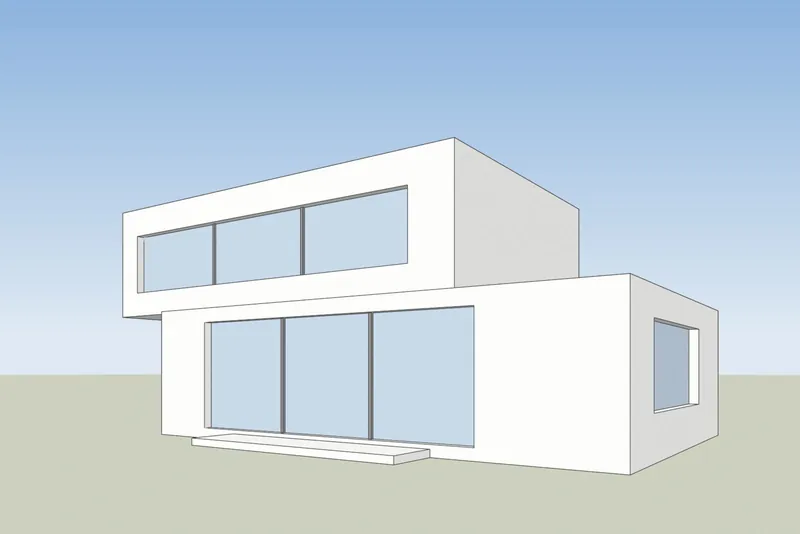
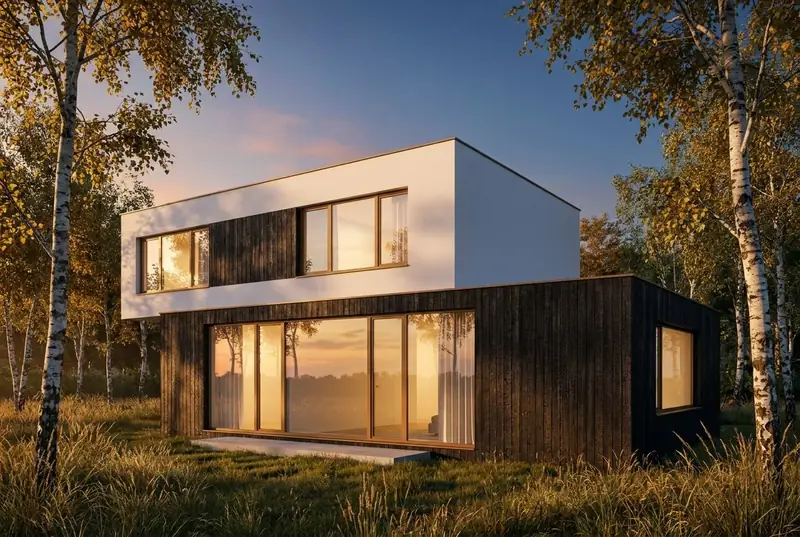 منظور SketchUpريندر بالذكاء الاصطناعي
أمثلة
منظور SketchUp كمدخل، وريندر واقعي كمخرج
أسطح بيضاء وحواف سوداء على اليسار، كما يعرض SketchUp النموذج. والريندر الناتج على اليمين، دون أي تعديل.
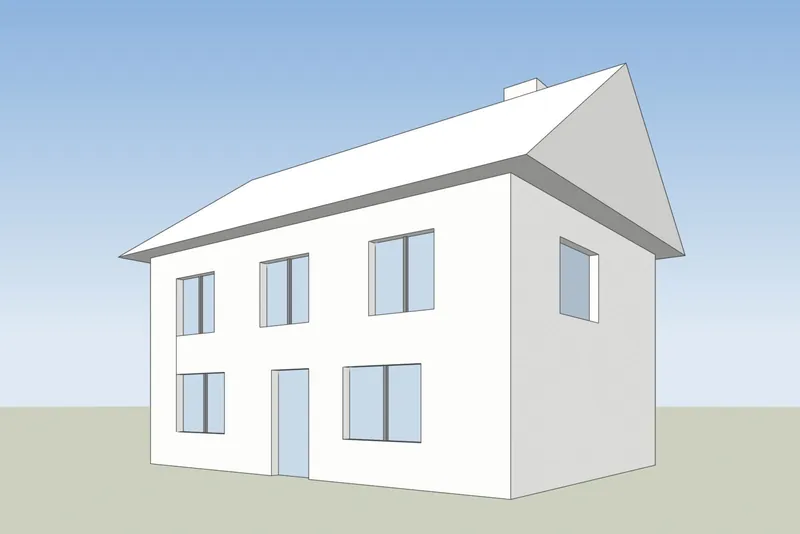
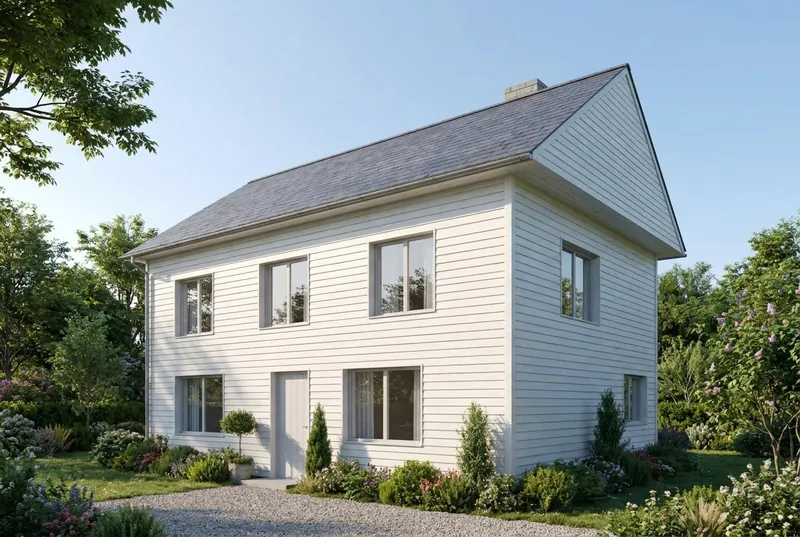 منظور SketchUpريندر بالذكاء الاصطناعي
منزل عائلي
منزل بسقف مائل في صباح صيفي. الجملون والمدخنة والباب والنوافذ الـ 8 كلها في أماكنها كما في النموذج.
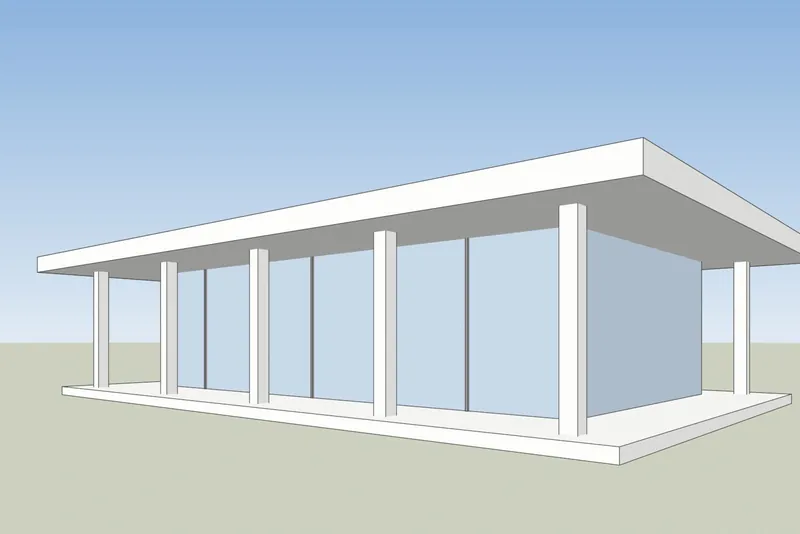
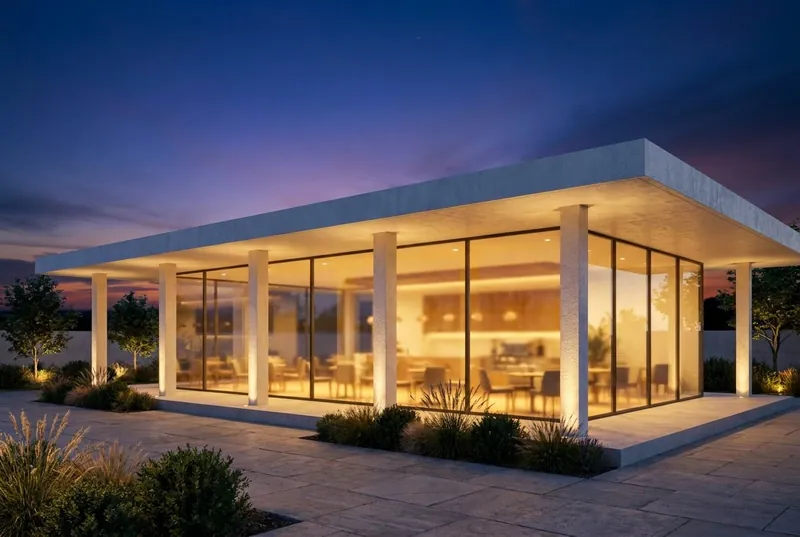 منظور SketchUpريندر بالذكاء الاصطناعي
مقهى في جناح زجاجي
جناح بسقف مسطح عند الغسق، مزدحم بالداخل وعلى التراس. الأعمدة وبروز السقف يطابقان النموذج.
خطوة بخطوة
كيف تجهّز منظور SketchUp
4 خطوات، والمطلوب منها التصدير فقط.
1. اضبط المنظور
أطّر المبنى بأداتي Orbit وPan. للحصول على جدران رأسية مستقيمة، فعّل Camera ثم Two-Point Perspective. أخفِ المحاور وأي خطوط إرشاد لا تريدها في الصورة.
2. اختر نمطًا بسيطًا
في لوحة Styles، اضبط نمط الأوجه على Shaded أو Hidden Line أو Monochrome. يعطي النموذج الأبيض أو الرمادي أنظف نتيجة. أوقف الظلال، فالذكاء الاصطناعي يضيف إضاءته الخاصة.
3. صدّر صورة PNG
في SketchUp لسطح المكتب استخدم File ثم Export ثم 2D Graphic واحفظ ملف PNG. وفي أي إصدار، تؤدي لقطة شاشة عادية لنافذة SketchUp الغرض أيضًا.
4. أنشئ الريندر
ارفع ملف PNG، واختر ضوء النهار أو الغيوم أو شمس المساء أو الغسق، وأضف ملاحظة قصيرة عن المواد إن أردت، مثل جص أبيض ونوافذ من خشب البلوط.
تم التحقق في 15 أكتوبر 2026
SketchUp AI Render أم أداة لقطة الشاشة
كلتاهما تصنعان صورًا بالذكاء الاصطناعي من نموذج SketchUp الخاص بك. والفرق بينهما فيما تحتاجه قبل أن تبدأ.
SketchUp AI Render
مدمجة في SketchUp لسطح المكتب وiPad والويب. تتطلب خطة SketchUp مدفوعة (Go أو Pro أو Studio)، وعلى سطح المكتب تتطلب SketchUp 2024 أو أحدث مع إضافة AI Render. تكلف كل صورة 10 أرصدة. تتضمن الخطط من 100 إلى 200 رصيد شهريًا، ولا يُرحَّل الرصيد غير المستخدم. وتتوفر فيها أيضًا أدوات للرسم والتعديل داخل SketchUp.
مساعدة SketchUp: AI RenderAI Rendering من 3Dstudio.co
يعمل في متصفحك من صورة مُصدَّرة، لذا فهو يعمل مع أي إصدار من SketchUp، بما في ذلك SketchUp Free، ودون أي إضافة. حتى 11 ريندرًا مجانيًا عند التسجيل. لا تنتهي صلاحية الرصيد المدفوع أبدًا. لا يحتوي على أدوات داخل SketchUp: تغيّر النتيجة باختيار الإضاءة وكتابة ملاحظة قصيرة.
افتح 3Dstudio.co AI Render
ماذا تتوقع
ما الذي يحتفظ به الذكاء الاصطناعي من نموذج SketchUp وما الذي يغيّره
لتعرف ما تعرضه على العميل وما ترسله إلى استوديونا.
ما يبقى كما هو
شكل المبنى، النوافذ والأبواب، خط السقف وعدد الطوابق. زاوية الكاميرا تبقى كما هي تمامًا في لقطة شاشتك.
ما الذي يغيّره الذكاء الاصطناعي
المواد والإضاءة والسماء والنباتات وتشطيبات الأثاث. استخدم حقل الملاحظات لتوجيهها، على سبيل المثال: جص أبيض ونوافذ من خشب البلوط.
ما يمكن تبسيطه
التفاصيل الدقيقة جدًا، مثل قضبان النوافذ الرفيعة أو الدرابزينات الصغيرة، قد تظهر أبسط مما هي عليه في النموذج. للحصول على صور نهائية دقيقة، استعن باستوديونا.
ماذا يحدث لملفك
تُرسل لقطة الشاشة فقط، ولا يُرسل ملف النموذج أبدًا. لا نستخدم صورك لتدريب الذكاء الاصطناعي، ولا ننشر الريندرات الخاصة بك.
الأسئلة الشائعة حول SketchUp AI Rendering
أسئلة حول AI Rendering لـ SketchUp
الإصدارات والملفات والدقة والسعر.
جرّب الأداة على نموذج SketchUp الخاص بكما إصدارات SketchUp التي تعمل؟
أي إصدار يستطيع عرض نموذجك. تحتاج الأداة إلى صورة للمنظور فقط، لذا تعمل SketchUp Free وSketchUp for Web والإصدارات القديمة من سطح المكتب والإصدار الحالي.
هل أحتاج إلى تثبيت إضافة؟
لا. تصدّر صورة PNG أو تلتقط لقطة شاشة وترفعها في متصفحك. لا يُضاف شيء إلى SketchUp ولا يُرفع ملف النموذج أبدًا.
كيف يختلف هذا عن AI Render المدمج في SketchUp؟
يعمل SketchUp AI Render داخل SketchUp ويتطلب خطة Go أو Pro أو Studio مدفوعة. على سطح المكتب يتطلب SketchUp 2024 أو أحدث. تكلفة كل صورة 10 أرصدة، ولا يُرحَّل الرصيد الشهري. تعمل أداتنا من صورة مُصدَّرة، لذا يعمل أي إصدار من SketchUp، وتحصل على ريندر مجاني دون حساب، ولا تنتهي صلاحية الرصيد المدفوع أبدًا. إذا كنت تدفع بالفعل مقابل SketchUp، فجرّب الاثنين. تم التحقق من الحقائق حول SketchUp في help.sketchup.com بتاريخ 15 أكتوبر 2026.
هل سيغيّر الذكاء الاصطناعي تصميمي في SketchUp؟
يحافظ الذكاء الاصطناعي على شكل المبنى والنوافذ وخط السقف وعدد الطوابق، ويغيّر المواد والإضاءة والمحيط. وقد تظهر التفاصيل الدقيقة جدًا، مثل قضبان النوافذ الرفيعة، أبسط مما هي عليه في النموذج.
أي نمط في SketchUp يعطي أفضل نتيجة؟
نمط بسيط. يعمل Shaded أو Hidden Line أو Monochrome مع إيقاف الظلال بشكل جيد. قد تظهر أنماط الحواف الشبيهة بالرسم اليدوي الثقيلة والخامات القوية في الريندر.
كم تبلغ التكلفة؟
التجربة مجانية. لا يتطلب أول ريندر حسابًا، ويمنحك الحساب المجاني حتى 11 ريندرًا مجانيًا للاستخدام الشخصي. للعمل مع العملاء، اختر خطة شهرية أو حزمة رصيد لمرة واحدة. الرصيد لا تنتهي صلاحيته أبدًا، وتُعرض الأسعار بعملتك مع احتساب ضريبة القيمة المضافة (VAT) على صفحة الأسعار.
أدلة AI Rendering
أدلة ومقارنات حول الريندر بالذكاء الاصطناعي
كيف تتقارن أدوات الريندر بالذكاء الاصطناعي من حيث السعر والميزات، وما الفرق بين الذكاء الاصطناعي وCGI. الأدلة باللغة الإنجليزية.
أفضل برامج الريندر بالذكاء الاصطناعي في 2026
مقارنة بين 7 أدوات للمعماريين: الأسعار، والبدء المجاني، ونقاط القوة، والحدود.
اقرأ المزيدأدوات الريندر المجانية بالذكاء الاصطناعي
ما تقدمه 11 أداة مجانًا، وأيّها تضيف علامة مائية، وهل يمكن استخدام النتيجة في أعمال العملاء.
اقرأ المزيدالريندر بالذكاء الاصطناعي مقابل V-Ray وEnscape
أين يتفوق V-Ray وEnscape، وأين يتفوق الريندر بالذكاء الاصطناعي، وكيف تستخدم الاثنين معًا.
اقرأ المزيدأسعار Veras في 2026
كم تكلف Veras، وماذا يشتري رصيدها، وكيف تقارن بأداة تعتمد على لقطات الشاشة.
اقرأ المزيدبديل MyArchitectAI
خططها وريندراتها المجانية، وأين تتقدم هي، وأين يتقدم 3Dstudio.co AI Render.
اقرأ المزيدمراجعة Rendair
خططها لعام 2026، وماذا يشتري الرصيد، وأين تتفوق، وكيف يقارن بها 3Dstudio.co AI Render.
اقرأ المزيدمراجعة mnml AI
خططها لعام 2026، وإضافاتها لـ SketchUp وRevit وRhino، وكيف يقارن بها 3Dstudio.co AI Render.
اقرأ المزيدCGI أم الذكاء الاصطناعي لصور العمارة
كيف تختلف صور CGI عن صور الذكاء الاصطناعي، وكيف تميّز بينها، ومتى تستخدم كلًّا منهما.
اقرأ المزيد
برامج أخرى
AI Rendering لبرامج 3D الأخرى التي تستخدمها
يعمل أي برنامج يمكنه التقاط لقطة شاشة لمنظور 3D. تجد في هذه الصفحات خطوات التصدير.
1,252
المشاريع المكتملة
13
سنوات في العمل
17
دول التسليم







★★★★★
تقييم 4.9 على Clutch · اطلع على آراء عملائنا
المهندسون المعماريون والمطورون ومصممو الديكور الداخلي
نعمل لـ 215 شركات منذ عام 2013
125 من 220 عاد العملاء
أكثر من نصف عملائنا تعاقدوا معنا مرة أخرى
جرّب الأداة على نموذج SketchUp الخاص بك
حوّل منظور SketchUp إلى ريندر الآن
حتى 11 ريندرًا مجانيًا دون بطاقة. لا يتطلب أول ريندر حسابًا. تحصل على الصورة في نحو 20 ثانية.