

SketchUp AI rendering
Fotorealistinen renderi noin 20 sekunnissa
Vie näkymä SketchUpista PNG-kuvana, niin saat samasta rakennuksesta fotorealistisen renderin.
- Enintään 11 ilmaista renderiä ilmaisella tilillä
- Mikä tahansa SketchUp-versio, myös SketchUp Free
- Ei laajennusta, ei korttia
- Mallitiedostosi pysyy tietokoneellasi
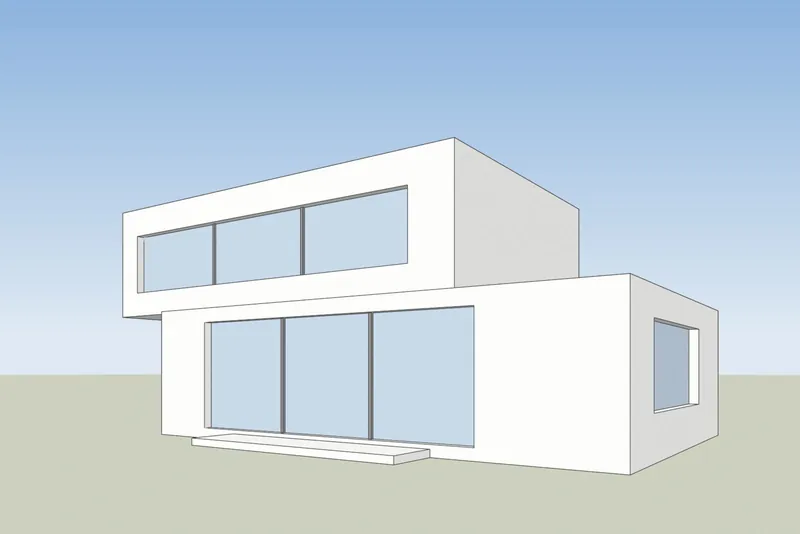
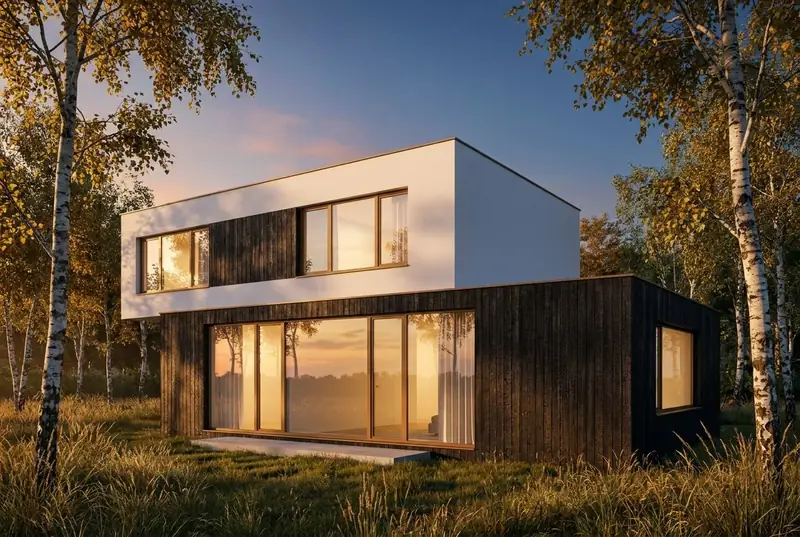 SketchUp-näkymäAI-renderi
Esimerkit
SketchUp-näkymä sisään, fotorealistinen renderi ulos
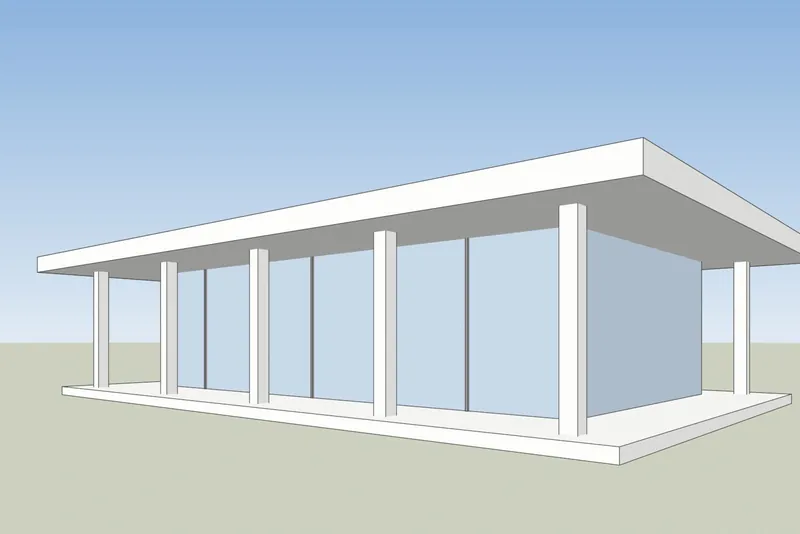
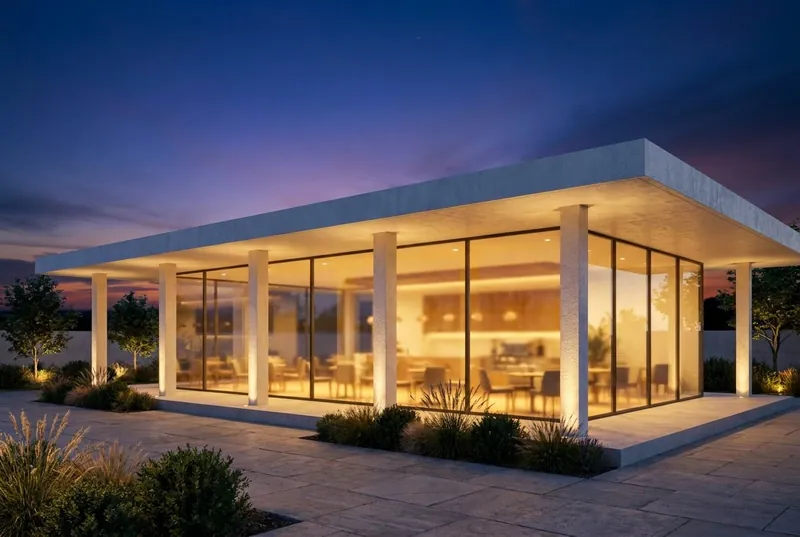
Vasemmalla valkoiset pinnat ja mustat reunat, sellaisena kuin SketchUp näyttää mallin. Oikealla on palannut renderi, muokkaamattomana.
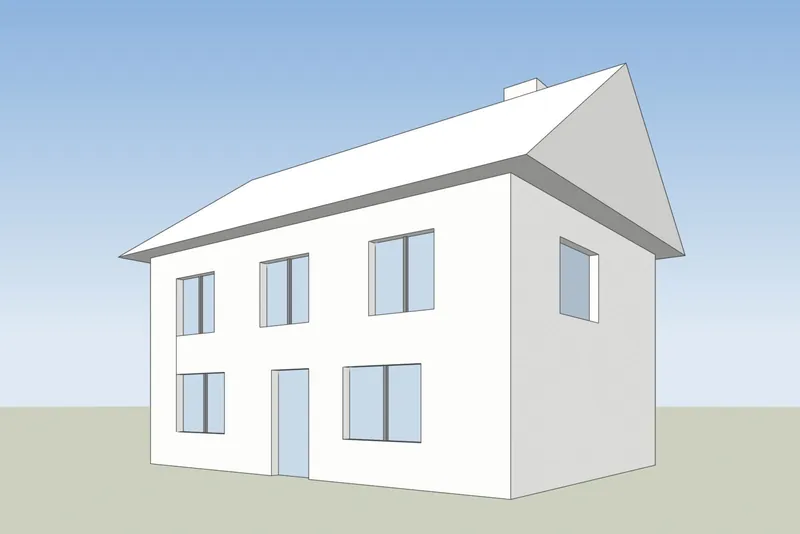
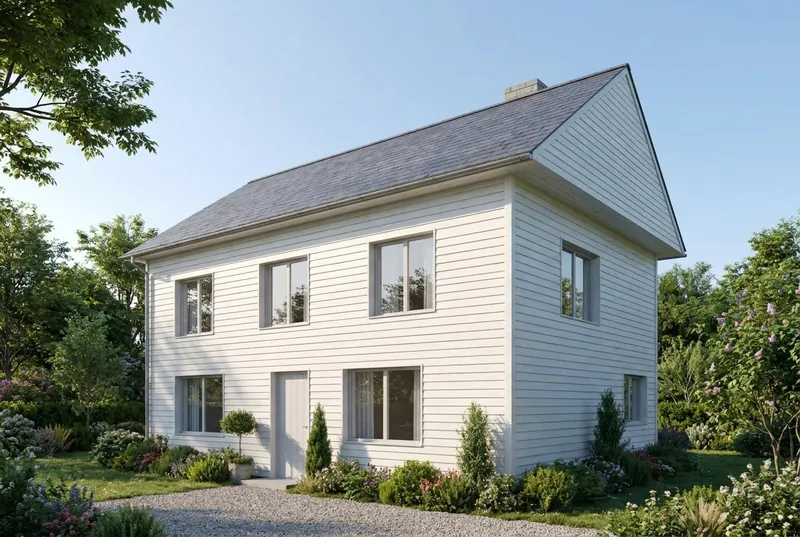 SketchUp-näkymäAI-renderi
Omakotitalo
Harjakattoinen talo kesäaamuna. Päätykolmio, savupiippu, ovi ja kaikki 8 ikkunaa ovat siellä, missä ne ovat mallissa.
 SketchUp-näkymäAI-renderi
Lasipaviljonkikahvila
Tasakattoinen paviljonki hämärässä, vilkas sisällä ja terassilla. Pilarit ja katon uloke vastaavat mallia.
Vaihe vaiheelta
Näin valmistelet SketchUp-näkymän
4 vaihetta, ja vain vienti on pakollinen.
1. Aseta näkymä
Rajaa rakennus Orbit- ja Pan-työkaluilla. Jos haluat pystysuorat seinät suoriksi, kytke päälle Camera, Two-Point Perspective. Piilota akselit ja kaikki apuviivat, joita et halua kuvaan.
2. Valitse yksinkertainen tyyli
Aseta Styles-paneelissa pintatyyliksi Shaded, Hidden Line tai Monochrome. Valkoinen tai harmaa malli antaa puhtaimman tuloksen. Kytke varjot pois, tekoäly lisää oman valonsa.
3. Vie PNG-kuva
SketchUpin työpöytäversiossa valitse File, Export, 2D Graphic ja tallenna PNG. Missä tahansa versiossa myös tavallinen kuvakaappaus SketchUp-ikkunasta toimii.
4. Renderöi
Lataa PNG, valitse päivänvalo, pilvinen sää, ilta-aurinko tai hämärä ja lisää halutessasi lyhyt huomautus materiaaleista, esimerkiksi valkoinen rappaus ja tammiset ikkunat.
Tarkistettu 15. lokakuuta 2026
SketchUpin AI Render vai kuvakaappaustyökalu
Molemmilla tehdään tekoälykuvia SketchUp-mallistasi. Ne eroavat siinä, mitä tarvitset ennen aloittamista.
SketchUpin AI Render
Sisäänrakennettu SketchUpin työpöytä-, iPad- ja verkkoversioihin. Se vaatii maksullisen SketchUp Go-, Pro- tai Studio-tilauksen, ja työpöydällä SketchUp 2024:n tai uudemman AI Render -laajennuksella. Jokainen kuva maksaa 10 krediittiä. Tilaukseen sisältyy 100-200 krediittiä kuukaudessa, eikä käyttämättömiä krediittejä siirretä seuraavalle kuulle. Siinä on myös piirto- ja muokkaustyökalut SketchUpin sisällä.
SketchUpin ohje: AI Render3Dstudio.co:n tekoälyrenderöinti
Toimii selaimessa viedyn kuvan pohjalta, joten se käy minkä tahansa SketchUp-version, myös SketchUp Freen, kanssa eikä tarvitse laajennusta. Enintään 11 ilmaista renderiä rekisteröityessäsi. Maksetut krediitit eivät vanhene. Siinä ei ole työkaluja SketchUpin sisällä: muutat tulosta valon valinnalla ja lyhyellä huomautuksella.
Avaa 3Dstudio.co AI Render
Mitä odottaa
Mitä tekoäly säilyttää SketchUp-mallistasi ja mitä se muuttaa
Jotta tiedät, mitä näyttää asiakkaalle ja mitä lähettää studiollemme.
Mikä pysyy samana
Rakennuksen muoto, ikkunat ja ovet, kattolinja ja kerrosten lukumäärä. Kamerakulma pysyy täsmälleen samana kuin kuvakaappauksessasi.
Mitä tekoäly muuttaa
Materiaalit, valo, taivas, istutukset ja kalusteiden pinnat. Ohjaa niitä huomautuskentällä, esimerkiksi valkoinen rappaus ja tammiset ikkunat.
Mikä voi yksinkertaistua
Hyvin pienet yksityiskohdat, kuten ohuet ikkunapuitteet tai pienet kaiteet, voivat tulla yksinkertaisempina kuin mallissa. Tarkkoihin lopullisiin kuviin käytä studiotamme.
Mitä tiedostollesi tapahtuu
Vain kuvakaappaus lähetetään, ei koskaan mallitiedostoasi. Emme käytä kuviasi tekoälyn kouluttamiseen emmekä julkaise renderöintejäsi.
SketchUp-tekoälyrenderöinnin UKK
Kysymyksiä SketchUpin tekoälyrenderöinnistä
Versiot, tiedostot, tarkkuus ja hinta.
Kokeile SketchUp-mallillasiMitkä SketchUp-versiot toimivat?
Mikä tahansa versio, jossa mallisi näkyy. Työkalu tarvitsee vain kuvan näkymästä, joten SketchUp Free, SketchUp for Web, vanhat työpöytäversiot ja nykyinen versio toimivat kaikki.
Täytyykö asentaa lisäosa tai laajennus?
Ei. Viet PNG-kuvan tai otat kuvakaappauksen ja lataat sen selaimessa. SketchUpiin ei lisätä mitään, eikä mallitiedostoa koskaan ladata.
Miten tämä eroaa SketchUpin sisäänrakennetusta AI Renderistä?
SketchUp AI Render toimii SketchUpin sisällä ja vaatii maksullisen Go-, Pro- tai Studio-paketin. Työpöytäversiossa se vaatii SketchUp 2024:n tai uudemman. Jokainen kuva maksaa 10 krediittiä, eivätkä kuukausittaiset krediitit siirry seuraavalle kuulle. Työkalumme toimii viedystä kuvasta, joten mikä tahansa SketchUp-versio käy, saat ilmaisen renderin ilman tiliä, ja maksetut krediitit eivät vanhene. Jos maksat jo SketchUpista, kokeile molempia. Tiedot SketchUpista on tarkistettu sivustolta help.sketchup.com 15. lokakuuta 2026.
Muuttaako tekoäly SketchUp-suunnitelmaani?
Se säilyttää rakennuksen muodon, ikkunat, kattolinjan ja kerrosten lukumäärän. Se muuttaa materiaaleja, valoa ja ympäristöä. Hyvin hienot yksityiskohdat, kuten ohuet ikkunapuitteet, voivat näyttää yksinkertaisemmilta kuin mallissa.
Mikä SketchUp-tyyli antaa parhaan tuloksen?
Yksinkertainen. Shaded, Hidden Line tai Monochrome ilman varjoja toimii hyvin. Voimakkaat piirrosmaiset reunatyylit ja vahvat tekstuurit voivat näkyä renderissä läpi.
Paljonko se maksaa?
Kokeilu on ilmainen. Ensimmäinen renderi ei vaadi tiliä, ja ilmainen tili antaa enintään 11 ilmaista renderiä henkilökohtaiseen käyttöön. Asiakastyöhön tarvitset kuukausipaketin tai kertaostettavan krediittipaketin. Krediitit eivät vanhene, ja hinnat näkyvät omassa valuutassasi arvonlisäveroineen hinnastosivulla.
AI rendering -oppaat
AI rendering -oppaat ja vertailut
Miten AI rendering -työkalut vertautuvat hinnassa ja ominaisuuksissa ja miten tekoäly eroaa CGI:stä. Oppaat ovat englanniksi.
Parhaat AI rendering -ohjelmistot 2026
7 työkalua arkkitehdeille vertailussa: hinnat, ilmaiset aloitukset, vahvuudet ja rajoitukset.
Lue lisääIlmaiset AI rendering -työkalut
Mitä 11 työkalua antaa ilmaiseksi, mitkä lisäävät vesileiman ja saako tulosta käyttää asiakastyössä.
Lue lisääAI rendering vs V-Ray ja Enscape
Missä V-Ray ja Enscape voittavat, missä AI rendering voittaa ja miten molempia käytetään.
Lue lisääVerasin hinnoittelu 2026
Paljonko Veras maksaa, mitä sen krediiteillä saa ja miten kuvakaappaukseen perustuva työkalu vertautuu.
Lue lisääMyArchitectAI-vaihtoehto
Sen paketit ja ilmaiset renderit, missä se on edellä ja missä 3Dstudio.co AI Render on edellä.
Lue lisääRendair-arvostelu
Sen vuoden 2026 paketit, mitä krediiteillä saa, missä se on vahva ja miten 3Dstudio.co AI Render vertautuu.
Lue lisäämnml AI -arvostelu
Sen vuoden 2026 paketit, SketchUpin, Revitin ja Rhinon lisäosat ja miten 3Dstudio.co AI Render vertautuu.
Lue lisääCGI vai tekoäly arkkitehtuurikuvissa
Miten CGI- ja tekoälykuvat eroavat, miten ne erottaa toisistaan ja milloin kumpaakin kannattaa käyttää.
Lue lisää
Muut ohjelmat
Tekoälyrenderöinti muille 3D-ohjelmillesi
Mikä tahansa ohjelma, jolla voi ottaa kuvakaappauksen 3D-näkymästä, käy. Näillä sivuilla on vientivaiheet.
1,252
Valmista projektia
13
Vuotta toiminnassa
17
Maata, joihin olemme toimittaneet







★★★★★
Arvosana 4.9 sivustolla Clutch · Lue arvostelumme
Arkkitehdit, rakennuttajat ja sisustussuunnittelijat
Palvelleet 215 yritystä vuodesta 2013
125 asiakkaistamme 220 asiakasta palasi
Yli puolet asiakkaistamme on palkannut meidät uudelleen
Kokeile SketchUp-mallillasi
Renderöi SketchUp-näkymä nyt
Enintään 11 ilmaista renderiä, ei korttia. Ensimmäinen renderi ei vaadi tiliä. Saat kuvan noin 20 sekunnissa.