

Rendu IA SketchUp
Photoréaliste en 20 secondes environ
Exportez une vue de SketchUp au format PNG. Obtenez un rendu IA photoréaliste du même bâtiment.
- Jusqu'à 11 rendus gratuits avec un compte gratuit
- Toutes les versions de SketchUp, y compris la version gratuite
- Sans extension, sans carte
- Votre fichier de modèle reste sur votre ordinateur
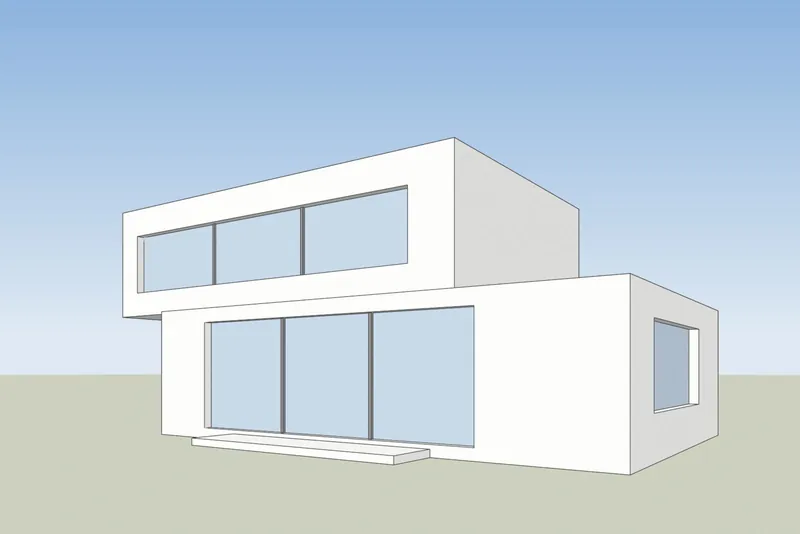
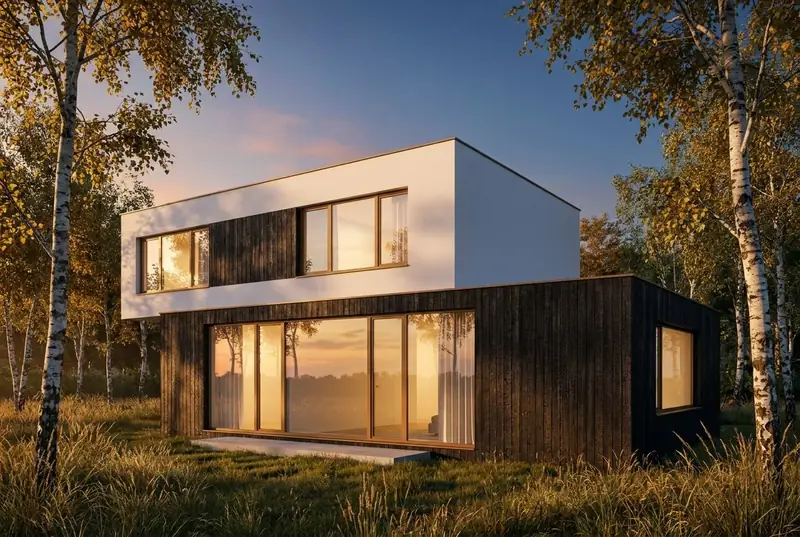 Vue SketchUpRendu IA
Exemples
Une vue SketchUp en entrée, un rendu photoréaliste en sortie
Faces blanches et arêtes noires à gauche, comme SketchUp affiche un modèle. Le rendu obtenu est à droite, sans retouche.
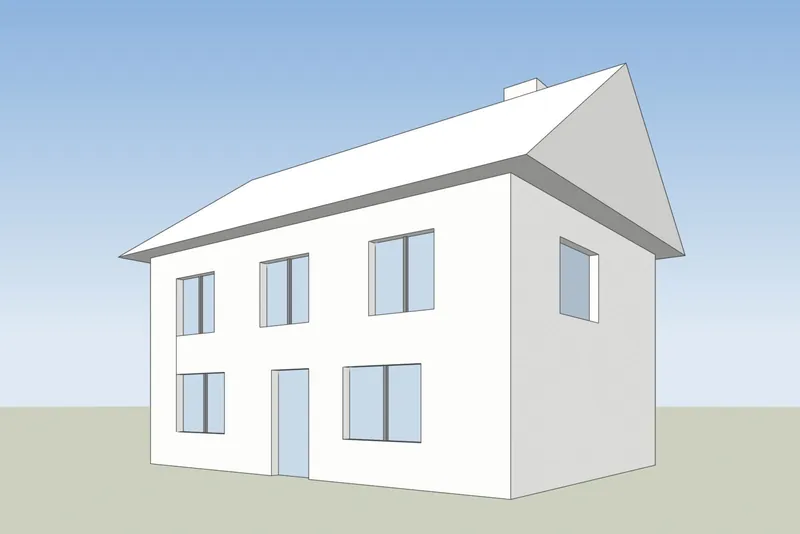
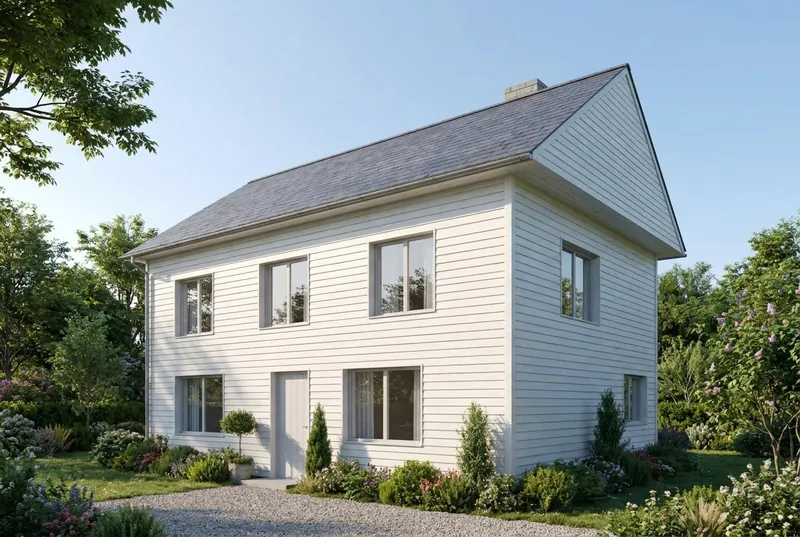 Vue SketchUpRendu IA
Maison familiale
Une maison au toit en pente par un matin d'été. Le pignon, la cheminée, la porte et les 8 fenêtres sont à l'emplacement défini par le modèle.
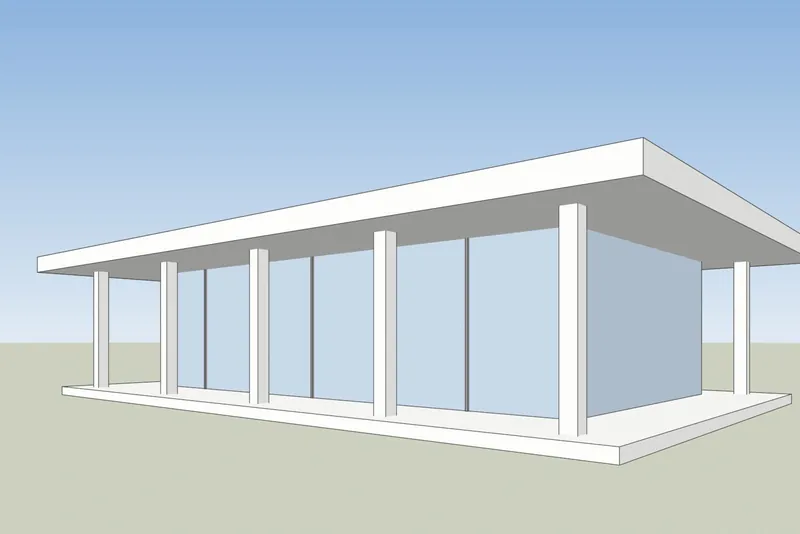
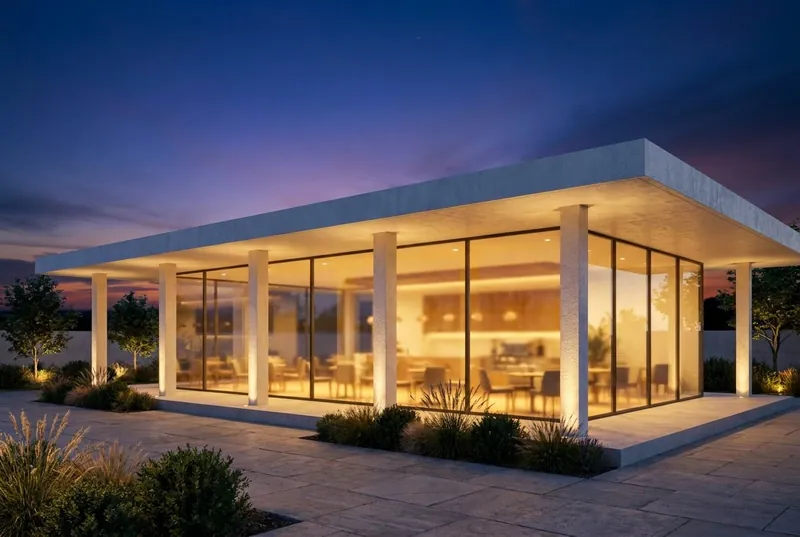 Vue SketchUpRendu IA
Café-pavillon en verre
Un pavillon à toit plat au crépuscule, animé à l'intérieur et sur la terrasse. Les colonnes et le débord de toit correspondent au modèle.
Étape par étape
Comment préparer votre vue SketchUp
4 étapes, et seule l'exportation est requise.
1. Configurez la vue
Cadrez le bâtiment avec les outils Orbite et Panoramique. Pour des murs verticaux droits, activez Caméra, Perspective à deux points. Masquez les axes et tous les guides que vous ne souhaitez pas voir sur l'image.
2. Choisissez un style simple
Dans le panneau Styles, définissez le style de face sur Ombré, Lignes cachées ou Monochrome. Un modèle blanc ou gris uni (maquette grise) donne le résultat le plus propre. Désactivez les ombres : l'IA ajoute sa propre lumière.
3. Exportez un PNG
Dans SketchUp pour ordinateur de bureau, utilisez Fichier, Exporter, Graphique 2D et enregistrez un PNG. Dans n'importe quelle version, une capture d'écran normale de la fenêtre SketchUp fonctionne également.
4. Effectuez le rendu
Importez le PNG, choisissez lumière du jour, couvert, soleil du soir ou crépuscule, et ajoutez une brève note sur les matériaux si vous le souhaitez, comme un enduit blanc et des fenêtres en chêne.
Vérifié le 15 octobre 2026
SketchUp AI Render ou un outil de capture d'écran
Les deux créent des images IA à partir de votre modèle SketchUp. Ils diffèrent par ce dont vous avez besoin avant de commencer.
SketchUp AI Render
Intégré à SketchUp pour ordinateur de bureau, iPad et web. Il nécessite un abonnement payant SketchUp Go, Pro ou Studio, et sur ordinateur de bureau, SketchUp 2024 ou plus récent avec l'extension AI Render. Chaque image coûte 10 crédits. Les abonnements comprennent 100 à 200 crédits par mois, et les crédits non utilisés ne sont pas reportés. Il dispose également d'outils de dessin et d'édition dans SketchUp.
Aide SketchUp : AI RenderRendu IA 3Dstudio.co
Fonctionne dans votre navigateur à partir d'une image exportée, ce qui le rend compatible avec toutes les versions de SketchUp, y compris SketchUp Free, et sans extension. Jusqu'à 11 rendus gratuits à l'inscription. Les crédits payants n'expirent jamais. Il n'intègre aucun outil dans SketchUp : vous modifiez le résultat par le choix de la lumière et une brève note.
Ouvrir 3Dstudio.co AI Render
À quoi s'attendre
Ce que l'IA conserve de votre modèle SketchUp et ce qu'elle modifie
Pour que vous sachiez quoi montrer à un client et quoi envoyer à notre studio.
Ce qui reste identique
La forme du bâtiment, les fenêtres et les portes, la ligne de toit et le nombre d'étages. L'angle de la caméra reste exactement comme sur votre capture d'écran.
Ce que l'IA modifie
Les matériaux, la lumière, le ciel, les plantations et les finitions de mobilier. Utilisez le champ de notes pour les orienter, par exemple un enduit blanc et des fenêtres en chêne.
Ce qui peut être simplifié
Les détails très fins, comme les petits bois des fenêtres ou les petits garde-corps, peuvent ressortir plus simples que dans le modèle. Pour des images finales exactes, utilisez notre studio.
Ce qu'il advient de votre fichier
Seule la capture d'écran est envoyée, jamais votre fichier modèle. Nous n'utilisons pas vos images pour entraîner l'IA, et nous ne publions pas vos rendus.
FAQ sur le rendu IA SketchUp
Questions sur le rendu IA pour SketchUp
Versions, fichiers, précision et prix.
Essayez-le sur votre modèle SketchUpQuelles versions de SketchUp fonctionnent ?
N'importe quelle version capable d'afficher votre modèle. L'outil n'a besoin que d'une image de la vue, donc SketchUp Free, SketchUp pour le Web, les anciennes versions de bureau et la version actuelle fonctionnent toutes.
Dois-je installer un plugin ou une extension ?
Non. Vous exportez un PNG ou prenez une capture d'écran et l'importez dans votre navigateur. Rien n'est ajouté à SketchUp et le fichier de modèle n'est jamais envoyé.
Comment cela diffère-t-il du rendu IA intégré de SketchUp ?
SketchUp AI Render fonctionne à l'intérieur de SketchUp et nécessite un abonnement payant Go, Pro ou Studio. Sur ordinateur de bureau, il nécessite SketchUp 2024 ou une version plus récente. Chaque image coûte 10 crédits, et les crédits mensuels ne sont pas reportés. Notre outil fonctionne à partir d'une image exportée, ce qui permet d'utiliser n'importe quelle version de SketchUp, vous obtenez un rendu gratuit sans compte, et les crédits payants n'expirent jamais. Si vous payez déjà pour SketchUp, essayez les deux. Informations sur SketchUp vérifiées sur help.sketchup.com le 15 octobre 2026.
L'IA va-t-elle modifier mon projet SketchUp ?
Elle conserve la forme du bâtiment, les fenêtres, la ligne de toit et le nombre d'étages. Elle modifie les matériaux, la lumière et l'environnement. Les détails très fins, comme les petits bois des fenêtres, peuvent ressortir plus simples que dans le modèle.
Quel style SketchUp donne le meilleur résultat ?
Un style sobre. Ombré, Lignes cachées ou Monochrome sans ombres fonctionne bien. Les styles à traits esquissés prononcés et les textures marquées peuvent transparaître dans le rendu.
Quel est le coût ?
L'essai est gratuit. Votre premier rendu ne nécessite aucun compte, et un compte gratuit vous offre jusqu'à 11 rendus gratuits pour un usage personnel. Pour le travail client, optez pour un abonnement mensuel ou un pack de crédits unique. Les crédits n'expirent jamais, et les prix sont affichés dans votre devise, TVA incluse sur page des prix.
Guides du rendu IA
Guides et comparatifs sur l'AI rendering
Comment les outils de rendu IA se comparent sur le prix et les fonctionnalités, et en quoi l'IA diffère de la CGI. Les guides sont en anglais.
Meilleurs logiciels de rendu IA en 2026
7 outils comparés pour les architectes, avec leurs prix, leur offre gratuite, leurs points forts et leurs limites.
Lire la suiteOutils de rendu IA gratuits
Ce que proposent 11 outils gratuitement, lesquels ajoutent un filigrane et si vous pouvez utiliser le résultat pour des projets clients.
Lire la suiteRendu IA contre V-Ray et Enscape
Où V-Ray et Enscape l'emportent, où le rendu IA l'emporte, et comment utiliser les deux.
Lire la suiteTarifs de Veras en 2026
Ce que coûte Veras, ce que ses crédits permettent d'obtenir, et comment il se compare à un outil basé sur une capture d'écran.
Lire la suiteAlternative à MyArchitectAI
Ses forfaits et ses rendus gratuits, là où il est en avance, et là où 3Dstudio.co AI Render l'est.
Lire la suiteAvis sur Rendair
Ses forfaits 2026, ce que permettent d'obtenir les crédits, ses points forts et la comparaison avec 3Dstudio.co AI Render.
Lire la suiteAvis sur mnml.ai
Ses forfaits 2026, ses plugins pour SketchUp, Revit et Rhino, et la comparaison avec 3Dstudio.co AI Render.
Lire la suiteCGI ou IA pour les images d'architecture
Comment les images CGI et IA diffèrent, comment les distinguer et quand utiliser chacune.
Lire la suite
Autres programmes
Rendu IA pour vos autres programmes 3D
Tout programme capable de prendre une capture d'écran d'une vue 3D fonctionne. Ces pages contiennent les étapes d'exportation.
1,252
Projets réalisés
13
Années d'activité
17
Pays desservis







★★★★★
Noté 4.9 sur Clutch · Voir nos avis
Architectes, promoteurs & designers d'intérieur
Travaillant pour 215 entreprises depuis 2013
125 de 220 clients sont revenus
Plus de la moitié de nos clients sont revenus
Essayez-le sur votre modèle SketchUp
Rendre une vue SketchUp maintenant
Jusqu'à 11 rendus gratuits, sans carte. Votre premier rendu ne nécessite aucun compte. Vous obtenez l'image en environ 20 secondes.