

Render de SketchUp con IA
Fotorrealista en unos 20 segundos
Exporte una vista de SketchUp como PNG. Obtenga un render fotorrealista del mismo edificio.
- Hasta 11 renders gratis
- Cualquier versión de SketchUp, incluida la gratuita
- Sin extensión, sin tarjeta
- El archivo de su modelo se queda en su ordenador
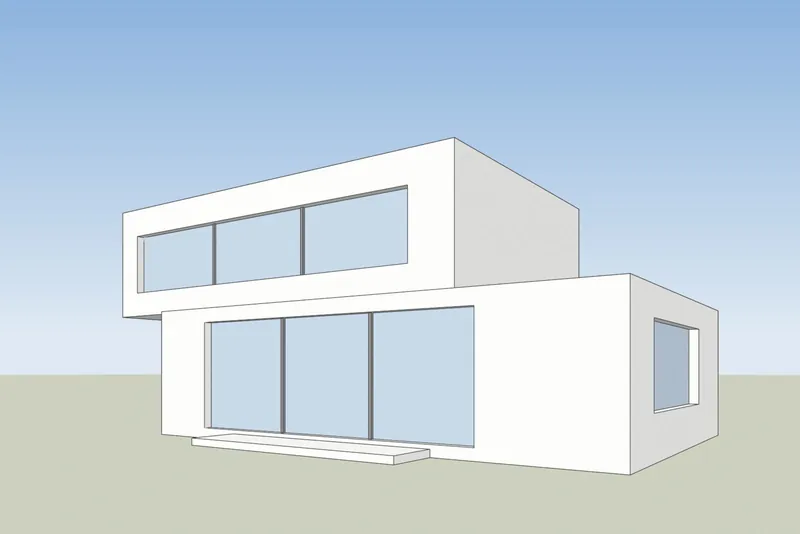
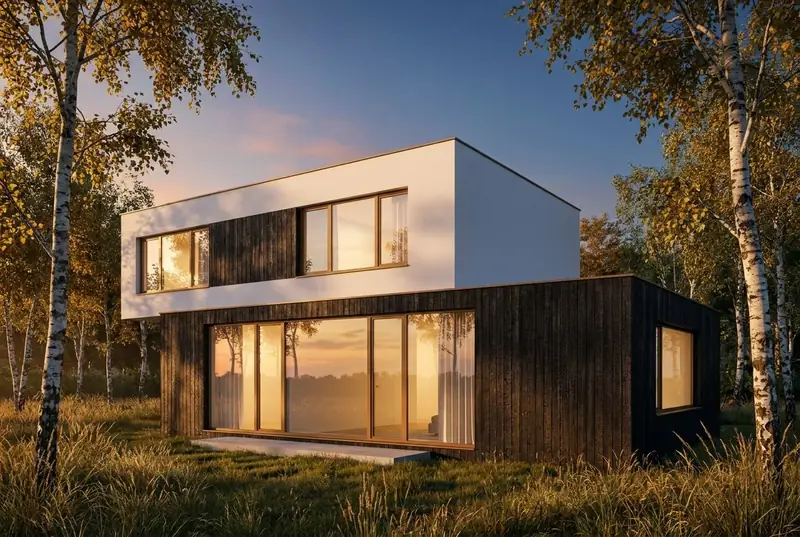 Vista de SketchUpRender con IA
Ejemplos
Entra una vista de SketchUp, sale un render fotorrealista
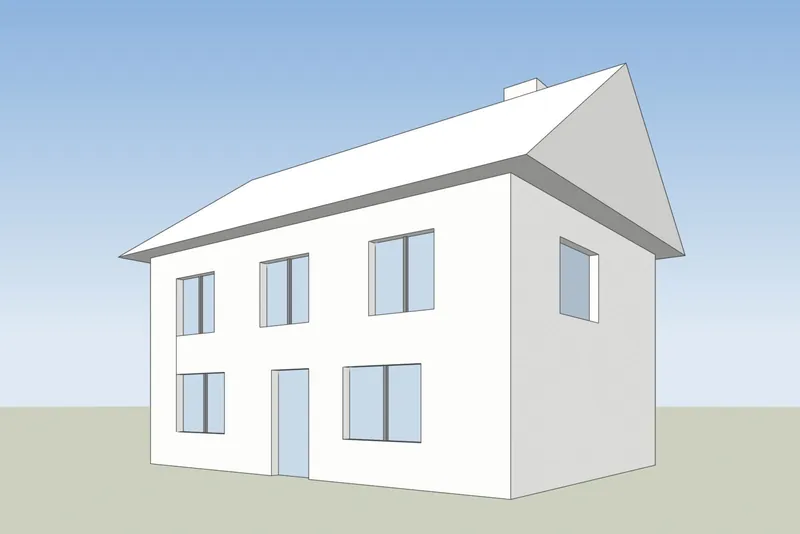
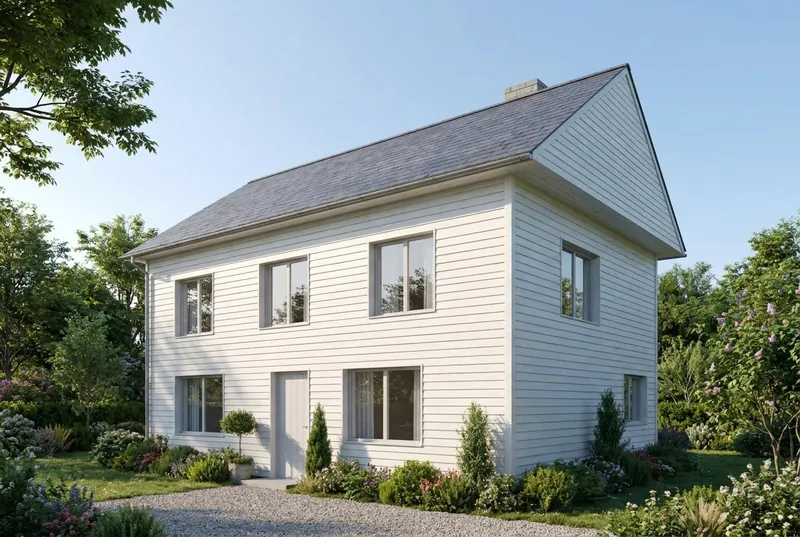
Caras blancas y aristas negras a la izquierda, tal como SketchUp muestra un modelo. A la derecha, el render que devolvió la herramienta, sin retocar.
 Vista de SketchUpRender con IA
Casa unifamiliar
Una casa con tejado a dos aguas en una mañana de verano. El hastial, la chimenea, la puerta y las 8 ventanas están donde las coloca el modelo.
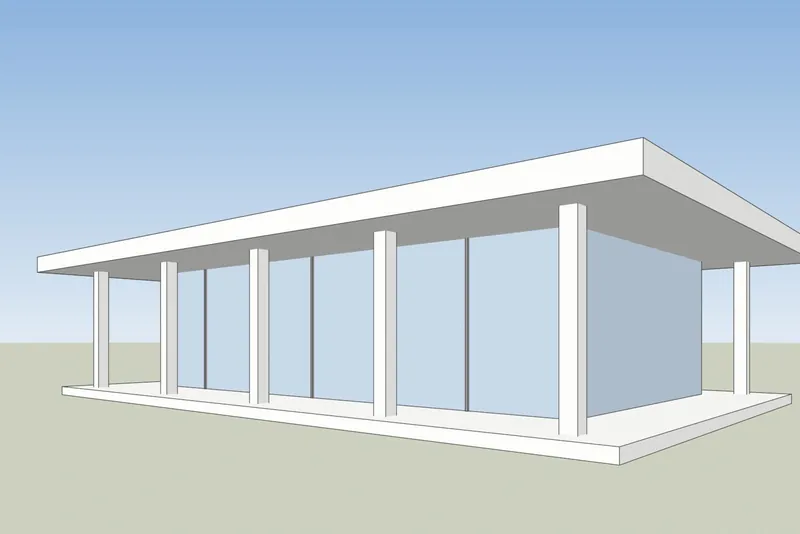
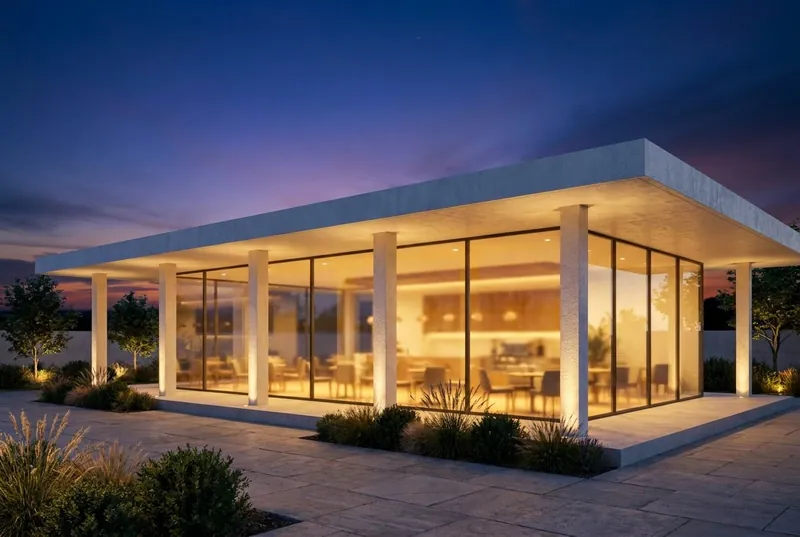 Vista de SketchUpRender con IA
Cafetería con pabellón de cristal
Un pabellón de cubierta plana al anochecer, con gente dentro y en la terraza. Los pilares y el voladizo de la cubierta coinciden con el modelo.
Paso a paso
Cómo preparar su vista de SketchUp
4 pasos, y solo la exportación es obligatoria.
1. Configure la vista
Encuadre el edificio con las herramientas Órbita y Desplazar. Para paredes verticales rectas, active Cámara, Perspectiva de dos puntos. Oculte los ejes y las guías que no quiera en la imagen.
2. Elija un estilo sencillo
En el panel Estilos, ponga el estilo de cara en Sombreado, Línea oculta o Monocromo. Un modelo blanco o gris da el resultado más limpio. Desactive las sombras: la IA añade su propia luz.
3. Exporte un PNG
En SketchUp para escritorio, use Archivo, Exportar, Gráfico 2D y guarde un PNG. En cualquier versión también sirve una captura normal de la ventana de SketchUp.
4. Renderícelo
Suba el PNG, elija luz de día, nublado, sol de tarde o anochecer, y añada una nota breve sobre los materiales si quiere, por ejemplo: revoco blanco y ventanas de roble.
Comprobado el 15 de octubre de 2026
SketchUp AI Render o una herramienta de captura de pantalla
Los dos crean imágenes con IA a partir de su modelo de SketchUp. Se diferencian en lo que necesita antes de empezar.
SketchUp AI Render
Integrado en SketchUp para escritorio, iPad y web. Necesita un plan de pago de SketchUp Go, Pro o Studio y, en escritorio, SketchUp 2024 o posterior con la extensión AI Render. Cada imagen cuesta 10 créditos. Los planes incluyen de 100 a 200 créditos al mes, y los créditos sin usar no se acumulan. También tiene herramientas de dibujo y edición dentro de SketchUp.
Ayuda de SketchUp: AI RenderRender con IA de 3Dstudio.co
Funciona en su navegador a partir de una imagen exportada, así que sirve con cualquier versión de SketchUp, incluida SketchUp Free, y sin extensión. Hasta 11 renders gratis al registrarse. Los créditos de pago no caducan nunca. No tiene herramientas dentro de SketchUp: se cambia el resultado con la elección de la luz y una nota breve.
Abrir 3Dstudio.co AI Render
Qué esperar
Qué conserva la IA de su modelo de SketchUp y qué cambia
Para que sepa qué enseñar a un cliente y qué enviar a nuestro estudio.
Lo que no cambia
La forma del edificio, las ventanas y puertas, la cubierta y el número de plantas. El ángulo de cámara queda exactamente como en su captura de pantalla.
Lo que la IA cambia
Materiales, luz, cielo, vegetación y acabados del mobiliario. Utilice el campo de notas para dirigirlos, por ejemplo: revoco blanco y ventanas de roble.
Lo que se puede simplificar
Los detalles muy finos, como los montantes delgados de las ventanas o las barandillas pequeñas, pueden salir más simples que en el modelo. Para imágenes finales exactas, utilice nuestro estudio.
Qué pasa con su archivo
Solo se envía la captura de pantalla, nunca el archivo de su modelo. No usamos sus imágenes para entrenar IA y no publicamos sus renders.
Preguntas frecuentes sobre el render con IA de SketchUp
Preguntas sobre el render con IA para SketchUp
Versiones, archivos, precisión y precio.
Pruébelo con su modelo de SketchUp¿Qué versiones de SketchUp sirven?
Cualquiera que pueda mostrar su modelo. La herramienta solo necesita una imagen de la vista, así que sirven SketchUp Free, SketchUp para web, las versiones de escritorio antiguas y la actual.
¿Tengo que instalar un plugin o una extensión?
No. Exporte un PNG o haga una captura de pantalla y súbala en su navegador. No se añade nada a SketchUp y el archivo del modelo nunca se sube.
¿En qué se diferencia del AI Render integrado de SketchUp?
SketchUp AI Render se ejecuta dentro de SketchUp y requiere un plan de pago Go, Pro o Studio. En escritorio necesita SketchUp 2024 o posterior. Cada imagen cuesta 10 créditos y los créditos mensuales no se acumulan. Nuestra herramienta funciona a partir de una imagen exportada, así que sirve cualquier versión de SketchUp, obtiene un render gratis sin cuenta y los créditos de pago no caducan nunca. Si ya paga por SketchUp, pruebe las dos. Datos sobre SketchUp comprobados en help.sketchup.com el 15 de octubre de 2026.
¿La IA cambiará mi diseño de SketchUp?
Mantiene la forma del edificio, las ventanas, la cubierta y el número de plantas. Cambia los materiales, la luz y el entorno. Los detalles muy finos, como los montantes delgados de las ventanas, pueden salir más simples que en el modelo.
¿Qué estilo de SketchUp da el mejor resultado?
Uno sencillo. Sombreado, Línea oculta o Monocromo con las sombras desactivadas funciona bien. Los estilos de borde muy marcados, tipo boceto, y las texturas fuertes pueden notarse en el render.
¿Cuánto cuesta?
Probarlo es gratis. Su primer render no necesita cuenta, y una cuenta gratuita le da hasta 11 renders gratis para uso personal. Para trabajos con clientes, elija un plan mensual o un pack de créditos de pago único. Los créditos no caducan nunca y los precios se muestran en su moneda con el IVA incluido en la página de precios.
Guías de render con IA
Guías y comparativas de render con IA
Cómo se comparan las herramientas de render con IA en precio y funciones, y en qué se diferencia la IA del CGI. Las guías están en inglés.
El mejor software de render con IA en 2026
7 herramientas comparadas para arquitectos, con precios, versiones gratuitas, puntos fuertes y límites.
Leer másHerramientas de render con IA gratis
Qué ofrecen gratis 11 herramientas, cuáles añaden marca de agua y si se puede usar el resultado en trabajos para clientes.
Leer másRender con IA frente a V-Ray y Enscape
Dónde ganan V-Ray y Enscape, dónde gana el render con IA y cómo usar ambos.
Leer másPrecios de Veras en 2026
Cuánto cuesta Veras, qué se obtiene con sus créditos y cómo se compara con una herramienta basada en capturas.
Leer másAlternativa a MyArchitectAI
Sus planes y renders gratuitos, en qué va por delante y en qué va por delante 3Dstudio.co AI Render.
Leer másReseña de Rendair
Sus planes para 2026, qué se obtiene con los créditos, dónde es fuerte y cómo se compara 3Dstudio.co AI Render.
Leer másReseña de mnml AI
Sus planes para 2026, plugins para SketchUp, Revit y Rhino, y cómo se compara 3Dstudio.co AI Render.
Leer másCGI o IA para imágenes de arquitectura
Cómo se diferencian las imágenes CGI y las de IA, cómo distinguirlas y cuándo usar cada una.
Leer más
Otros programas
Render con IA para sus otros programas 3D
Sirve cualquier programa que pueda hacer una captura de una vista 3D. Estas páginas incluyen los pasos para exportar.
1,252
Proyectos completados
13
Años de actividad
17
Países atendidos







★★★★★
Valoración 4.9 en Clutch · Ver nuestras opiniones
Arquitectos, promotores & diseñadores de interiores
Trabajando para 215 empresas desde 2013
125 de 220 clientes que regresaron
Más de la mitad de nuestros clientes nos han contratado de nuevo
Pruébelo con su modelo de SketchUp
Renderice ahora una vista de SketchUp
Hasta 11 renders gratis, sin tarjeta. Su primer render no necesita cuenta. Tendrá la imagen en unos 20 segundos.