Veras Pricing in 2026: Plans, Credits and a Screenshot Alternative
What Veras costs in 2026, what its credits buy, how the trial and refunds work, where Veras is stronger, and how a screenshot-based AI render tool compares.
In this article
- Chaos sells Veras as Starter, Pro and Ultra plans, priced by monthly AI credits, and it runs inside Revit, SketchUp, Rhino, Archicad and other programs
- On 3 November 2026 Chaos listed Starter at €15.90 and Pro at €27.50 a month on annual billing, before tax
- Using AI credits voids the Veras refund, so the 14-day free trial is the time to test it on your own model
- A screenshot-based tool such as our AI Render Studio needs no plugin and shows how much of your linework was kept on every render
Veras pricing is set by Chaos, the company behind V-Ray and Enscape, and it is based on monthly AI credits. On 3 November 2026 the Chaos website listed three Veras plans: Starter, Pro and Ultra. Starter and Pro had prices shown, and each plan comes with a fixed number of credits that you spend on images and videos.
This guide sets out what each Veras plan costs, what the credits buy, how the trial and refund rules work, and where Veras is the better choice. We also make an AI render tool, so we compare it with ours in the same terms and say where each one is stronger. Every Veras figure below was read on the Chaos Veras page on 3 November 2026. Prices can change, so check that page before you buy.
Veras pricing in 2026 at a glance
The table shows the plans as Chaos listed them to a visitor in Europe, on annual billing. Chaos states that its prices do not include taxes. Monthly billing is also offered and costs more per month, because the annual plan is discounted.
| Veras plan | Credits a month | About how many images | Price shown on annual billing |
|---|---|---|---|
| Starter | 500 | Up to about 50 images, or about 50 videos | €15.90 a month, billed as €190.80 a year |
| Pro | 2,000 | Up to about 200 images, or about 200 videos | €27.50 a month, billed as €330 a year |
| Ultra | 6,000 | Up to about 600 images, or about 600 videos | No price shown in our selection |
Each plan is a named license for one person, and you can use it on any device with your Chaos login. Veras is also included with Enscape. The Chaos pricing page listed Enscape Solo at €44.90 a month on annual billing, with 100 AI credits a month, which Chaos puts at about 10 images.
What a Veras credit buys
Veras uses one pool of credits for images and videos. Chaos gives its image counts for 1K images made with the Nano Banana 2 model, and it says that output can vary. In plain terms, Starter covers a few images on most working days, and Pro covers a steady weekly flow of design options.
Have a 3D model? Our AI Render Studio turns a screenshot of it into a photoreal image in about 20 seconds. Your first render needs no account.
Render your model freeThree points decide what you really get from the credits:
- The model you pick. Veras offers more than 30 AI models. A different model can use credits at a different rate than the 1K example.
- Videos. Videos come from the same pool, so a month with many videos leaves fewer images.
- Extra credits. Chaos sells more credits when you run low. Check the price of a top-up before a busy month.
If you only need a few images for one competition or one client meeting, a yearly plan is a long commitment for a short job. In that case, compare the trial and any pay-as-you-go option first.
Veras free trial and refund terms
Chaos offers a 14-day free trial of Veras. It also lists a 14-day money back guarantee with its licenses, with one condition that matters for an AI tool: the use of AI credits voids the right to a refund. So once you render with a paid plan, you should expect to keep it.
That makes the trial the moment to test Veras on your own work. Use a real project view, not a sample scene, and check the result against your drawings before you pay.
Where Veras is the stronger choice
Veras has real strengths, and for some teams it is the better tool:
- It runs inside your design program. Chaos lists Revit, SketchUp, Rhino, Archicad, Vectorworks, Forma and Allplan, plus Enscape, V-Ray and Corona and a web app. You render the live view without saving a screenshot.
- It does more than still images. Veras can turn a sketch or an image into an editable 3D scene, make videos, and chain steps together with its Nodes feature.
- The entry price on annual billing is low. If you already know you will use it all year, Starter costs little per month.
- It fits a Chaos office. If your team already renders with Enscape or V-Ray, Veras sits in the same account and the same support system.
We do not offer a plugin yet. If rendering inside Revit or Rhino without leaving the program is your first need, Veras does that today.
A screenshot-based alternative to Veras
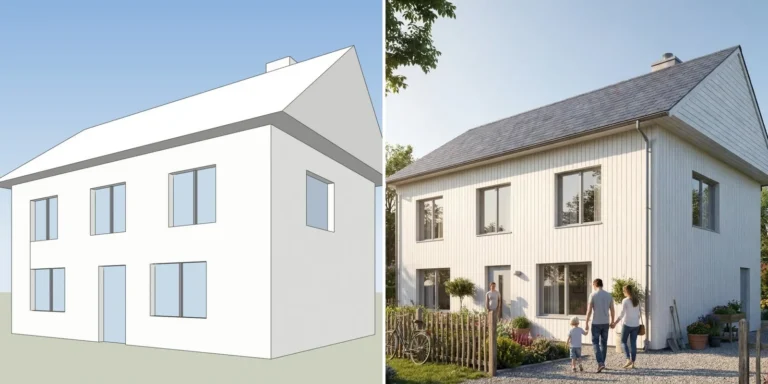
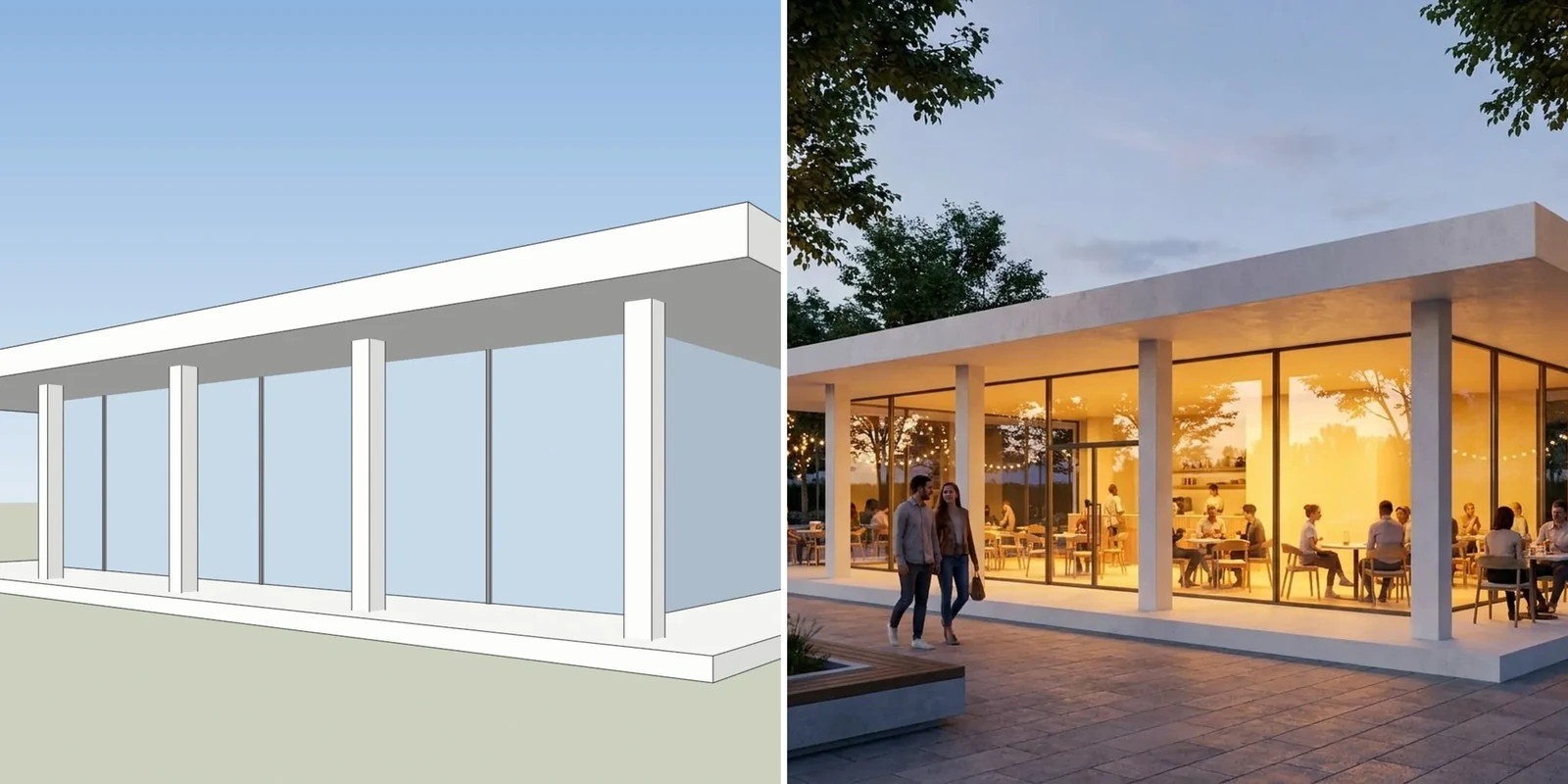
Our AI Render Studio works from a screenshot instead of a plugin. You take a screenshot of a view in SketchUp, Revit, Archicad, Rhino or any other 3D program, upload it, and a photoreal render comes back in about 20 seconds. There is nothing to install and no license to manage.

A screenshot of one of our own test models, left, and the AI Render Studio image of the same view, right.
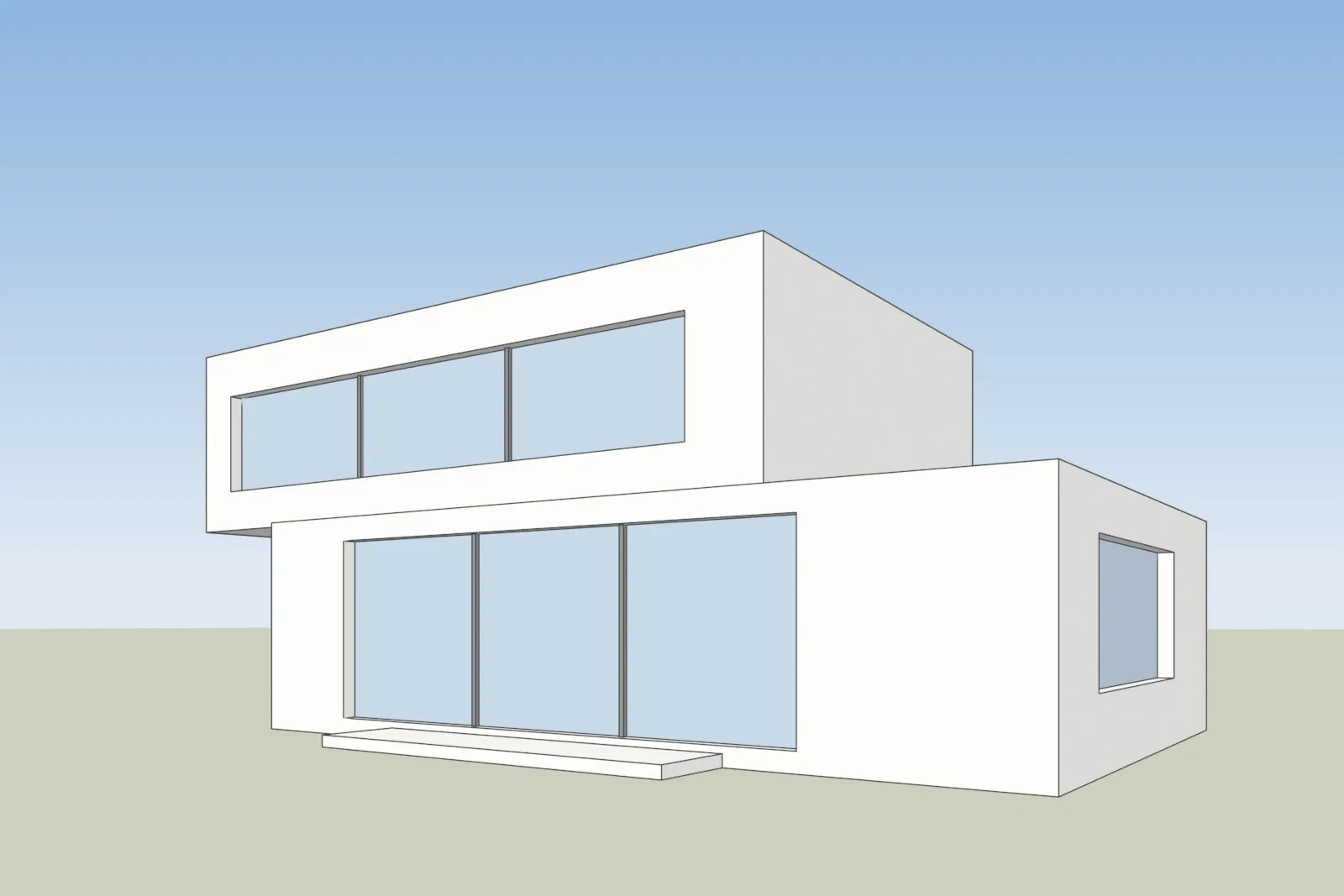
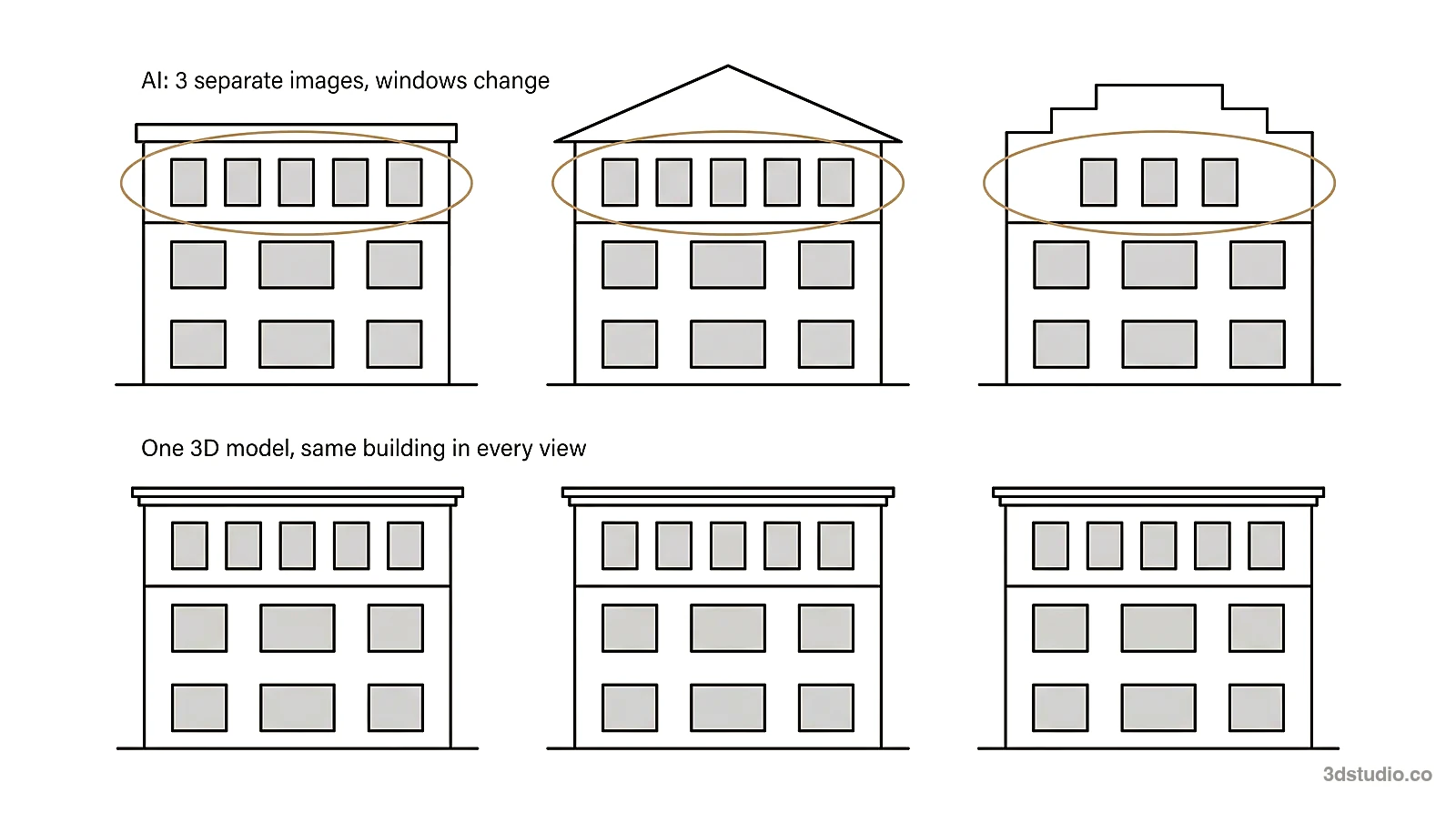
The tool is told to keep your walls, openings, roof line and camera, and to change only light, surroundings and the materials you ask for. AI can still slip, so every result opens with a drag line over your screenshot, and the library shows how much of your linework was kept. You can check the windows and the roof line yourself before anyone else sees the image.
After the first render you change the image instead of starting again:
- Brush one area and say what should change. Only that area is redrawn.
- Relight the same render to dusk, night or winter with one click.
- Add people or trees, or change a material with words.
- Send a client review link. Your client pins comments on the image or approves it, with no account.
The tool also works inside ChatGPT and Claude as a connector, and the app is in 13 languages. It is made by 3Dstudio.co, an architectural visualization studio with 1,200+ projects since 2013, rated 4.9 on Clutch. If you work in SketchUp, our SketchUp AI rendering page shows the export steps.
Veras vs AI Render Studio side by side
This comparison uses what each company states on its own pages on 3 November 2026. Where we found nothing on the Veras page, the cell says so, and that does not prove the feature is missing.
| Veras | AI Render Studio | |
|---|---|---|
| How you start | Plugin in your design program, or the web app | A screenshot of any 3D view, in the browser |
| Free start | 14-day free trial | First render with no account, then 5 renders and 5 fixes after sign-up (small logo, personal use) |
| How the price is shown | Before tax, shown per region, cheapest on annual billing | Your currency, with VAT or sales tax included where it applies |
| Check that your design was kept | Not found on the page | Drag line on every result, and a lines kept check in the library |
| Change one part of a render | Prompt control over which parts change | Brush an area, change with words, or relight with one click |
| Client review | Not found on the page | Review link on paid plans; the client comments or approves without an account |
| Inside ChatGPT or Claude | Not found on the page | Yes, as a connector |
| Plugins | Revit, SketchUp, Rhino, Archicad, Vectorworks, Forma, Allplan | None yet |
| Refunds | 14-day money back, but using AI credits voids it | 14 days if no credits are used; failed renders are refunded automatically |
| Credits | Monthly credits by plan; top-ups sold | Credits never expire, even after you cancel |
Our plans and credit packs are on the AI Render Studio pricing page. We do not copy our prices into this post, because they are shown in each visitor’s currency and they can change.
How to test either tool on your own model
Do not judge an AI tool by its gallery. Run the same test on both tools with one of your own views:
- Pick a view with clear, countable features: windows, floor levels, the roof line and the entrance.
- Render it once with the default settings and once with a material change.
- Count the windows and the floors in each result, and compare the roof line with your model.
- Change one detail, such as the facade color, and check that the rest of the image stayed the same.
- Note the time to a usable image, including the retries.
For a model you cannot open, our free Revit viewer shows an RVT file in the browser, so you can take the screenshot without a Revit license. More free tools are on the tools page.
When to use a studio instead of an AI tool
Both tools are made for options and early concepts. Neither one checks the image against your drawings for you. When an image goes to a planning authority, a jury or buyers, the details must match the drawings, and a person should check them.
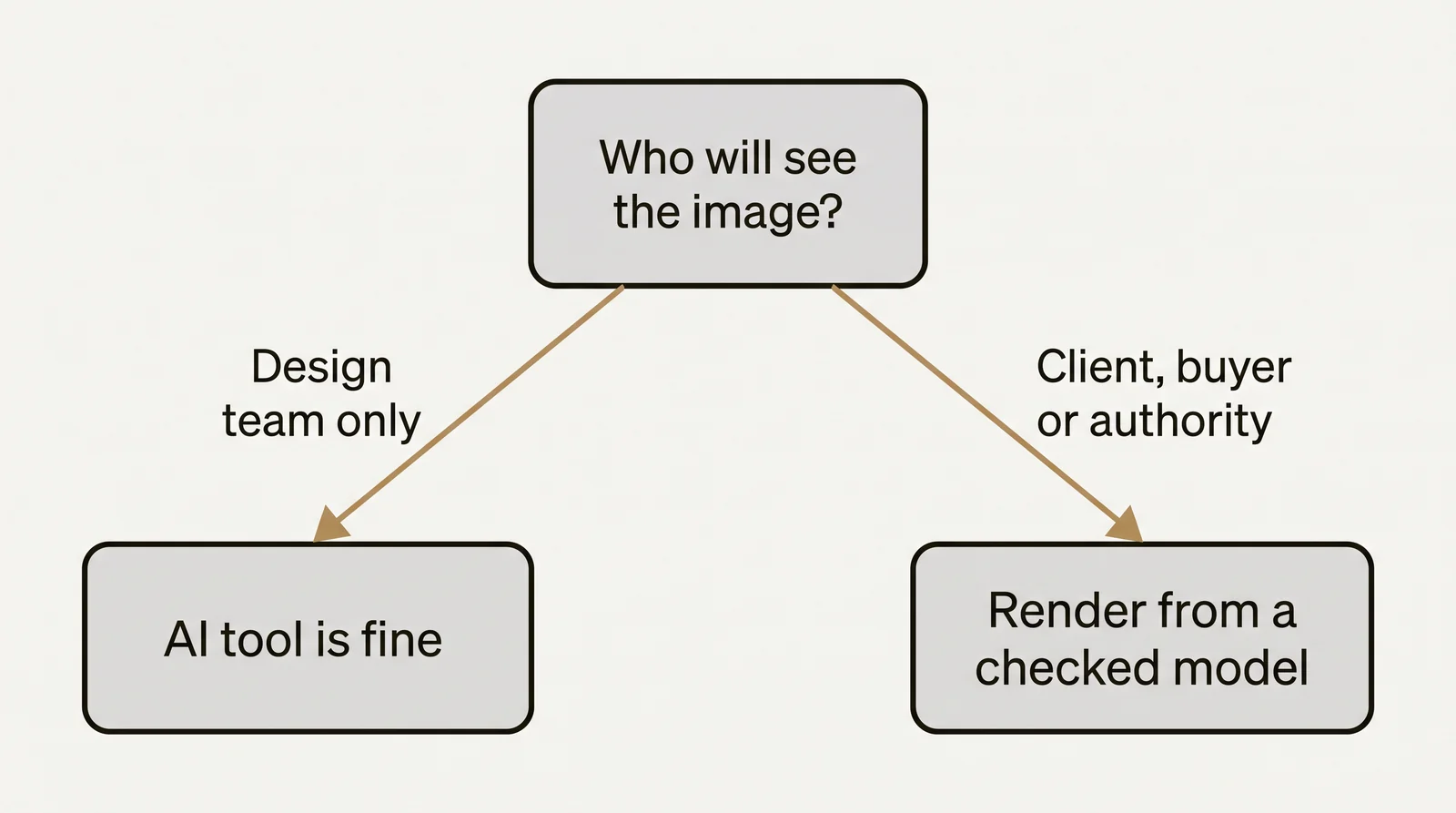
For those images, we build the 3D model from your drawings and check it against them. See architectural visualization for how that works, and the difference between CGI and AI for the full comparison of the 2 methods. What a studio image costs is explained in our 3D rendering cost guide.
Questions about Veras pricing
How much does Veras cost per month?
On 3 November 2026, Chaos listed Veras Starter at €15.90 a month and Veras Pro at €27.50 a month, both on annual billing, before tax. Monthly billing costs more. Check the Chaos page for the price in your region.
Is Veras free?
Veras has a 14-day free trial. After the trial you need a Veras plan, or an Enscape license that includes a small number of AI credits each month.
Can I get a refund on Veras?
Chaos lists a 14-day money back guarantee, but it states that the use of AI credits voids the right to a refund. Test Veras during the free trial instead.
What is a good alternative to Veras without a plugin?
A screenshot-based tool needs no plugin. Our AI Render Studio renders a screenshot from any 3D program in about 20 seconds, and your first render needs no account. It has no plugin yet, so you export a view instead of rendering inside your program.
Which is cheaper, Veras or AI Render Studio?
It depends on how you pay and how much you render. Veras is cheapest on a yearly plan. AI Render Studio sells monthly plans and one-off credit packs, with VAT included and credits that never expire. Compare both pricing pages with the number of views you render in a month.
Diagrams in this post are drawn with an AI image tool from our brief and checked by our team.