

AI garden design
Redesign your garden from a photo
Upload a photo of your garden or plot. Pick a style, and get the same place and the same house back with new landscaping.
- Free to try, no account needed
- 4 garden styles
- Add a terrace or a pool
- The house and the plot stay the same
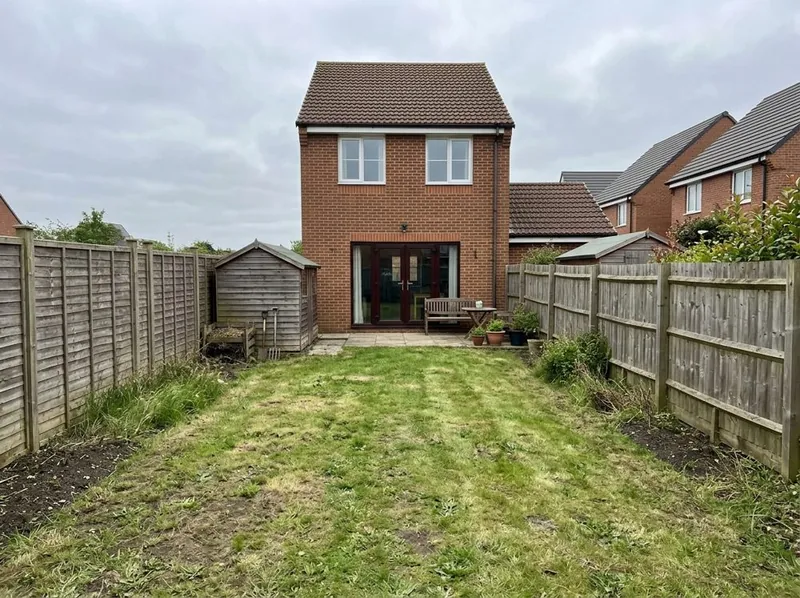
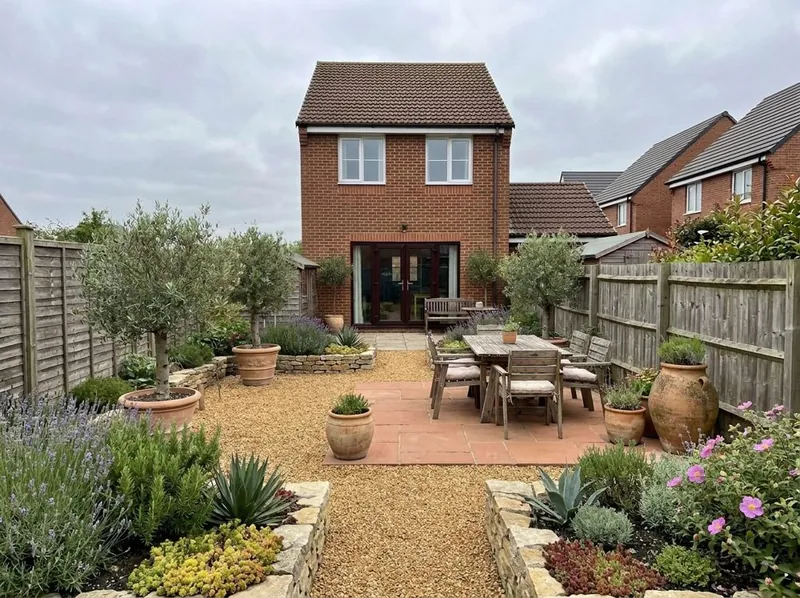 Your photoNew version
Styles and extras
AI landscape design in 4 garden styles
Pick a style, add a terrace or a pool if you want one, and write anything else in the notes.
Modern
Clean lines, paving and simple planting.
Cottage
Full, soft planting with flowers and natural paths.
Mediterranean
Gravel, terracotta pots, olive trees and dry-climate planting.
Low maintenance
Less lawn and fewer beds to look after.
A terrace or a pool
Add either one, or both, to the new design.
Your own words
For example a vegetable bed and a fire pit.
Step by step
How to redesign your garden with AI
3 steps. Your first picture needs no account.
1. Take a photo of the garden
The garden or the empty plot, in daylight. Show the house in the picture if you can.
2. Pick a style
Modern, cottage, Mediterranean or low maintenance. Add a terrace or a pool if you want one.
3. Get the new garden
You get the same place back with new landscaping. Try another style in the same way.
What to expect
What the AI keeps from your garden photo and what it changes
The example pair is a generated sample picture, not a client project.
What stays the same
The house, the fences and the shape of the plot, as in your photo.
What changes
The landscaping: lawn, paving, beds, planting, trees and the terrace or pool you add.
What can move
The picture is drawn again from your photo, so small details can move. Plants are the AI's suggestion and are not chosen for your climate or soil. Compare it with your photo before you rely on it.
What happens to your photo
Your photo is used to make your picture. We do not use your images to train AI, and we do not publish your pictures.
AI garden design FAQ
Questions about AI garden and landscape design
Photos, styles, plants and accuracy.
Design my gardenIs this AI garden design tool free?
Yes. Your first picture is free, with no account. Create a free account to keep going.
Can AI design my garden from a photo?
Yes. Upload a photo of the garden or plot, pick a style, and the AI draws the same place with new landscaping. The house and the plot stay as in your photo.
Can I add a pool or a terrace?
Yes. Tick A terrace, A pool, or both, before you start.
Are the plants right for my garden?
Not necessarily. The plants are the AI's suggestion for the style. Ask a garden centre or a landscaper which plants suit your climate and soil.
Which photo works best?
A daylight photo of the whole garden or plot, with the house in it if you can. Stand where you want to see the garden from.
Is the result a garden plan?
No. It is a picture to compare ideas, not a measured plan. Small details can move, so use a landscaper or garden designer for the build.
More from a photo
Other free photo tools
Have a 3D model instead of a photo? Our AI rendering tool turns a screenshot of it into a photoreal render.
1,200+
Projects completed
13
Years in business
17
Countries delivered to







★★★★★
Rated 4.9 on Clutch · See our reviews
Architects, developers & interior designers
Working for 215 companies since 2013
125 of 220 clients came back
More than half of our clients have hired us again
Free to try, no account needed
Redesign your garden from a photo now
Upload a photo and see the new version. Your first picture is free, with no account.