3D File Formats Explained: STL, OBJ, FBX, glTF, STEP and More
What STL, 3MF, OBJ, FBX, glTF, USDZ, STEP and IFC each store, what is lost when you convert, and which 3D file format to use for printing, the web, CAD or BIM.
In this article
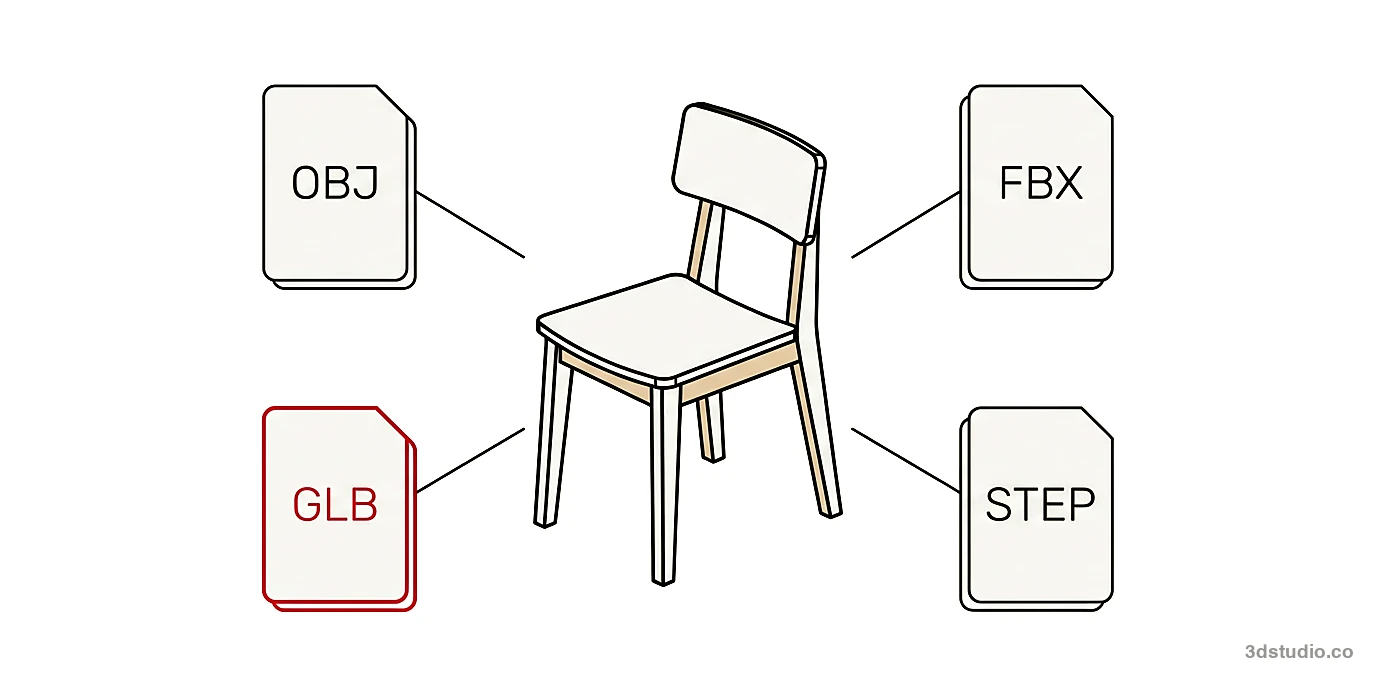
- STL and 3MF are for 3D printing, OBJ and FBX for exchanging models, GLB for the web and USDZ for iPhone AR
- Mesh formats store flat faces, STEP stores exact curves, and IFC adds building object data
- STL and OBJ store no units, so write down the unit and check scale and up axis after every conversion
- Native files such as .blend, .skp and .rvt open fully only in their own program, so export first
A 3D file format is the way a program saves a 3D model: its shape and, depending on the format, its colors, materials, animation and units. The most common are STL and 3MF for 3D printing, OBJ and FBX for exchanging models between programs, glTF and GLB for the web, USDZ for AR on iPhone, STEP for CAD parts and IFC for buildings.
The table below matches each job to a format, and the comparison table after it lists what each format stores. If you already have a model and need another format, our free 3D model converter opens STL, 3MF, OBJ, PLY, FBX, glTF, GLB, 3DS, DAE, STEP, IGES, IFC and 3DM files. It runs in the browser and saves to OBJ, STL, 3MF, GLB, glTF, STEP, PLY and 3DM. If the model does not exist yet, because all you have is a drawing, a scan or a photo, that is 3D modeling work.
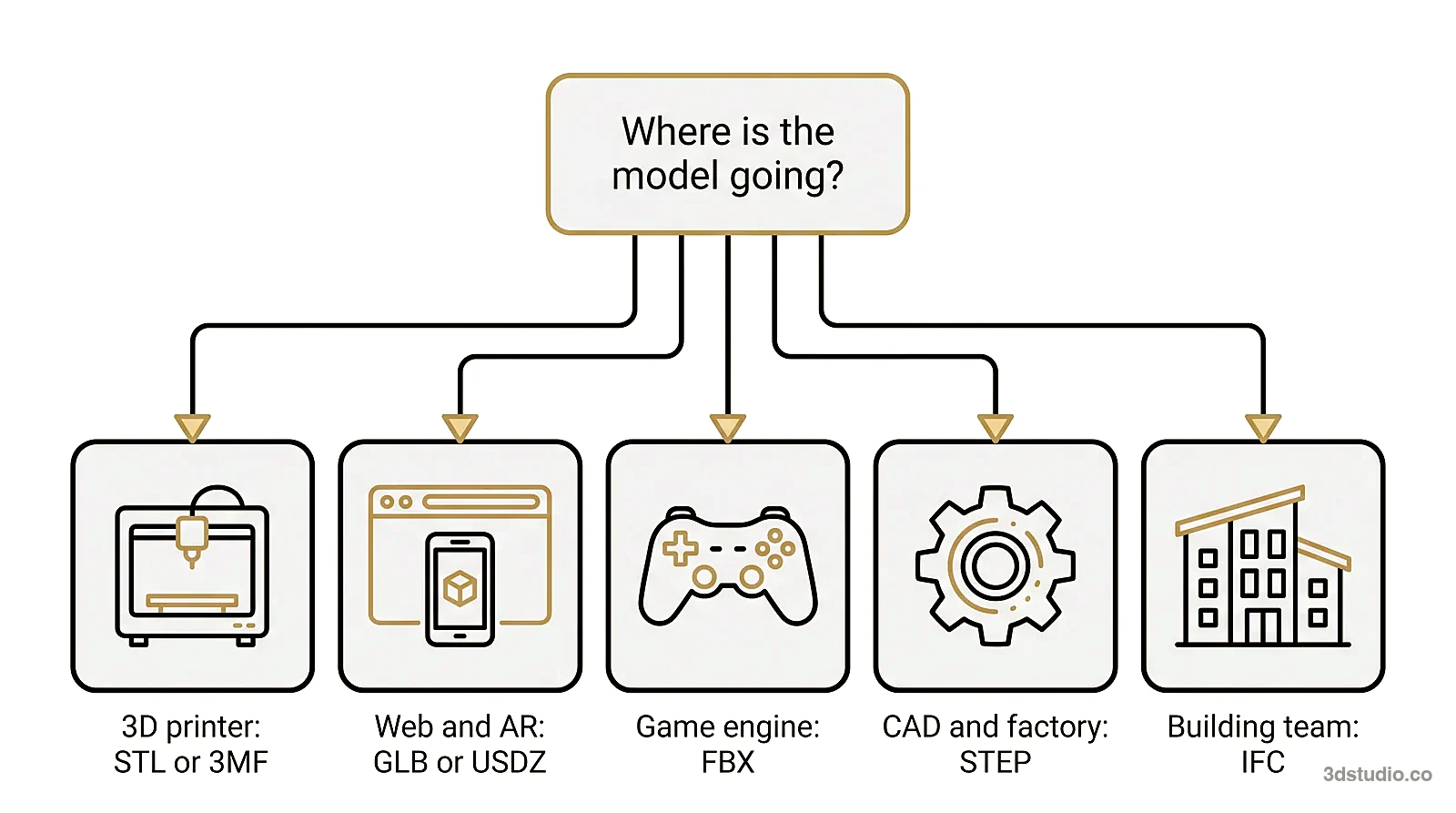
Which 3D file format to use for which job
| Job | Format | Why |
|---|---|---|
| 3D printing | STL, or 3MF | STL is the format print services and slicers ask for. 3MF also stores units, color and several parts in one file. |
| Transferring a static model between 3D programs | OBJ | Almost every 3D program reads it. Materials sit in a separate file and there is no animation. |
| Animated models and game engines | FBX | Stores a skeleton, keyframes, cameras and lights. Unity and Unreal Engine read it. |
| Website, product viewer, Android AR | GLB | One file with materials, textures and animation. Android Scene Viewer opens it. |
| iPhone and iPad AR | USDZ | The file AR Quick Look opens on iPhone and iPad. |
| Scan of a real object | PLY | Stores points or a mesh, with a color for each point. |
| CAD part sent to a manufacturer | STEP | Stores exact curves and surfaces, not triangles. ISO standard 10303. |
| Building model shared by architect, engineer and contractor | IFC | Open BIM format. Every object carries data about what it is. |
3D file formats compared
The geometry column shows how each format stores shape. The units column shows whether the file records if one unit is a millimeter, a meter or an inch.
Have a 3D model? 3Dstudio.co turns a screenshot of it into a photoreal image in about 20 seconds. Your first render needs no account.
Render your model free| Format | Extensions | Geometry | Materials and textures | Animation | Units stored | Owner or standard |
|---|---|---|---|---|---|---|
| STL | .stl | Triangles | No | No | No | Open format from 3D Systems |
| 3MF | .3mf | Triangle mesh | Yes, including color | No | Yes | 3MF Consortium, ISO/IEC 25422 |
| AMF | .amf | Triangles, optionally curved | Yes, including color | No | Yes | ISO/ASTM 52915, little used now |
| OBJ | .obj and .mtl | Polygons | Yes, in the separate MTL file | No | No | Open format from Wavefront |
| PLY | .ply | Polygons or points | Color for each point | No | No | Open format from Stanford University |
| FBX | .fbx | Polygons and NURBS | Yes | Yes | Yes | Autodesk, closed |
| glTF and GLB | .gltf with .bin, or .glb | Triangles | Yes, PBR materials | Yes, including skeletal | Yes, always meters | Khronos Group, ISO/IEC 12113 |
| Universal Scene Description and USDZ | .usda, .usdc, .usdz | Polygons and subdivision surfaces | Yes | Yes | Yes | Pixar, open source. USDZ is used for Apple AR |
| 3DS | .3ds | Triangles | Basic | Limited | No | Autodesk, old format |
| DAE (COLLADA) | .dae | Polygons | Yes | Yes | Yes | Khronos Group, ISO/PAS 17506 |
| STEP and IGES | .step, .stp, .iges, .igs | Exact curves and surfaces | Limited, no textures | No | Yes | STEP is ISO 10303. IGES is the older standard STEP replaced |
| IFC | .ifc | Exact solids or triangle meshes, plus object data | Limited | No | Yes | buildingSMART, ISO 16739-1 |
| Native files | .blend, .max, .skp, .rvt | Everything the program stores | Yes | Depends on the program | Yes | Open fully only in their own program |
What a 3D file format stores
A 3D file can carry several kinds of information, and no single format stores all of them:
- Geometry: the points, edges and faces, or in CAD formats the exact curves and surfaces, that give the model its shape
- UV coordinates: a map that says how a flat texture image wraps around the geometry
- Materials and textures: color, shine, roughness and the image files used for surface detail
- Animation: a skeleton, joints and the keyframes that animate them, plus camera and light animation
- Units and scale: whether one unit in the file equals a millimeter, a meter or nothing defined at all
- Semantic data: what an object is, such as a wall, a door or a chair, used mainly in BIM formats
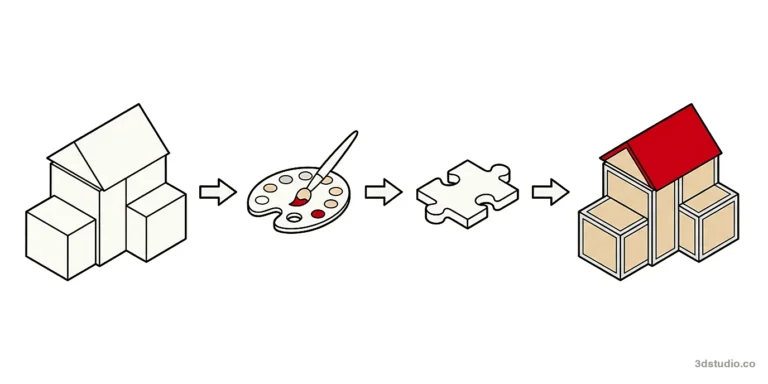
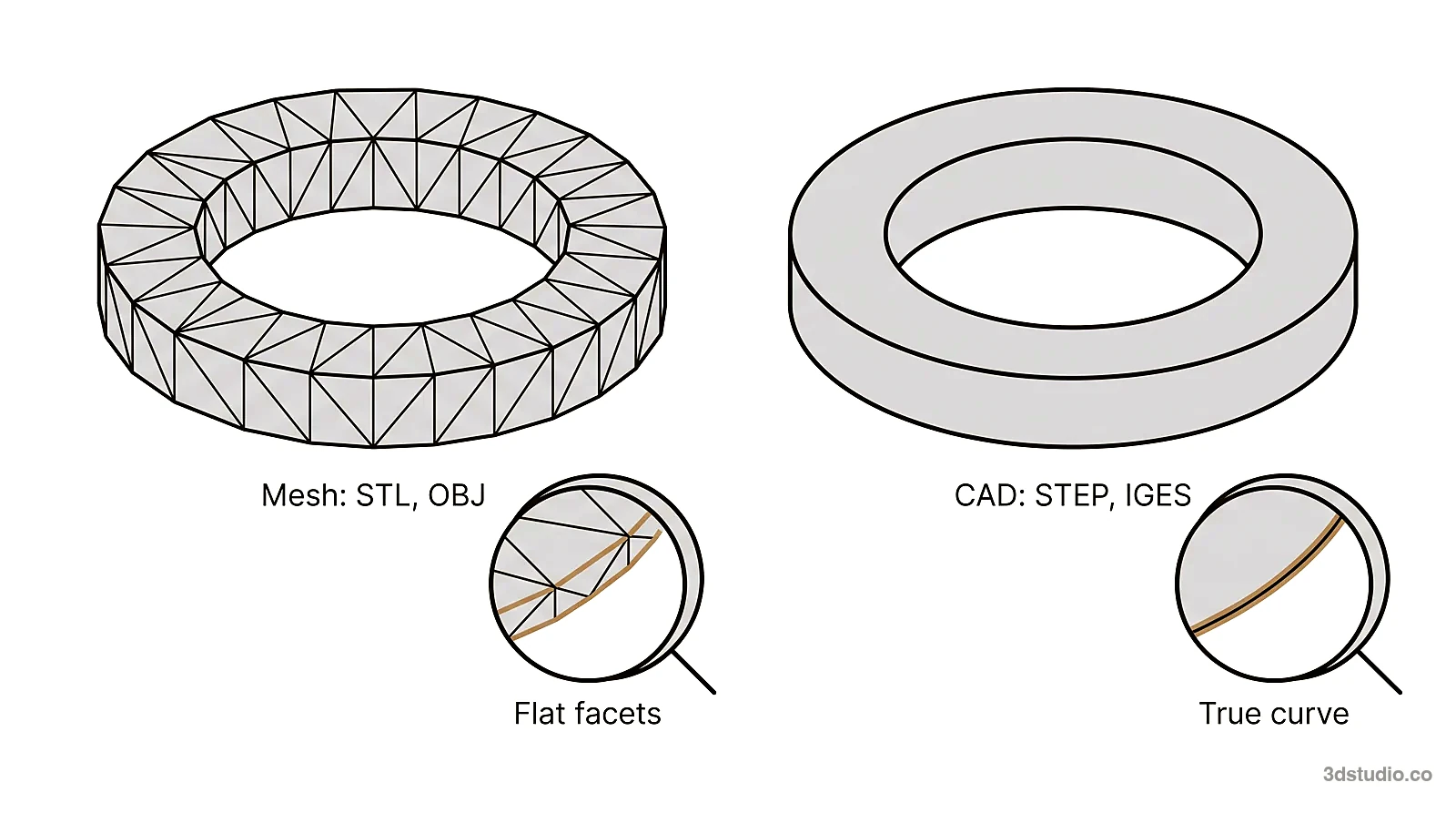
Most formats fall into 2 families. Mesh formats, such as STL and OBJ, describe a shape as a set of flat faces, usually triangles (see polygon mesh basics). They are fast to display and simple to share, but a curved surface is only an approximation. CAD formats, such as STEP, describe exact mathematical curves and surfaces, so a circle stays a circle at any zoom level. IFC adds building object data on top of geometry that can be exact or a mesh, depending on the program that exported it.
A grey clay model, with no materials, is geometry only, close to what an STL file stores. A textured OBJ, FBX or glTF file can also carry materials and textures, but the lighting and the final image are made in the rendering program.
Mesh formats for printing and scanning: STL, 3MF, OBJ and PLY
STL (.stl) is an open mesh format from 3D Systems that stores only triangles. Standard STL has no color, no materials and no units. It comes as binary, which is smaller and the normal choice, or as ASCII text, which is larger but readable. A printable STL must be watertight: a closed surface with no holes or loose faces. Our free STL converter shows the triangle count, the size and whether the mesh is watertight before you save.
3MF (.3mf) is a ZIP package of XML files, maintained by the 3MF Consortium. Unlike STL, it stores units, colors, materials and several objects in one file. Slicer programs such as PrusaSlicer and UltiMaker Cura save their projects as 3MF. As a rule, send STL when a print service asks for it, and keep 3MF for your own slicer projects. AMF (.amf) was an earlier open attempt to replace STL with color and curved triangles. It is standardized as ISO/ASTM 52915 and is little used now. Our 3D converter opens both 3MF and AMF.
OBJ (.obj) is an open format created by Wavefront. It stores a polygon mesh (triangles, quads or larger faces) plus UV coordinates and normals. Materials, color and texture image names live in a separate .mtl file, so an OBJ model is usually 3 kinds of file kept in one folder: the .obj, the .mtl and the texture images. If the .mtl or the images are missing, the model opens grey. OBJ stores no animation and no units, but almost every 3D program reads it. Our free OBJ converter keeps the MTL file and textures together and returns them in one ZIP.
PLY (.ply) is an open format from Stanford University, most often produced by 3D scanners and photogrammetry software. It can store points or a mesh, and it can store a color for each point instead of using a texture image. A scan first produces a point cloud, which is points with no surface. LAS and E57 are common formats for large laser scans of buildings and sites. Turning a scan into a clean model is modeling work.
Animation and real-time formats: FBX, glTF and GLB
FBX (.fbx) is a closed Autodesk format used by 3ds Max and Maya and read by game engines such as Unity and Unreal Engine. Unlike STL, OBJ or PLY, FBX can carry a skeleton, joints and keyframes, so a character or a piece of machinery can move. It also stores materials, textures, cameras, lights and units. Our free FBX converter saves an FBX as OBJ, GLB, STL or STEP. It keeps materials and textures but leaves out animation and bones, and saves the model in its first pose.
glTF and GLB are open standards from the Khronos Group, published as ISO/IEC 12113, and were designed for the web, AR and real-time viewers. A .gltf file is a JSON text file that points to a separate .bin file with the geometry and to separate texture images. GLB packs all of that into one binary file, which is usually the better choice for a website or an app. Both store PBR materials (base color, metallic, roughness and normal maps), so a model looks much the same in different viewers. They also store skeletal and morph animation. Draco mesh compression and KTX2 textures make the files smaller. The format is described on the Khronos glTF page.
Universal Scene Description and USDZ: full scenes and AR on iPhone
Universal Scene Description is an open source format from Pixar, built for film and animation production, where many pieces of geometry, materials, lights and cameras load together as one scene, often from different departments working at the same time. It stores what a glTF file does, plus a system for layering separate files into one combined scene.
USDZ (.usdz) is a self-contained package of Universal Scene Description, a ZIP archive with no compression, so the files inside can be read directly. On iPhone and iPad, AR Quick Look opens USDZ, which lets a person place a piece of furniture or a product in their own room through the camera without installing a separate app. Android does the same with GLB files through Scene Viewer, and it does not open USDZ. A website that offers product AR on both platforms therefore usually needs 2 files of the same model: a USDZ and a GLB. Our 3D converter does not open Universal Scene Description or USDZ files.
Older and other formats: 3DS, DAE, DWG and more
3DS (.3ds) is the format of 3D Studio for DOS, the Autodesk program that came before 3ds Max. It is still found in old model libraries. It stores triangles with basic materials, limits each object to 65,536 vertices and allows only short texture file names, so FBX or OBJ is now the usual export.
DAE (.dae), also called COLLADA, is an open XML format from the Khronos Group, made for exchanging models between programs. It stores geometry, materials, units and animation. SketchUp can export it, and it was the model format inside Google Earth KMZ files.
Other formats you may meet, each in one line:
- DWG and DXF: AutoCAD drawings, mostly 2D. Our free DWG viewer opens both in the browser.
- Alembic (.abc): baked animation, with the shape stored at each point in time, passed between film programs.
- OpenVDB (.vdb): volumes such as smoke, fire and clouds, instead of surfaces.
- Parasolid (.x_t, .x_b): the file of the CAD kernel behind SolidWorks and Siemens NX.
- LAS and E57: point clouds from laser scanners.
- VRML (.wrl): an older web 3D format. Our 3D converter opens it.
CAD formats and the BIM format: STEP, IGES and IFC
STEP (.step, .stp) is the ISO 10303 standard for exchanging CAD models. It is used by programs such as SolidWorks, Fusion 360, Inventor and CATIA. IGES (.iges, .igs) is the older exchange standard that STEP replaced. Both store exact curves and surfaces rather than triangles. They usually carry little color and no textures, because their job is to pass an exact shape between engineering programs. Our free STEP viewer opens both, measures between 2 points, and shows the overall size, the volume and the watertight status.
IFC (.ifc) is the open format for Building Information Modeling, maintained by buildingSMART as ISO 16739-1 and exported by Revit, ArchiCAD, Tekla and Vectorworks. It uses the same file technology as STEP. Its geometry can be exact solids or triangle meshes, depending on the program that exported it, and every object carries data about what it is, such as a wall, a door or a pipe, and how the objects relate. That data lets an architect’s model, an engineer’s model and a contractor’s model be checked against each other before anything is built. The standard is described on the buildingSMART IFC page, and our free IFC viewer lists the elements, floor levels and properties in a model.
We build architectural visualization from files like these. We accept CAD drawings (.dwg), PDF plans and elevations, SketchUp, Revit, ArchiCAD and 3ds Max files, IFC and other common 3D and BIM formats, and even a photo of a hand sketch is enough for a quote. Do not convert a CAD model to STL or OBJ before you send it, because a mesh export turns exact curves into flat faces. More detail is in our guide to how to prepare files for a 3D rendering studio.
Native formats and exchange formats
A native format is the file a program saves by default, such as .blend for Blender or .rvt for Revit. A native file keeps everything, including modifiers, history and parametric features, but only its own program opens it fully. An exchange format is what you send to someone who does not use that program. Exchange formats keep the shape and often the materials, but not the editing history. Export from the native program to the format in the last column below.
| Program | Native file | What to export for someone without that program |
|---|---|---|
| Blender | .blend | FBX, OBJ or GLB |
| 3ds Max | .max | FBX or OBJ |
| SketchUp | .skp | DAE, OBJ, or IFC in SketchUp Pro |
| Revit | .rvt | IFC, or FBX for visualization |
| ArchiCAD | .pln | IFC |
| Rhino | .3dm | STEP or OBJ |
| SolidWorks | .sldprt | STEP |
| Cinema 4D | .c4d | FBX |
Rhino’s .3dm is an exception to the rule that native files stay closed, because Rhino’s developers publish a free toolkit, openNURBS, that other programs use to read it. Our 3D converter opens .3dm. It cannot open .rvt, .skp, .blend, .max, .c4d, .pln or .sldprt, so export those first.
What gets lost when you convert a 3D file
Conversion between formats fails in 6 common ways. Each has a symptom and a fix.
- Wrong scale. STL and OBJ store no units, so a model drawn in millimeters opens 1,000 times too large in a program that assumes meters. Fix: write down the unit before you send the file, and set it on import.
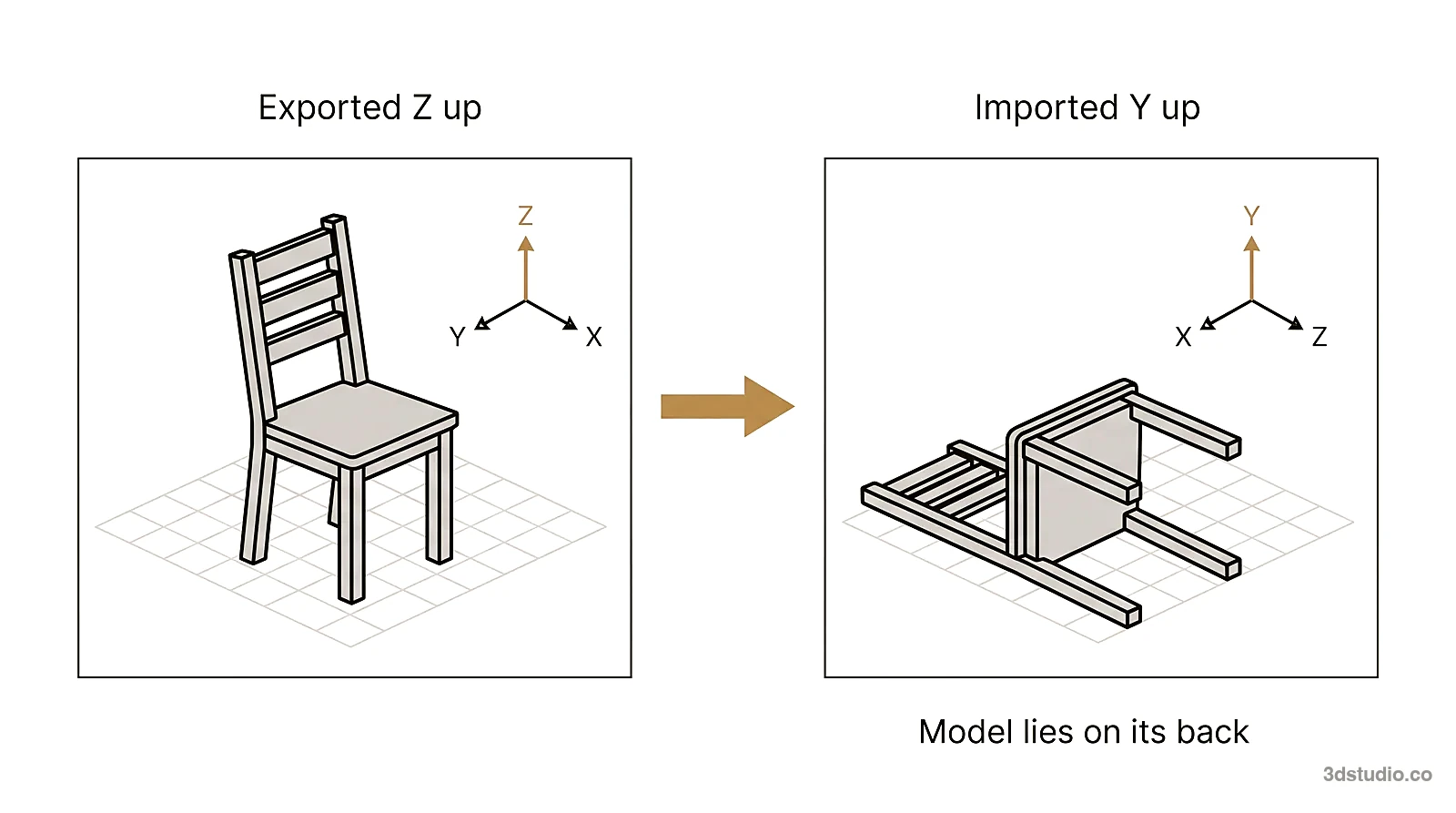
- Model lying on its back. Blender, 3ds Max and Unreal Engine use Z as the up axis. Maya (by default), Unity and glTF use Y. Fix: use the up axis option in the export or import dialog.
- Grey model. The OBJ arrived without its .mtl file or texture images. Fix: send the .obj, the .mtl and the images together in one ZIP.
- Curves turned into facets. Every mesh export turns CAD curves into small flat triangles, and the tolerance setting decides how many. Fix: lower the tolerance when you export for a smooth result, and keep the STEP file as the master.
- Mesh saved as CAD. An STL saved as STEP is still made of flat faces. Getting exact curves back means rebuilding the model in CAD.
- Animation dropped. STL and OBJ have no animation, and our FBX converter saves the model in its first pose. Fix: keep the FBX or glTF for anything that moves.
How to check a converted file: open it in a free viewer and confirm the size, the triangle count and that the mesh is watertight. Our 3D converter shows all 3 before you download.
Tip: Before you send any STL, OBJ or PLY file, write the unit and the up axis in the message. Neither is stored in those files.
How to open a 3D file without the program that made it
- STL: any slicer, or our STL converter, which also shows the size and the watertight check.
- OBJ: our OBJ converter. Drop the .obj, the .mtl and the textures together, or a ZIP of the folder.
- GLB and glTF: our 3D converter, or any browser-based glTF viewer.
- STEP and IGES: our STEP viewer, or the free program FreeCAD.
- IFC: our IFC viewer.
- 3DM: our 3D converter opens and previews it.
- DWG: our DWG viewer.
- USDZ: iPhone and iPad open it directly in AR Quick Look.
Our tools in this list open the file in your browser tab and do not upload it.
Questions about 3D file formats
What is the best 3D file format?
No format is best for every job. Use STL or 3MF for 3D printing, OBJ or FBX for exchanging models between 3D programs, GLB for the web, USDZ for iPhone AR, STEP for CAD parts and IFC for buildings. Pick the format by where the model goes next.
Is STL or OBJ better?
Neither is better in general. STL is the standard for 3D printing: shape only, with no color and no units. OBJ adds UV coordinates and materials in a separate .mtl file, so use it when the model must look right in another 3D program. For color printing, use 3MF.
What is the difference between FBX and OBJ?
FBX can store a skeleton, keyframes, cameras and lights, so a model can move. OBJ stores only a static shape, with materials in a separate file.
How do I open a 3DM file?
3DM is the native format of Rhino. Rhino opens it, and many CAD programs import it because the openNURBS toolkit is free. Our free 3D model converter opens and previews 3DM in the browser and can save it as STEP, OBJ or STL.
Which 3D file format is best for Blender?
Inside Blender, keep the .blend file. To exchange a model, use FBX for rigged or animated models, OBJ for static models with materials, GLB for the web and STL for printing.
Can I convert an STL file to STEP?
Yes, but the STEP file will still be made of flat triangles, not exact curves. Getting real curves and editable features back means rebuilding the model in CAD, which is 3D modeling work.
Which 3D file format keeps the scale of the model?
FBX, glTF (always meters), Universal Scene Description, DAE, STEP, IFC and 3MF store units. STL, OBJ and PLY do not, so write the unit down when you send them.
Diagrams in this post are drawn with an AI image tool from our brief and checked by our team.