What Is a 3D Polygon? Polygon Mesh Basics Explained
A 3D polygon is a flat face with 3 or more vertices. Polygons join into a mesh, the surface of a model. Here is how meshes are built, checked and counted.
In this article
- A 3D polygon is a flat face with 3 or more vertices. Connected polygons form a polygon mesh.
- Triangles, quads and n-gons are the 3 kinds of face, and a quad counts as 2 triangles.
- Topology, the pattern of edges across a mesh, decides how well a model deforms and shades.
- Check a mesh for holes, flipped normals and its triangle count before printing or sending it.
A 3D polygon is a flat shape with 3 or more corners (vertices) joined by straight edges and placed in 3D space. In 3D modeling it is one face of a polygon mesh, the set of connected polygons that forms the surface of a model.
In geometry, a closed 3D solid made of polygon faces, such as a cube or a pyramid, is called a polyhedron. In 3D software, a single polygon is called a face or a poly. In GIS mapping software, “3D polygon” means something else: a map shape that also stores height (z) values.
3Dstudio.co builds meshes as part of its 3D modeling service, from drawings, reference photos or existing CAD files.
What a 3D polygon is
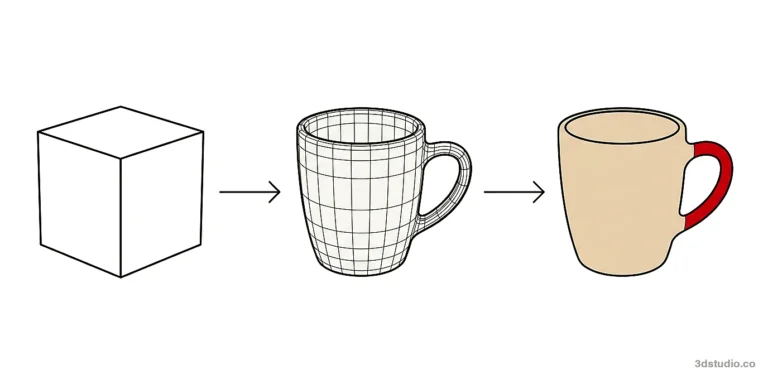
In a mesh, each polygon is one flat face. The software stores it as a list of vertex positions and draws it as a flat shape. A curved surface is drawn as many small polygons set at slightly different angles. More polygons follow the curve more closely, and they also cost more to store and draw.
Shape and position of a polygon in 3D
A polygon is a closed, flat shape with straight sides: 3 vertices make a triangle, 4 make a quad and 5 make a pentagon. A triangle is always flat, because 3 points define exactly one plane. A polygon has no thickness. What places it in 3D is the x, y and z position of each vertex and the way it connects to the polygons around it.
Join enough polygons so that each shares edges and vertices with its neighbors, and the result wraps around a volume: a car body, a character, a chair. That connected set of polygons is a polygon mesh (also called a polygonal mesh), the usual way 3D graphics and game software store the shape of an object.
What is a mesh in 3D modeling
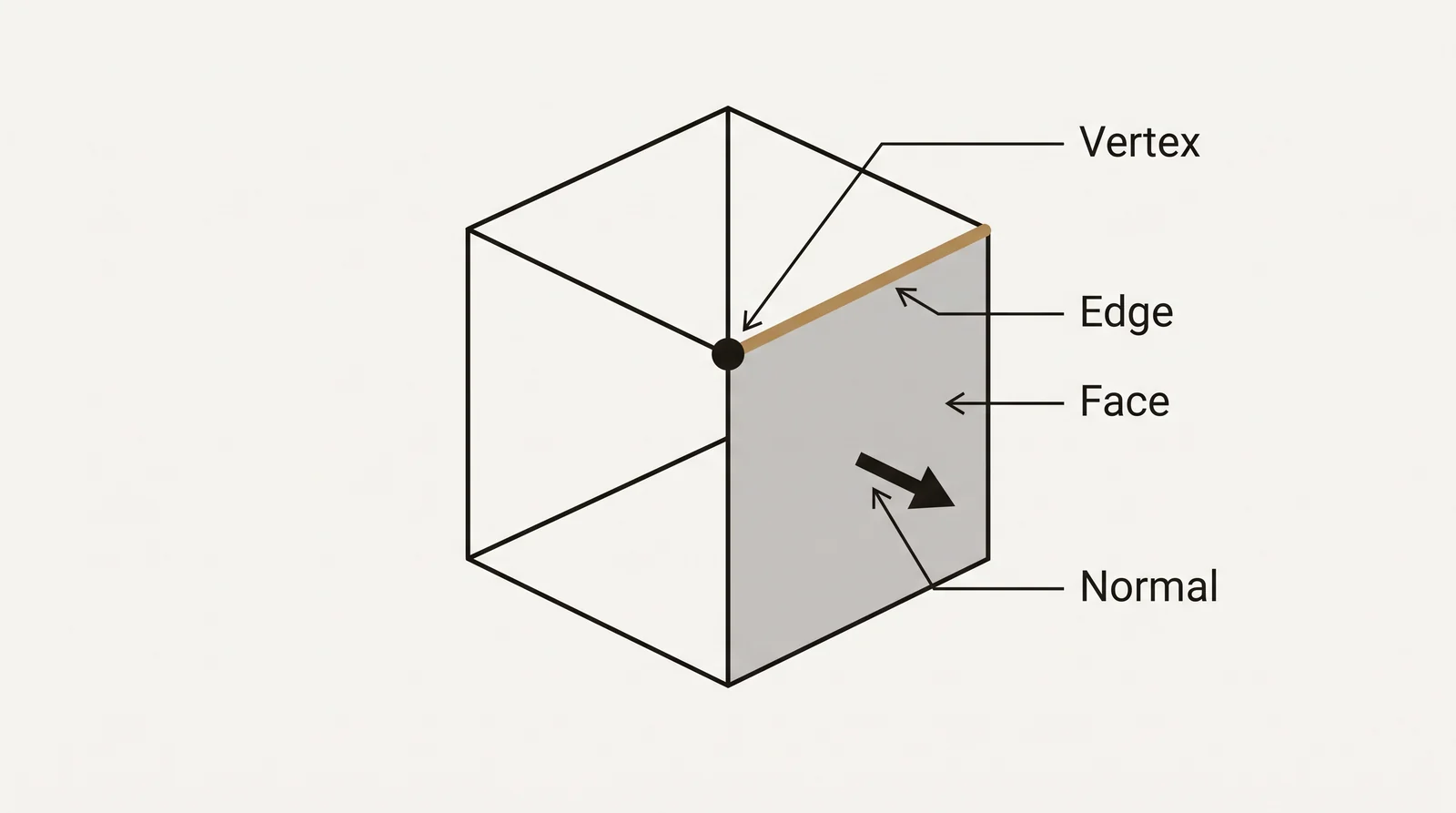
A mesh is the surface of a 3D model, stored as vertices, edges and faces. It is a shell. It has no thickness and no inside unless its surface is closed.
Have a 3D model? Our AI Render Studio turns a screenshot of it into a photoreal image in about 20 seconds. Your first render needs no account.
Render your model freeA mesh is not the same as a model. A model file can also hold materials, textures, UV coordinates, a rig and animation, and all of these attach to the mesh.
A cube is a simple example: 8 vertices, 12 edges and 6 quad faces. Triangulated, the same cube has 12 triangles. For any closed mesh shaped like a ball, with no handles or tunnels, vertices minus edges plus faces equals 2. The cube follows it: 8 – 12 + 6 = 2.
Polygon mesh (polygonal mesh): vertices, edges and faces
- Vertices: points in 3D space, each storing an x, y and z position.
- Edges: straight lines that connect two vertices.
- Faces: a closed loop of edges, most often a triangle or a quad.
- Polygons: another name for a face (also called a poly). A face with 5 or more sides is called an n-gon.
- Surfaces: a named group of connected faces that make up one part of the mesh, such as a car door or a character’s sleeve.
Most meshes also carry UV coordinates, a flat 2D layout of the same surface used to apply texture maps. UV unwrapping is the step that creates that layout.
Normals and smoothing
A face normal is the direction a face points, straight out from its surface. Renderers and game engines use it to tell the front of a face from the back and to calculate how light hits it. A flipped normal points into the model, and the face can look black or disappear in a render or an engine that hides back faces.
A vertex normal is stored at each corner and blended across the faces that share it. This is why a low-poly mesh can look smooth: the shading uses vertex normals, while the outline still has flat facets. A hard edge keeps a crisp corner, such as the edge of a table top. A soft edge blends the shading across it. In 3ds Max, smoothing groups mark which faces shade as one smooth surface.
Triangles, quads and n-gons
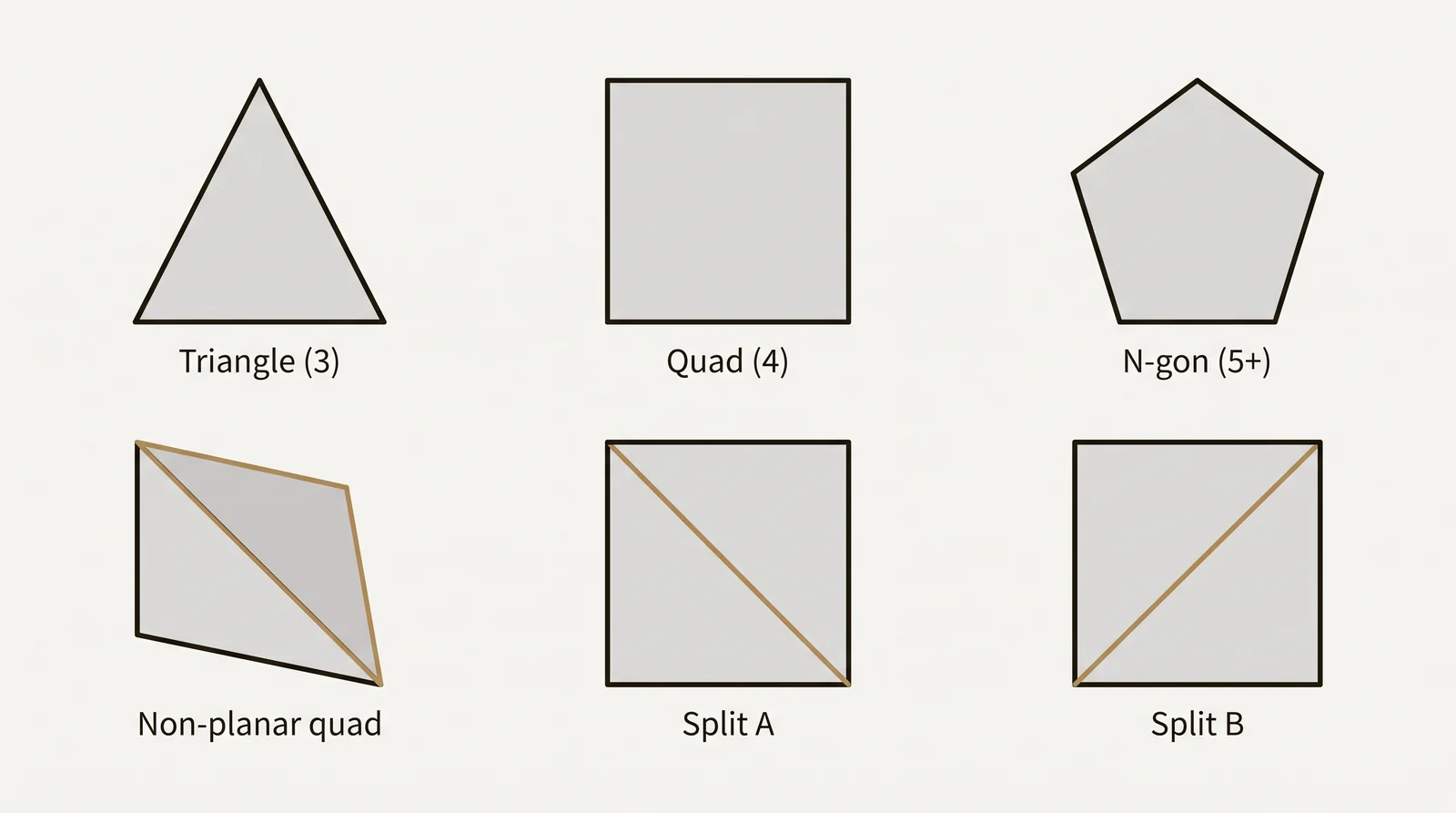
| Face type | Sides | Where it works best |
|---|---|---|
| Triangle | 3 | Always flat and predictable. It is the only face graphics hardware draws, so every mesh ends up as triangles. Harder to edit smoothly by hand. |
| Quad | 4 | Predictable when subdividing or reshaping, and the default while modeling. Can be bent if its corners are not on one plane. |
| N-gon | 5 or more | Useful for blocking out flat areas. Can shade incorrectly and is usually split into triangles or quads before final use. |
A mesh made mostly of quads is easier to edit and to subdivide into a smoother shape. Game engines split quads and n-gons into triangles on import, and the STL format used for 3D printing stores only triangles.
A quad is not always flat. If its 4 corners do not lie on one plane, the quad is bent (non-planar), and software has to split it into 2 triangles along one of its 2 diagonals. Each diagonal gives a different shape and different shading. Epic Games recommends that you triangulate the mesh in the modeling program before export, so you control where the split happens.
Topology and edge flow
Topology is the pattern the edges form across a mesh’s surface, not how many faces it has. Good topology follows the shape of the object: edges run along its natural creases, such as a knee joint or a car panel seam, so the surface deforms and shades correctly.
A pole is a vertex where 3 edges meet, or where 5 or more meet. A regular quad grid has 4 edges at every vertex, so poles are where the grid changes direction. They can pinch the shading, so modelers place them on flat or hidden areas.
Edge flow matters most on anything that bends or gets a close up render: an animated character, or a product model shown at an angle where a badly placed edge would show as a visible crease. A static background object can use simpler topology, because it never bends and is not seen up close. Hard surface and organic modeling need different edge flow for this reason.
Polygon count and real time rendering
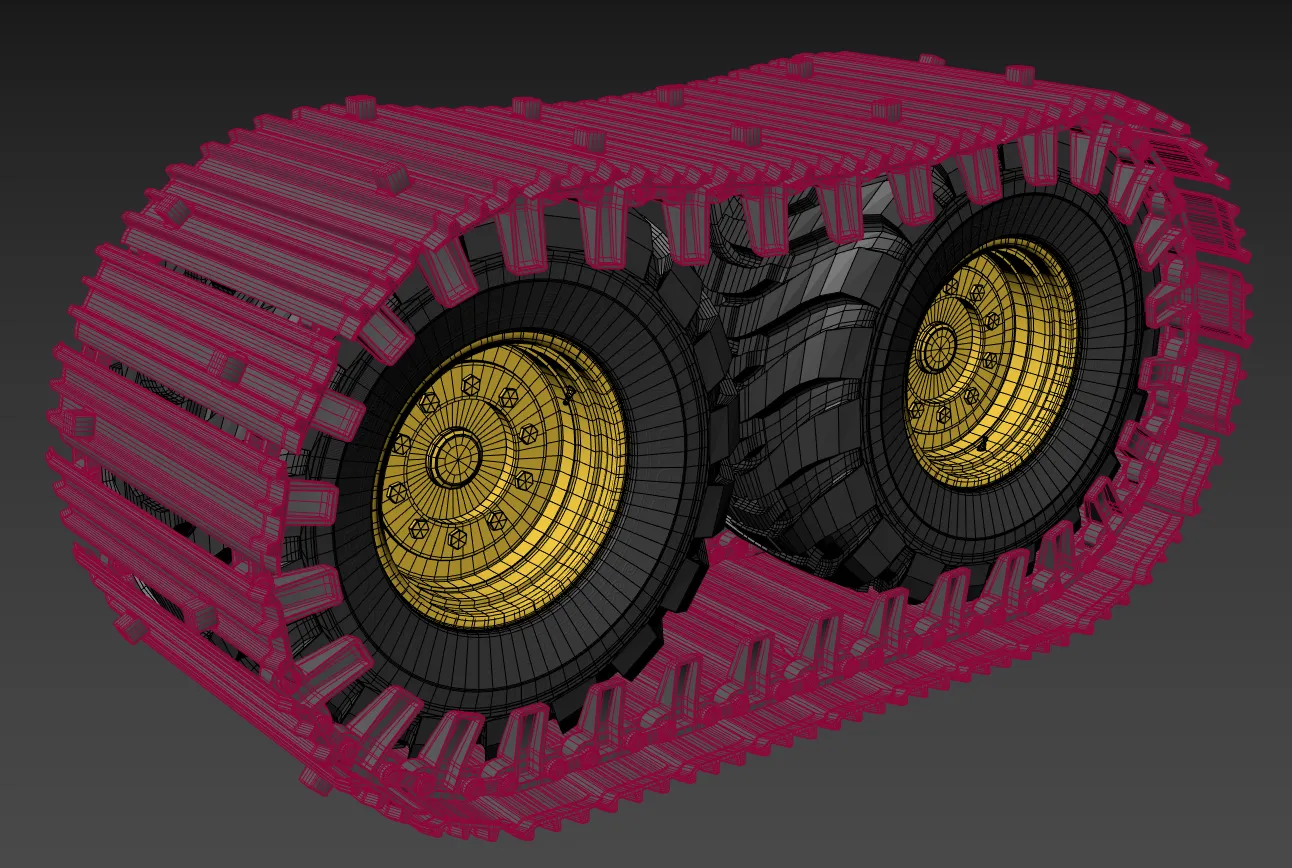
Polygon count is the number of faces in a mesh. Game engines and most viewers count triangles, and a quad counts as 2. A model with 1 quad has 2 triangles, and the cube in the diagram at the top of this post has 6 polygons but 12 triangles. When someone gives you a budget, ask whether it is in polygons or in triangles.
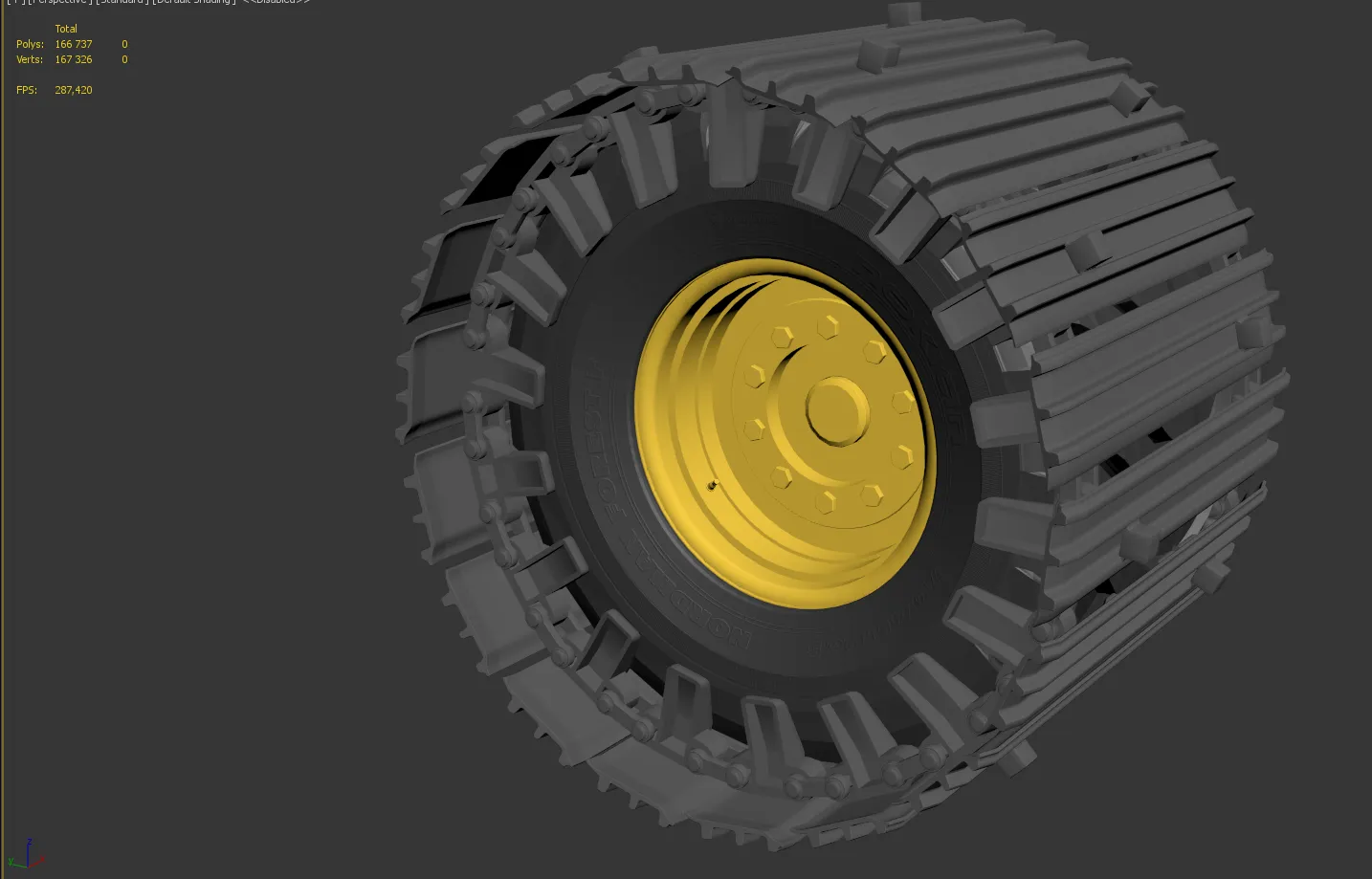
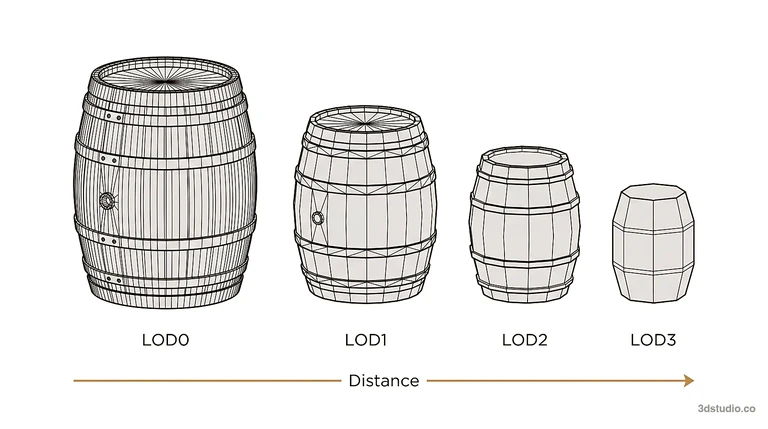
Every polygon costs processing time, whether a game engine draws a new frame many times every second or an offline renderer works on one image for minutes. Real time engines budget polygon count carefully. A game asset is usually built at several levels of detail, from LOD0, the full detail version seen up close, to simpler versions (LOD1, LOD2 and so on) shown further away. Offline rendering of a still can use a far denser mesh. See how LOD is used and low versus high poly modeling for the budget trade-off.
To see the count of your own file, open it in a viewer that reports triangles. The free 3D viewer in our browser tools shows the size and triangle count of OBJ, FBX, GLB and STL files without uploading them. In 3ds Max the viewport statistics show Polys and Verts, and Blender has a statistics overlay.
How a mesh is stored in a file
Most mesh files hold a list of points, then a list of faces that refer to the points by number. The OBJ format writes one square like this:
| Line | Meaning |
|---|---|
| v 0 0 0 | Vertex 1, at x 0, y 0, z 0 |
| v 1 0 0 | Vertex 2 |
| v 1 1 0 | Vertex 3 |
| v 0 1 0 | Vertex 4 |
| f 1 2 3 4 | One quad face that joins vertices 1, 2, 3 and 4 |
Vertex numbering in OBJ starts at 1, and a face can list 3 or more vertices. STL works differently: it stores only triangles, and each triangle carries its own 3 corners. Shared corners are repeated, so a converter has to merge the duplicates. STL files also carry no unit, so the sender and the receiver have to agree on the units. Our OBJ converter opens and converts these files in the browser.
Polygon 3D models vs CAD, NURBS and BIM models
| Type | How the shape is stored | Curves | Typical files | Typical use |
|---|---|---|---|---|
| Polygon mesh | Vertices, edges and faces | Approximated with small flat faces | OBJ, FBX, STL, glTF | Games, renders, 3D printing, web viewers |
| CAD solid or NURBS | Mathematical curves and surfaces | Exact | STEP, IGES | Product design and manufacturing |
| BIM model | Building elements such as walls and doors, with data attached | Depends on the element | RVT, IFC | Building design and coordination |
| Point cloud | Millions of measured points, no faces | Sampled, not modeled | E57, LAS | Scans of existing buildings |
Architects and product designers usually send CAD or BIM files, not meshes. When a CAD or BIM program writes a mesh format such as OBJ, FBX or STL, it cuts every curved surface into triangles. This is called tessellation. The export setting decides how many triangles a curve gets: too few and a round column shows flat facets, too many and the file becomes heavy. You can convert a STEP file to an STL mesh in the browser and look at the result. For how polygon modeling compares with NURBS and sculpting, see how to 3D model.
Common mesh problems and how to check a mesh
A watertight mesh has no holes, and every edge is shared by exactly 2 faces, so the surface encloses a volume. 3D printing and volume calculation need that. Most other problems show up as shading errors in a render.
| Problem | What you see | How to fix |
|---|---|---|
| Hole | A gap in the surface. The mesh is not watertight, so a slicer reports errors and there is no volume. | Fill or bridge the gap so the surface is closed. |
| Non-manifold edge | An edge shared by more than 2 faces. Boolean cuts and 3D printing can fail. | Delete the extra faces and rebuild the junction. |
| Flipped normals | Faces that look black or see-through. | Recalculate the normals so they point outward. |
| Duplicate vertices | Seams that split apart when you move a part, or hard edges inside smooth areas. | Merge vertices that sit at the same position. |
| N-gons and non-planar quads | Creases and uneven shading. | Triangulate, or rebuild the area with flat quads. |
| Overlapping faces | Flicker where 2 faces sit in the same place (z-fighting). | Delete the extra face or move it apart. |
| Wrong scale or units | A model that arrives tiny or huge. | Agree on the units and check the size in a viewer. |
How to check: open the file in a viewer and read the size and triangle count. For STL files, the STL converter shows whether the mesh is watertight, along with its triangle count and size. Do this before you send a model for printing or for a quote.
How a polygon mesh is built
A mesh starts one of these ways:
- Primitives: start from a cube, cylinder or sphere and combine several into a rough blockout (box modeling).
- Extrusion: push a face or edge outward to add a section, the usual way to build arms, handles or window frames from a flat base.
- Sweep or lathe: pull a profile along a path, or spin it around an axis, to make pipes, columns and bottles.
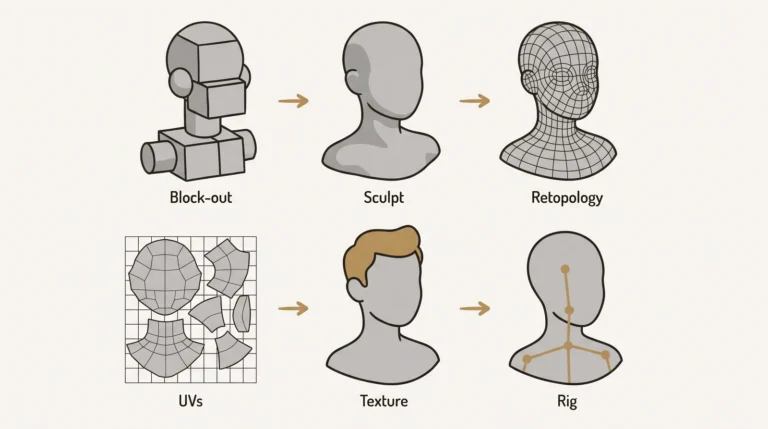
- Digital sculpting: push and pull a dense mesh like clay. See digital sculpting software for the tools.
- Scanning or photogrammetry: turn photos or laser scans of a real object into a mesh.
- Export from CAD or BIM: tessellate an existing model, as described above.
Then the mesh is refined:
- Subdivision: split faces into smaller ones. Catmull-Clark subdivision is the common method, and it turns every face into quads.
- Beveling: round sharp edges so they show a thin highlight, as real edges do.
- Retopology: rebuild a dense or messy mesh, usually after sculpting or scanning, with cleaner topology so it deforms and textures properly.
- Cleanup: delete faces that will never be seen and merge duplicated vertices.
Building a mesh for games and product models
A game asset has to hold its shape at every LOD while staying inside a triangle budget for the engine. 3Dstudio.co builds meshes to a set triangle budget for game studios, in 3ds Max.
Product models use fewer, larger polygons where a surface is flat or gently curved, and keep extra detail only where the camera gets close. The wheel and track chain model in the polygon count section above is an example of a product model kept as an untextured clay model, where the shape is checked before materials, lighting and a scene are added.
The clay model is the stage where the shape is checked, before any materials are added. How the clay model stage works is explained on the process page. Upload drawings or a reference model and you get a reply within 30 minutes: a fixed price and a delivery date, or the 1-2 questions we need answered first. Every project includes 2 revision rounds.
Questions about polygon meshes
What is a 3D polygon called?
In geometry, a 3D solid built from flat polygon faces is a polyhedron, such as a cube, pyramid or prism. In 3D modeling, one polygon is called a face or a poly, and many connected faces form a polygon mesh.
Are polygons 3D or flat?
A polygon is a flat shape with no thickness, but its corners can sit anywhere in 3D space, so it can face any direction. Depth comes from joining many polygons into a mesh. A triangle is always flat. A quad can be slightly bent if its corners are not on one plane.
What is the difference between a mesh and a 3D model?
The mesh is only the shape: vertices, edges and faces. A model file can also carry materials, textures, UVs, a rig and animation on top of that mesh.
Is polygon count the same as triangle count?
No. A quad counts as 1 polygon but 2 triangles. Game engines and most viewers report triangles, so ask which one a budget means.
How can I see how many polygons my 3D model has?
Open the file in a viewer that reports triangles, such as the free 3D viewer in our browser tools, or use the statistics overlay in 3ds Max or Blender.
What does watertight or manifold mean for a mesh?
Every edge is shared by exactly 2 faces and there are no holes, so the mesh encloses a volume. 3D printers and volume calculations need this.
How many polygons should a 3D model have?
Start from the platform. Get the triangle budget from the client, the engine team or the platform’s documentation, build the detailed version first, then reduce it with levels of detail. A model rendered offline as a still image can carry a much denser mesh. Open your file in a viewer to read its triangle count before you compare it with a budget.
Diagrams in this post are drawn with an AI image tool from our brief and checked by our team.