Site Plan Rendering: 2D, 3D, Aerial and What to Include
A rendered site plan shows the whole plot from above: buildings, access, parking, green space and neighbors. 2D or 3D, how it is made, what to check in AI output, and what to send for a quote.
In this article
- A site plan rendering is a colored, readable image of a plot, drawn in 2D over the CAD plan or rendered from a 3D model.
- A rendering supports the scaled drawings in a planning application. It does not replace them.
- AI tools make attractive pictures but can change footprints, parking counts or road positions, so a submission needs a modeled plan.
- Send the site plan, a topographic survey, the landscape plan and the building drawings, and get a reply within 30 minutes.
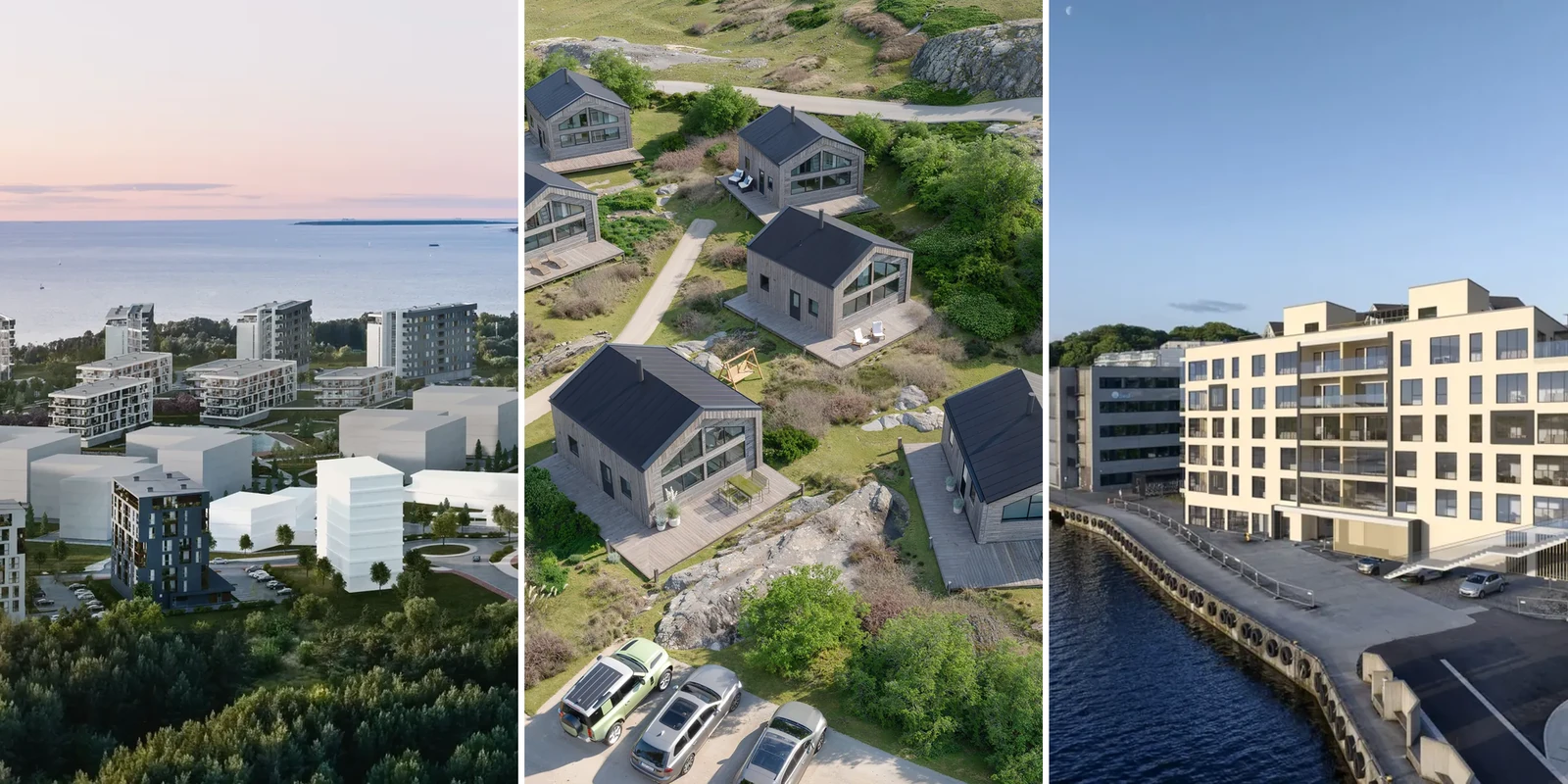
A site plan rendering is a colored, readable image of a site plan. It shows the buildings, roads, parking, landscaping and neighbors of a plot, either drawn in 2D over the CAD plan or rendered from a 3D model and seen from above. A planning officer, an investor or a resident at a consultation evening can read it quickly, without unrolling a set of drawings.
In a planning application, a rendering supports the scaled drawings and does not replace them. We build the 3D versions from your drawings, as part of our site plan rendering service.
What an architecture site plan rendering shows
The image covers the whole plot: every building on it, the roads and paths that reach it, the parking, the landscaping, and enough of the surrounding area to show how the scheme sits next to its neighbors. A 3D version is built from the site plan drawing and a topographic survey, not from a single building model on its own.
It is not the same thing as a 3D floor plan, which shows the inside of one unit, one layout at a time, for a buyer choosing between apartments. A site plan rendering works at the scale of the whole development. See how a 3D floor plan differs from a 2D plan if that is the image you need.
Types of site plan rendering: 2D, 3D top-down, aerial and eye level
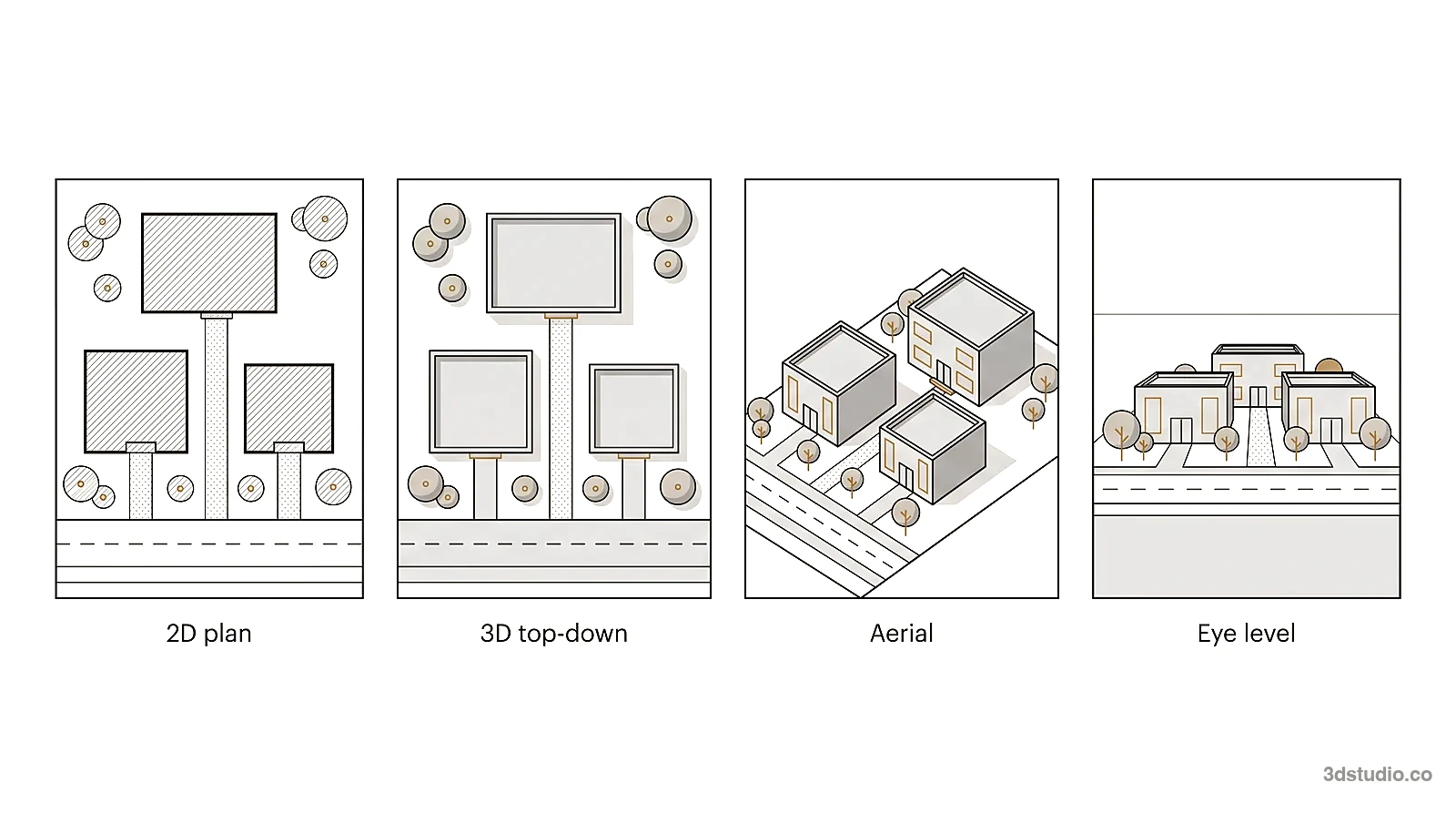
There are 4 common ways to show the same site. They differ in how they are made and in what a reader can check.
| Type | How it is made | Best for | Can it be checked against the drawings |
|---|---|---|---|
| 2D rendered plan | The CAD plan colored, textured and shaded in Photoshop or Illustrator, with labels and a legend | Planning documents, sales plans, quick layout reviews | Yes, it keeps the geometry and scale of the plan |
| 3D top-down | A 3D model of the site rendered from directly above, with real shadows and planting | Plans that need correct proportions plus shadows and planting that look real | Mostly. Proportions hold, but heights show only through shadows |
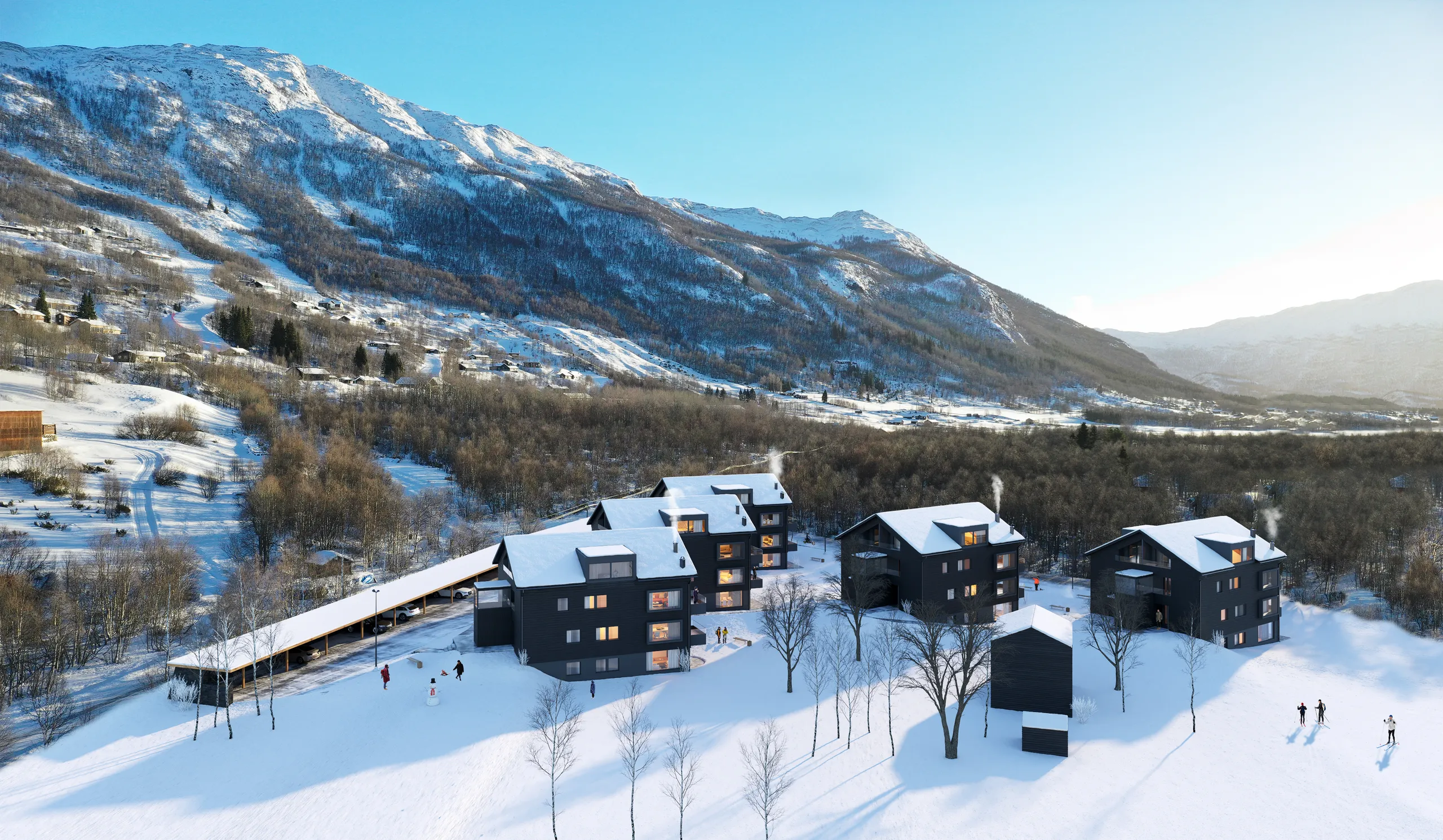
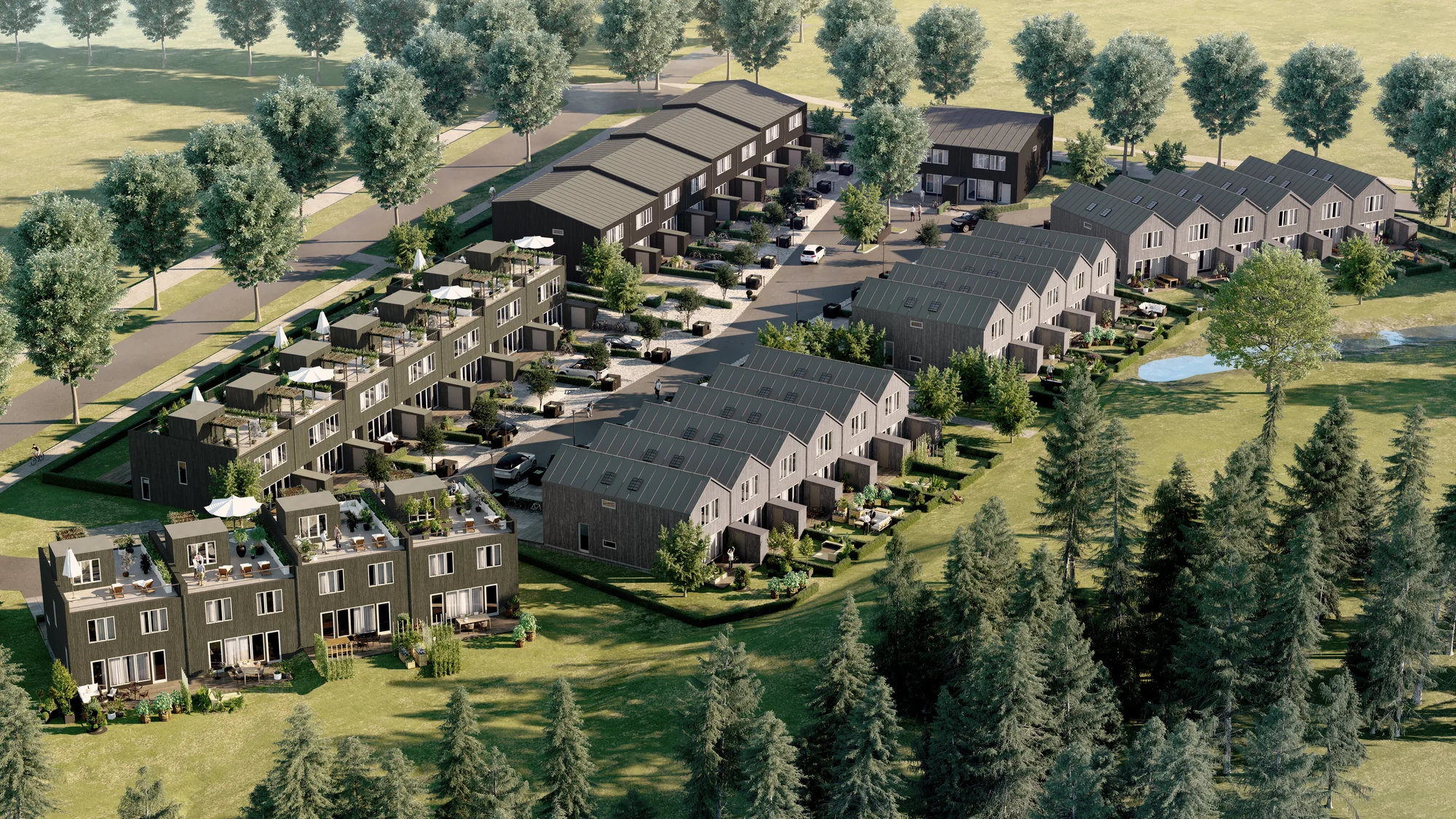
| Oblique aerial | The same 3D model seen from an angle | Investor packs, launches and consultation boards, because it shows heights and terrain | Partly. Perspective makes distances differ across the image |
| Eye-level view | A street or courtyard view taken from the same model | Showing how the scheme feels at ground level | No. It is a view, not a plan |
The 3 types that start from a 3D model can come from one scene: the site is built once and rendered from several cameras. Our guide to 3D exterior rendering covers eye-level views in detail.
Whichever type you choose, it has to stay legible at the scale of the whole plot, with north marked and every element in its correct position, even when it is styled for a brochure.
Site plan rendering vs masterplan rendering
A site plan covers one plot and its immediate context. A masterplan covers many plots, streets and shared infrastructure, often built in phases. At masterplan scale the image needs a stronger hierarchy and less detail per building, so the roads, blocks and open spaces read first. For that scale, see our page on masterplan and urban planning visualization.
How a site plan rendering is made
A 3D site plan rendering is built in 8 steps.
- Clean the CAD plan. Freeze or delete the dimension, hatch and text layers. Keep the boundary, building footprints, curbs, paths and parking lines.
- Build the terrain. Use the spot levels or contours from the topographic survey.
- Raise the buildings. Extrude the footprints to their heights, or import the building models.
- Give each surface type one material. Road, path, paving, lawn, planting bed and water each get one consistent look, so the hierarchy reads at once.
- Place the planting. Put trees and planting where the landscape plan shows them, at handover size.
- Add the context. Build the neighboring buildings and streets from a map or survey and from site photos.
- Set the sun. Use the true north point, so the shadows fall the right way.
- Add the annotation layer. Legend, labels, scale bar, north arrow and phase colors.
At 3Dstudio.co these steps sit inside our 4-stage process. You upload the files, and you get a reply within 30 minutes: a fixed price and a delivery date, or the 1-2 questions we need answered first. We build an untextured clay model first, where the camera position, lens, height and time of day are agreed while changes are cheap. Then comes a photoreal first-look preview of one view, with 2 revision rounds. Final delivery is in 4K, and further views reuse the same scene. See how the process works.
Software used for site plans
| Job | Software |
|---|---|
| Drawing the site plan | AutoCAD, Civil 3D, Revit, ArchiCAD, Vectorworks, SketchUp |
| 2D rendering | Photoshop, Illustrator |
| 3D rendering | 3ds Max with Corona or V-Ray, which is what we use |
| Quick real-time reviews | Lumion, Twinmotion, Enscape |
The choice of software changes little for you. What matters is clean source files and an output that is checked against the drawings.
Can AI render a site plan?
Yes, AI tools can turn a site plan image into an attractive picture quickly, and they are useful for loose mood and early landscape ideas. AI tools that start from a site plan image can change footprints, parking counts or road positions, and nothing in the output is checked against the drawings. That matters most on a site plan, because planning officers and buyers check exactly those things.
3 checks you can run on any AI output:
- Count the parking spaces and compare the number with the drawing.
- Trace the boundary line and check that it matches the application.
- Check the shadows against the north point. They should agree with it and with the stated time of day.
Use a modeled site plan when the image goes into a submission, when a sales plan carries unit numbers, or when a phasing set must match from one phase to the next. A studio model is built from the drawings and checked by a person.
Who reads a site plan rendering
Each reader checks a site plan rendering for something different.
- Planning officers and committees use it to understand the scaled drawings quickly. They check that the boundary, access and parking match the drawings.
- Investors and lenders use it to judge the whole scheme at once: how many buildings, how much parking, how much of the site is landscaping, and how the phases relate to each other.
- Buyers use it to see what they are buying into beyond their own unit: the courtyard, the path to the entrance, the parking space, the neighbors on either side.
- Residents at a consultation evening compare the proposal with the street they already know. They notice a neighbor or a street drawn in the wrong place.
One 3D model can serve every audience, with a different view for each: a top-down plan for the submission, an aerial for the investor pack and eye-level views for the public.
What a rendering can and cannot do in a planning application
A rendered site plan supports a planning application. It does not replace the scaled drawings the authority requires. In England, for example, the location plan is typically at 1:1250 or 1:2500, with the site edged in red (see the GOV.UK guidance on making an application). Committees, consultees and residents use the rendering to understand those drawings.
Where the effect on a protected view or landscape is assessed, authorities may ask for verified views, also called accurate visual representations, prepared to a documented method, with camera positions fixed by survey. Ask your authority which it requires before you order. We build images from your drawings and survey, with the camera position agreed on the clay model. For competitions and applications in general, see 3D visualization for planning applications and competitions.
What to include in a site plan rendering
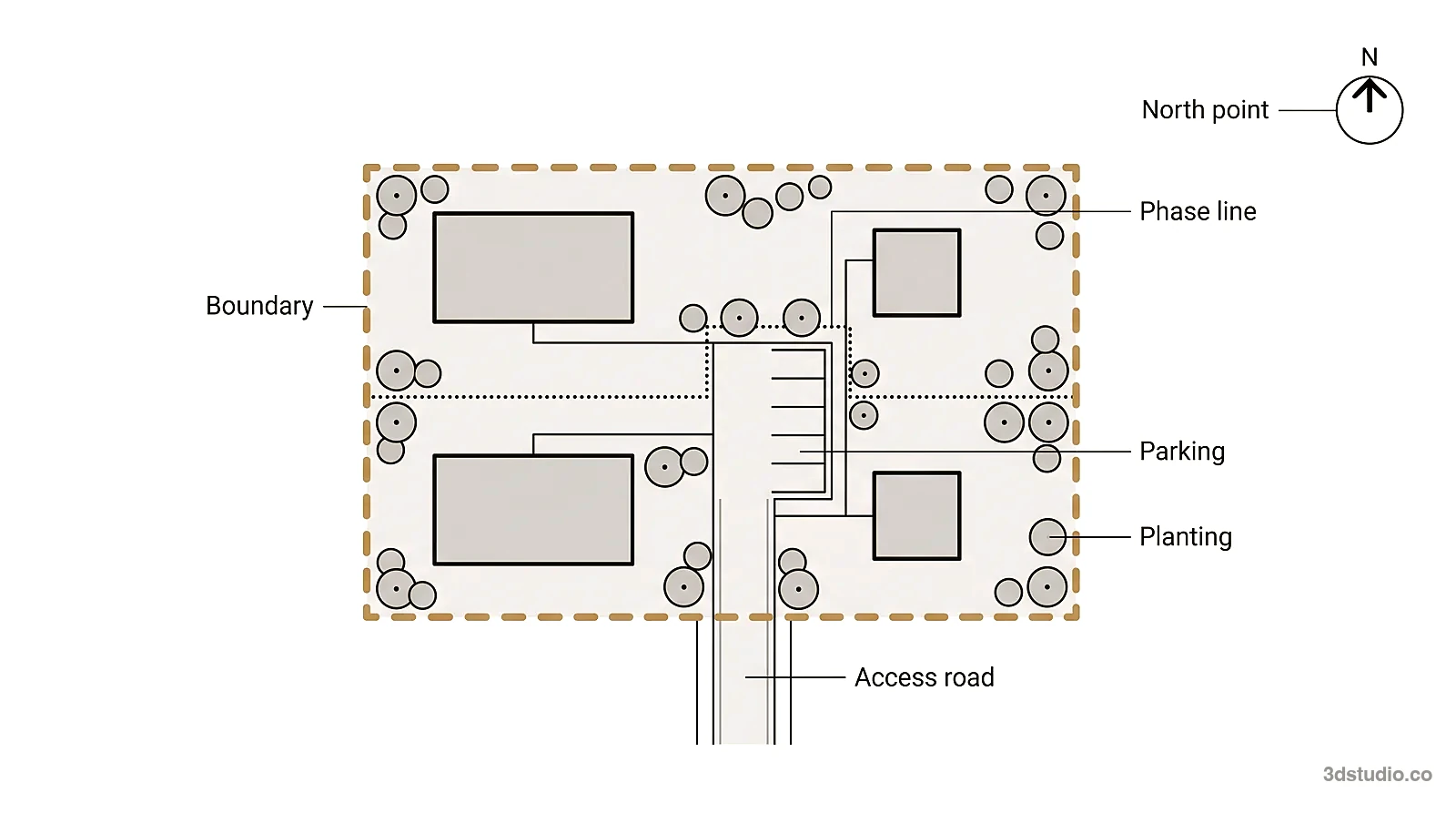
Include what readers check first: the boundary, north, access, parking, planting and context.
- The boundary. The edge of the plot, drawn clearly, so a reader can tell what is inside the application and what is not.
- A north point. Without it, nobody can judge shadow, orientation or which elevation faces the street.
- Access and parking. Every road, path and parking space that serves the scheme, laid out the way it will be used.
- Green areas and landscaping. Planted areas, trees and open space, at the size they will have at handover.
- Phasing lines, if the scheme is built in stages. Which buildings belong to which phase, marked clearly rather than shown as one finished whole.
- Context. The neighboring buildings, roads and other structures close enough to affect how the scheme reads.
What makes a rendered site plan easy to read
- Roads, paths and parking stay visible and are not hidden under tree canopies.
- Buildings are the strongest shapes on the page.
- Each surface type keeps one color or material everywhere.
- Shadows follow the north point.
- People and cars appear only to give a sense of scale.
- The legend, labels and scale bar sit outside the busy areas.
- Phase areas get colored overlays.
Common mistakes and how to fix them
| Mistake | Fix |
|---|---|
| Trees shown at mature size for a handover image | Draw planting at handover size |
| Boundary does not match the application | Overlay the boundary from the application drawing before rendering |
| Inconsistent paving | Give each surface type one material everywhere |
| Shadows that contradict the north point | Set the sun from the true north point |
| An aerial perspective used where a measurable plan is needed | Use a top-down view or a 2D plan to measure, and keep the aerial for how the scheme looks |
What each project type must show
| Project type | What the image must show |
|---|---|
| Residential community | The units against shared space, parking and play areas |
| Commercial or logistics | Truck routes, loading bays, parking capacity and pedestrian separation |
| Resort or cabin site | The privacy and outlook of each unit, and the paths to shared facilities |
| Mixed-use | Ground-floor uses and entrances |
Top-down or aerial: choosing the viewpoint
Choose the viewpoint by the question the reader asks. A straight top-down view keeps proportions easy to judge, so it sits well next to the scaled site plan in a planning submission or a design statement. An angled aerial shows building heights, rooflines and the character of the landscaping, so it suits an investor pack, a launch or a consultation board, where the reader needs to picture the place rather than measure it.
Many projects need both. Because both views come from the same 3D model, building the second one after the first costs much less than starting again.
Tip: Agree the viewpoint on the clay model. Moving the camera after the preview stage counts as a change.
Showing phasing on a large scheme
A large scheme is often built in phases. A phasing set shows each phase from the same camera, with the same 3D model and light, one image per phase: what exists today, what phase one adds, and the finished site. Keep the camera, the light and the season the same in every image, so the only thing that changes is the buildings. Mark each phase with a color overlay.
Because every phase image comes from the same scene, adding a later phase or updating an earlier one does not mean starting over. The same model can also give a 3D flythrough of the masterplan. See ordering images by project stage for how phase images fit into a launch schedule.
Keeping a site plan rendering honest
People who read a site plan often know the site, so they notice errors. Show only what is agreed, at the size it will have when the scheme opens.
- Planting. Show trees and planting at handover size, not the size they reach after years of growth. If a mature version is also wanted, make it a separate image labeled as mature.
- Later phases. Show a phase that is not yet consented only as a clearly labeled future phase, for example as a lighter overlay, never as built.
- Undecided items. Leave out anything still under discussion, such as a landscaping scheme that is not agreed.
- Neighbors. Model the neighboring buildings and streets from survey data, a map or site photos, not from memory.
What a site plan rendering costs and how long it takes
Projects start at €1,000. A single-building launch set typically costs €3,000 to €6,000. Multi-building developer packages typically run €5,000 to €15,000. We quote one fixed price per project, agreed before work starts. See our pricing and what drives 3D rendering cost.
For a site plan, the price moves with:
- The site area and the number of buildings.
- How much of the surrounding context is modeled.
- Whether a topographic survey exists.
- The number of views and phases.
- The print size.
The first view carries the cost of building the scene. Later views and phase images reuse it and cost much less.
A single view takes about a week. A medium set takes 2 to 3 weeks.
Delivery is 4K as standard, and up to 8K to 12K for large-format print on request, such as consultation boards and site hoardings. You get full usage rights to every delivered image, including planning submissions, with no license fee.
Files to send for a site plan rendering quote
A site plan rendering starts from what already exists on paper or in a model file. The more of these you send, the less we have to assume:
- The site plan drawing. A DWG with its layers intact (not exploded), or a vector PDF. If you need to share a DWG as a PDF, use our free DWG to PDF converter.
- A topographic survey. A DWG with spot levels or contours, so the model sits at the correct height against its surroundings.
- A landscape plan. Planting positions and species, with the planting schedule, if landscaping is already designed.
- Building drawings. DWG, PDF plans and elevations, Revit, ArchiCAD, SketchUp, 3ds Max or IFC files for the buildings on the plot, at whatever stage they are.
- Photos or a map of the surroundings. They let us build the neighboring context accurately. Add a drone or aerial photo of the site if the view is a photomontage.
Send what you have rather than waiting for a complete set. Even a photo of a hand sketch is enough for a quote.
Questions about site plan rendering
Can AI turn a CAD site plan into a rendering?
Yes, for a quick mood image. No, for anything that will be checked. AI tools that start from a site plan image can change footprints, parking counts or road positions, and nothing in the output is checked against the drawings. Use AI for early ideas and use a modeled site plan for submissions and sales.
Can a rendered site plan be used in a planning application?
Yes, as supporting material that helps committees, consultees and residents understand the scheme. It does not replace the scaled location plan and site plan drawings the authority requires. Where visual impact is assessed, an authority may ask for verified views, so check its requirements first.
How long does a site plan rendering take?
A single view takes about a week. A medium set takes 2 to 3 weeks.
What is the difference between a 2D and a 3D site plan rendering?
A 2D rendering colors the CAD plan in Photoshop or Illustrator. A 3D rendering builds the site as a model, so it has real shadows and terrain, and the same model also gives aerial and eye-level views.
Can you make a site plan rendering from a PDF or a sketch?
A PDF site plan is enough to start, and a photo of a hand sketch is enough for a quote. Ground levels and the landscape plan improve accuracy. Send what you have and you get a reply within 30 minutes.
What is the difference between a site plan rendering and a 3D floor plan?
A site plan rendering shows the whole plot: every building, the roads, the parking and the landscaping. A 3D floor plan shows the inside layout of one unit, for a buyer comparing one apartment with another. They answer different questions and are usually built separately, even on the same project.
What is a rendered site plan?
A rendered site plan is a site plan drawing turned into a colored image. It shows the buildings, roads, parking, landscaping and neighbors of a plot so that a reader can understand the layout without reading CAD linework. It can be drawn in 2D over the plan or rendered in 3D from above.
Diagrams in this post are drawn with an AI image tool from our brief and checked by our team.