3D Character Modeling: The 8 Steps and the Software for Each
The 8 steps of 3D character modeling, from reference to rigging, with the software for each stage, the types of characters and a checklist for accepting a finished model.
In this article
- 3D character modeling usually moves from reference and blocking to sculpting, retopology, UVs, baking and texturing, with rigging once the topology is final
- Realistic characters start as a sculpt, while stylized and low poly characters are often modeled directly with polygons
- Blender can do every stage for free, and studios often combine a sculpting tool, a rigging tool and a texturing tool
- Check a character model on the delivered file: wireframe, deformation in extreme poses, UVs, baked maps, spec and export
3D character modeling is the process of building a digital person, creature or stylized figure as a 3D mesh. A character made for a game or an animation also gets clean topology, UV maps, textures and a rig, so it can be posed and moved.
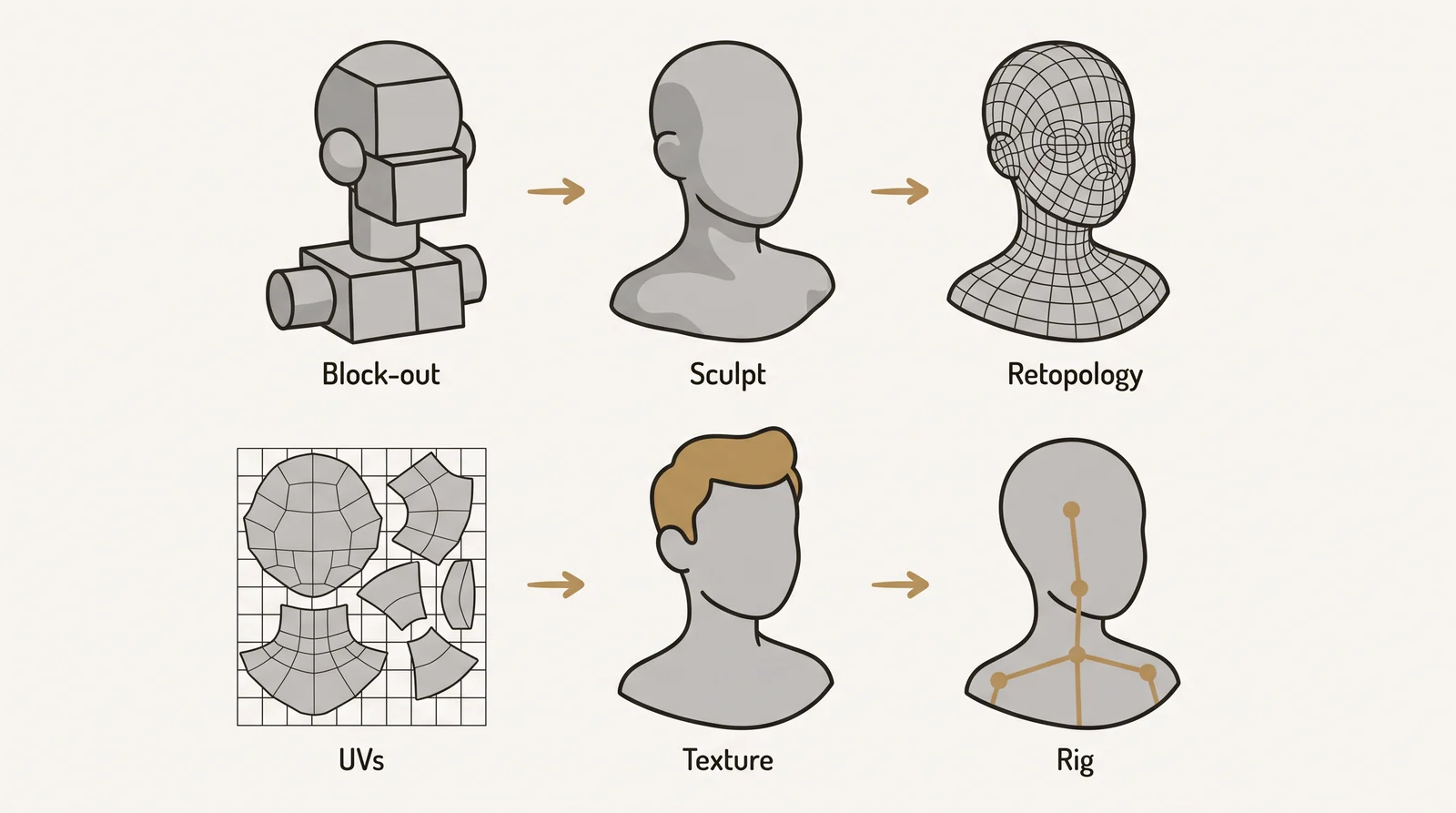
The work runs in 8 steps: reference, blocking, sculpting, retopology, UV unwrapping, baking, texturing and rigging. Rigging only needs the final topology, so it often overlaps with texturing.
What is 3D character modeling
A person who does this work is called a character artist or character modeler. The job sits inside 3D modeling as its own specialty, next to hard surface modeling for man made objects and environments.
A finished character model for a game or animation has 4 parts: a mesh with topology planned for movement, a UV layout, texture maps, and a skeleton with skin weights. Skip one and the problem shows up later as a pinched joint, a stretched texture or a mesh that tears when it moves. A character made only for a still image or a 3D print can skip some of these parts.
Tip: a character built for a still image only has to look right from the camera angles used. A character built for a game or animation has to hold up from every angle and in every pose.
Types of 3D characters and how the process changes
The 8 steps are not the same for every character. The type of character decides which steps you do, and how much effort each one takes.
Have a 3D model? Our AI Render Studio turns a screenshot of it into a photoreal image. 11 free renders, no card needed.
Render your model free| Type | Typical start | Sculpting needed | Rig needed | Main constraint |
|---|---|---|---|---|
| Realistic | Sculpt, built from reference photos or scans | Yes, a lot | Yes, for games and film | Believable anatomy, skin detail, many texture sets |
| Stylized or cartoon | Simple forms, often box-modeled directly with polygons | Light, or none | Yes | A clear silhouette and one consistent style across all parts |
| Low poly game or mobile | Built directly at a tight triangle budget | Often skipped | Yes, with few bones | Triangle count, bone count and texture size |
| 3D print or collectible | Sculpt, then posed | Usually yes | No | A closed (watertight) mesh at real size with walls thick enough to print |
The 3D character modeling process
Each step depends on the one before it. If the sculpt changes after retopology, the retopology, UVs and bake must be redone. That is why the order below matters.
- Reference and concept. This step produces a turnaround sheet: front, side and back views in a T-pose or A-pose, plus close-ups of the face, hands and costume. The pose is chosen here because the rig will expect it. If the front and side views do not match, the model looks wrong from at least one angle.
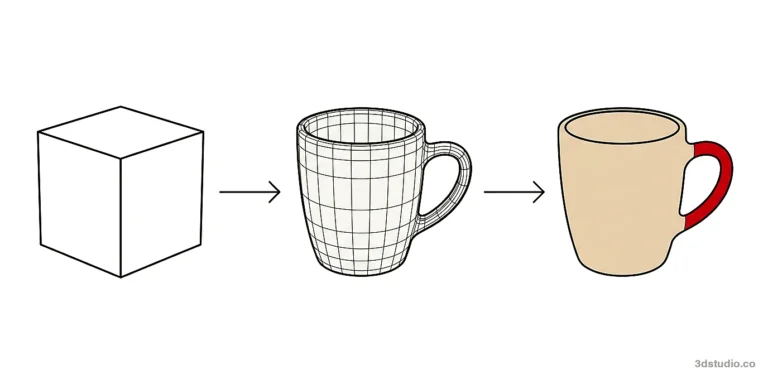
- Blocking. Simple shapes (cubes, cylinders, spheres) are combined into a rough base mesh that sets the proportions and the real world scale. If proportions are wrong here, every later step inherits the error.
- Sculpting. The base mesh moves into digital sculpting software, where brushes push, pull and smooth a very dense mesh to add anatomy, muscle and fine surface detail. A common error is sculpting skin pores before the big forms are right. Stylized and low poly characters often skip this step.
- Retopology. The sculpt is rebuilt as a clean, mostly four sided polygon mesh that follows the flow of the body, with extra edge loops around the eyes, mouth, shoulders, elbows and knees. Triangles and faces with five or more sides across a bending area cause pinching.
- UV unwrapping. The retopologized mesh is flattened into 2D UV space so textures can be placed without stretching. Seams should sit where the camera rarely looks. Check the layout with a checker pattern: squares of different sizes mean the texture detail will be uneven. Our guide to UV unwrapping software covers this step in detail.
- Baking. The detail of the high poly sculpt is projected onto the low poly mesh as a normal map. Ambient occlusion and curvature maps are baked at the same time, and texturing uses them later. A bad bake shows as wavy edges, black spots or visible seams, often because the cage or ray distance is set wrong. Baking comes after UVs because the maps are stored in the UV layout.
- Texturing. Base color, roughness and metallic values are painted on top of the baked maps, which act as masks for edges and dirt. See texture maps for what each map does. A common error is finishing textures before testing how the rig deforms the mesh.
- Rigging and skinning. A skeleton is built inside the mesh, and the mesh is bound (skinned) to it so that moving a bone moves the surface around it. A humanoid game skeleton has dozens of bones, and more for fingers and the face. Poor skin weights show as a collapsed shoulder or a stretched elbow.
Rigging, skin weights and facial setup
Skin weights say how much each bone moves each part of the surface. Artists set them by weight painting, then test the result in extreme poses such as arms raised, a deep squat, a head turn and an open mouth. Do this before the textures are final. A deformation problem can need a topology change, and a topology change means new UVs, a new bake and new textures.
A face is driven by bones, by blend shapes, or by both. Blend shapes (also called morph targets or shape keys) store a set of target faces, such as a smile or a closed eye, that the rig blends between. Apple’s ARKit face tracking defines 52 blend shapes, so characters made for live face capture are often built with that set. Shoulders and elbows often get corrective shapes, which fix the surface when a joint bends far.
Hair and clothing
Games usually build hair from hair cards, which are textured strips of polygons. Film usually uses strand-based hair, built from curves that are groomed and often simulated. Clothing is often simulated in a cloth tool, then retopologized like the body. Layered clothing needs a small gap between layers, or the layers clip through each other when the rig moves.
Polygon modeling vs digital sculpting for characters
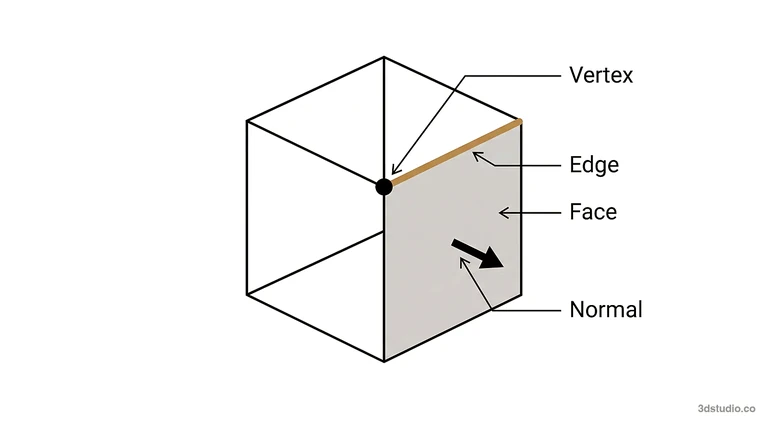
Polygon modeling builds a mesh directly from vertices, edges and faces, which gives control over topology from the start. Sculpting is faster for organic shapes but leaves topology that is not ready for animation, so realistic characters are sculpted first and retopologized after. Armor, weapons and vehicles are hard surface work and are usually built with polygons, as explained in our post on hard surface vs organic modeling.
Software used for 3D character modeling
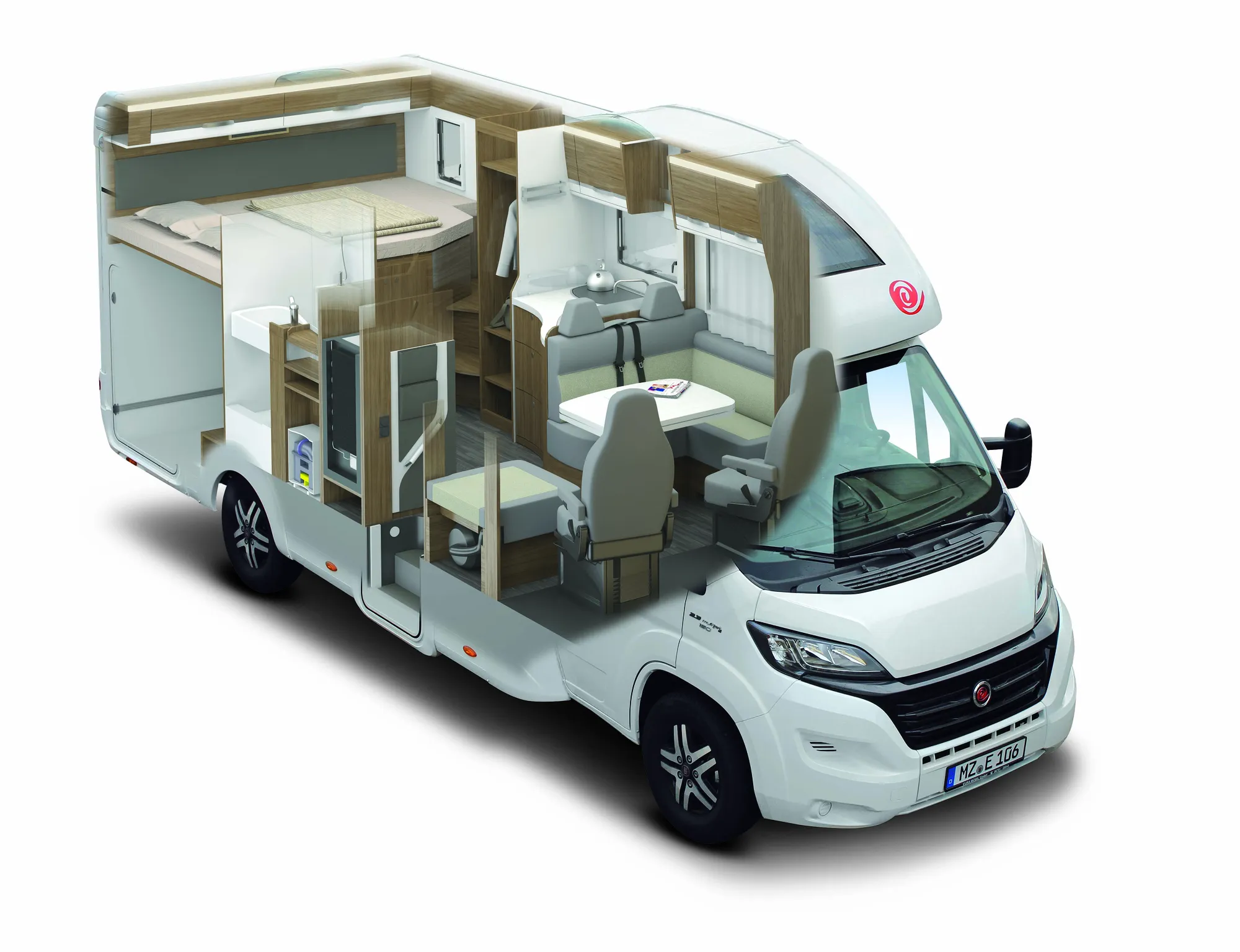
Blender is free and can do every stage. Studios often still combine a sculpting tool, a polygon and rigging tool and a texturing tool, because each is faster at its own job. The table lists common choices per stage.
| Stage | Common software | Free option |
|---|---|---|
| Sculpting | ZBrush, Blender | Blender |
| Retopology | Maya (Quad Draw), Blender, TopoGun, ZBrush (ZRemesher for a first pass) | Blender |
| UV unwrapping | Maya, Blender, RizomUV | Blender |
| Baking and texturing | Substance 3D Painter, Marmoset Toolbag, Mari | Blender |
| Clothing | Marvelous Designer | Blender cloth simulation |
| Rigging | Maya, Blender with the Rigify add-on, 3ds Max with Biped, Mixamo for automatic humanoid rigs | Blender, Mixamo |
Rigify builds the bones and rig controls for you. You still bind the mesh to the rig and correct the skin weights yourself. For a free start, see our post on 3D modeling in Blender for beginners and the Blender download.
Character generators such as MetaHuman, Character Creator and Daz Studio give you a finished human base with a standard rig. They save time on realistic people. A unique stylized design still has to be modeled from its concept. Check the license terms before you ship a product that uses a generated character.
3ds Max character modeling is possible: 3ds Max has full polygon modeling tools and built-in character animation tools including Biped. Many character artists still sculpt in ZBrush or Blender and rig in Maya or Blender. A typical 3ds Max route is to build the base mesh, retopology and UVs there and send the model to a sculpting tool for detail.
Character models for games, film and 3D printing
The delivery target changes what the finished model looks like.
| Target | Geometry | Textures | Rig | Delivery |
|---|---|---|---|---|
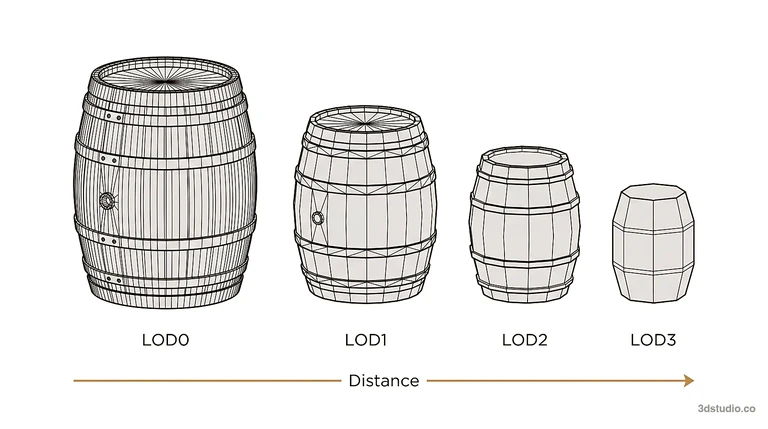
| Games | Triangle budget set by the platform, plus a chain of lower detail versions (level of detail, LOD) | One to a few texture sets | Skeleton that matches the engine | FBX or glTF |
| Film and animation | Subdivision surfaces smoothed at render time | Many UDIM tiles, displacement maps | Built for animators, with detailed face controls | Set by the studio pipeline |
| 3D printing | Watertight mesh, enough wall thickness | Usually none | None, the pose is fixed before export | STL or 3MF (a free STL converter helps with format changes) |
For games, the triangle budget depends on the target platform, how many characters are on screen and how close the camera gets. It comes from the project’s technical spec, not from a general rule.
How to check a 3D character model before you accept it
A render of a character can look fine while the model underneath is unusable. Check these points on the delivered file, not on a picture of it:
- Wireframe. Mostly quads in areas that bend, with edge loops around the eyes, mouth, shoulders, elbows and knees.
- Deformation. Test 4 extreme poses: arms up, deep squat, head turn and open mouth. Look for pinching, collapsing and stretched textures.
- UV layout. Apply a checker map. Squares should look the same size everywhere, with no stretching, and seams should be hidden.
- Baked maps. No wavy edges or black spots in the normal map.
- Spec. Triangle count and number of texture sets match the agreed budget.
- Skeleton. Naming and orientation match the target engine.
- Export. The FBX or glTF opens in the engine with skeleton, skin weights and materials intact. A free FBX converter and viewer lets you inspect an FBX without the original software.
- Scale. The model uses the real world units of the target engine, for example meters in Unity or centimeters in Unreal Engine.
What to send a character artist
- The turnaround sheet, or concept art with front, side and back views.
- The triangle budget and the number of LODs.
- The target engine and its version.
- The skeleton standard, if one exists.
- The texture resolution and the list of maps, including channel packing.
- A date for a grey model review, so changes happen before texturing.
Common mistakes in 3D character modeling
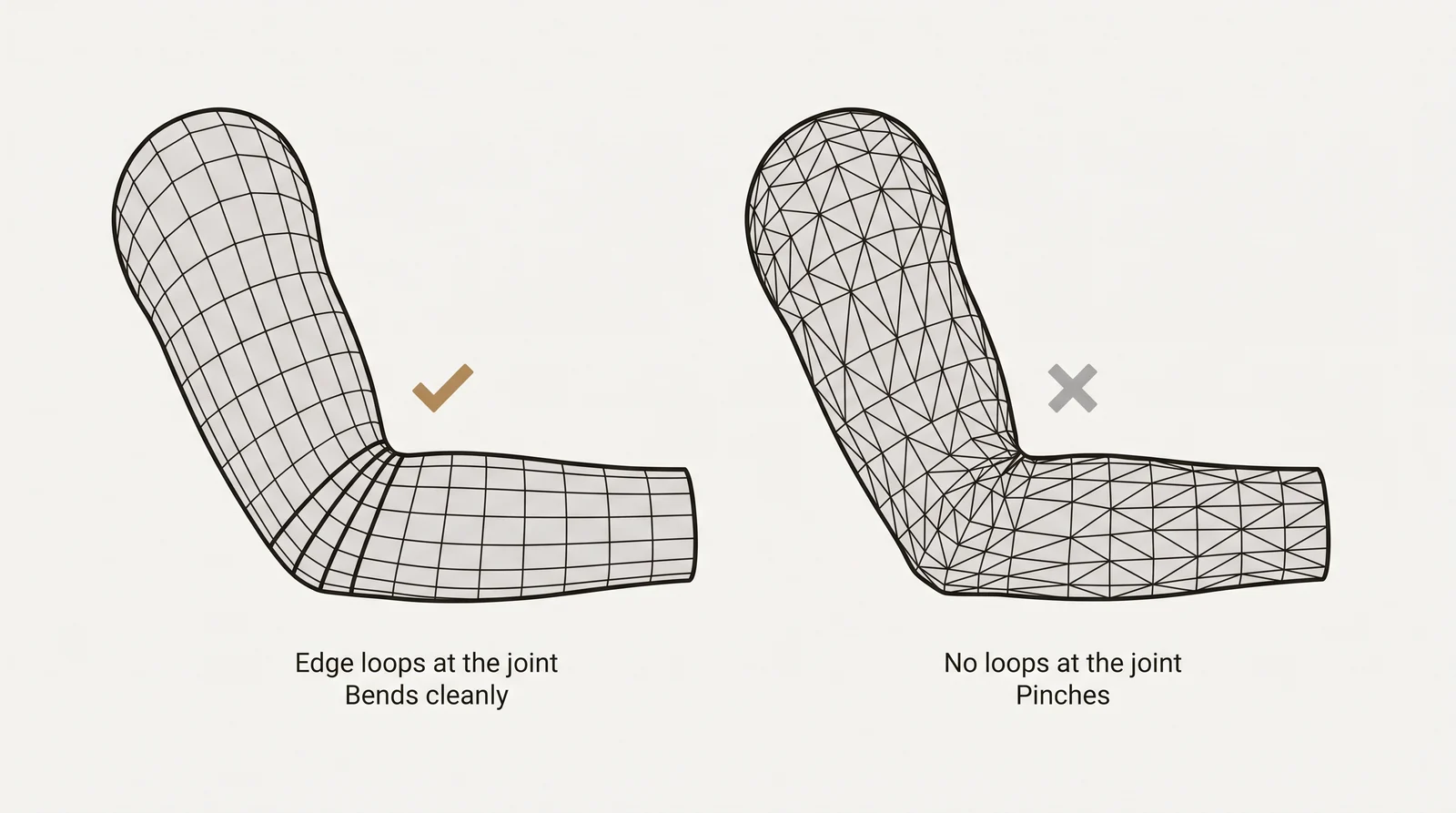
- Using n-gons (faces with five or more sides) or leftover triangles across areas that need to bend, which causes pinching when the rig moves.
- Blocking out proportions without anatomy reference, which is hard to fix later without reworking the sculpt.
- Skipping retopology and trying to rig the raw sculpt, which usually deforms badly at the joints.
- Leaving out extra edge loops around the knees, elbows, shoulders and mouth before rigging.
- Building at the wrong real world scale, which throws off physics, cloth and hair simulation later.
- Finalizing textures before testing how the rig deforms the mesh in a few extreme poses.
How much does a 3D character model cost
The price depends on how much work the model contains, so there is no single figure. These are the main cost drivers:
- The level of realism.
- The number of separate parts, such as clothing, armor and props.
- Whether the face has a rig with blend shapes.
- The number of LODs and texture sets.
- Whether a concept sheet already exists.
- Whether animation is included.
3Dstudio.co does not make characters. It builds the environments and props around them, as described in the section on game art below.
Is 3D character modeling hard to learn
Yes, it is one of the harder 3D specialties. You need anatomy and proportion, form and silhouette, topology that deforms well, UVs and baking, and skill in one sculpting tool plus one polygon tool, all at the same time.
A practical learning order:
- Block and sculpt a bust.
- Retopologize the bust and bake its detail.
- Model a full body.
- Rig the full body and test it in extreme poses.
Getting game art built by a studio
Studios that outsource characters often send environments, props and vehicles to a separate hard surface vendor. Characters and creatures need rigging and facial deformation skills, so they usually go to artists who specialize in them.
3Dstudio.co’s game art outsourcing covers environments, props and hard surface assets built to your technical spec: triangle budget, LOD chain, naming convention and channel packing. We do not build characters or creatures. See how our fixed quote works.
Questions about 3D character modeling
How much does a 3D character model cost?
There is no fixed price. It depends on realism, the number of separate parts, the face rig, the number of LODs and texture sets, and whether a concept sheet already exists. 3Dstudio.co does not make characters. It builds game environments and props.
What is the best software for 3D character modeling?
There is no single best program. Most artists use one sculpting tool (ZBrush or Blender), one polygon and rigging tool (Maya, Blender or 3ds Max) and Substance 3D Painter for textures. Blender is free and covers every stage.
Is 3D character modeling hard?
Yes, it is one of the harder specialties, because it needs anatomy knowledge and topology for deformation on top of software skills. A good learning order is a bust, then retopology and baking, then a full body, then a rig.
What files should a finished character model include?
A finished character should include the low poly mesh with skeleton and skin weights as FBX or glTF, the high poly sculpt, the texture maps (base color, normal, roughness, metallic and ambient occlusion, or a packed map), any LOD meshes you requested, and a test pose or animation that proves the deformation.
What is the difference between a T-pose and an A-pose?
In a T-pose the arms stretch out straight to the sides, which many older engine skeletons and auto-riggers expect. In an A-pose the arms hang angled down, which usually gives cleaner shoulder deformation. The pose is chosen before modeling and must match the rig.
How many polygons does a game character need?
The budget is set by the target platform, how many characters appear on screen, how close the camera gets and how many LODs are needed. It comes from the project’s technical spec. Artists usually work from a low poly and high poly pair: a dense sculpt for detail, baked onto the lighter mesh the engine runs.
Can 3ds Max be used for character modeling?
Yes. 3ds Max has full polygon modeling tools and built-in character animation tools including Biped. Many artists pair it with a dedicated sculpting tool for the organic detail pass.
Diagrams in this post are drawn with an AI image tool from our brief and checked by our team.