Digital Sculpting: What It Is and the 3D Sculpting Software to Use
What digital sculpting is, how it differs from polygon modeling, and the free, paid, iPad and online 3D sculpting software compared.
In this article
- Digital sculpting shapes a mesh or voxel volume with brushes, like digital clay
- Sculpting suits organic shapes, polygon modeling suits hard surface and measured objects
- Pipelines use both: sculpt for detail, retopologize, then bake the detail into texture maps
- Software ranges from free Blender and browser based SculptGL to ZBrush, Nomad Sculpt and 3DCoat
Digital sculpting, also called 3D sculpting, is a way of shaping a 3D model by pushing, pulling and smoothing a dense mesh or a voxel volume with brushes, the way a sculptor works real clay. It suits organic shapes such as faces, creatures, rock and fabric folds.
Common 3D sculpting software includes ZBrush (professional, subscription), Blender (free), Nomad Sculpt (tablets and desktop), 3DCoat (voxel sculpting) and SculptGL (in a browser). This guide compares them by platform, price model and resolution method, and explains how sculpting differs from the polygon 3D modeling from drawings and CAD files that 3Dstudio.co does for buildings, interiors and products.
What is digital sculpting
Digital sculpting shapes a 3D object with brush tools instead of editing individual vertices, edges and faces. A brush can push a bump outward, carve a groove inward or smooth a rough patch, and the software recalculates the surface as you work.
It starts from a simple base shape, such as a sphere or a rough block out made in a regular 3D modeling program. The sculptor then adds resolution where more detail is needed. Sculpting works by eye, like clay. Polygon modeling works by measurement, like drafting.
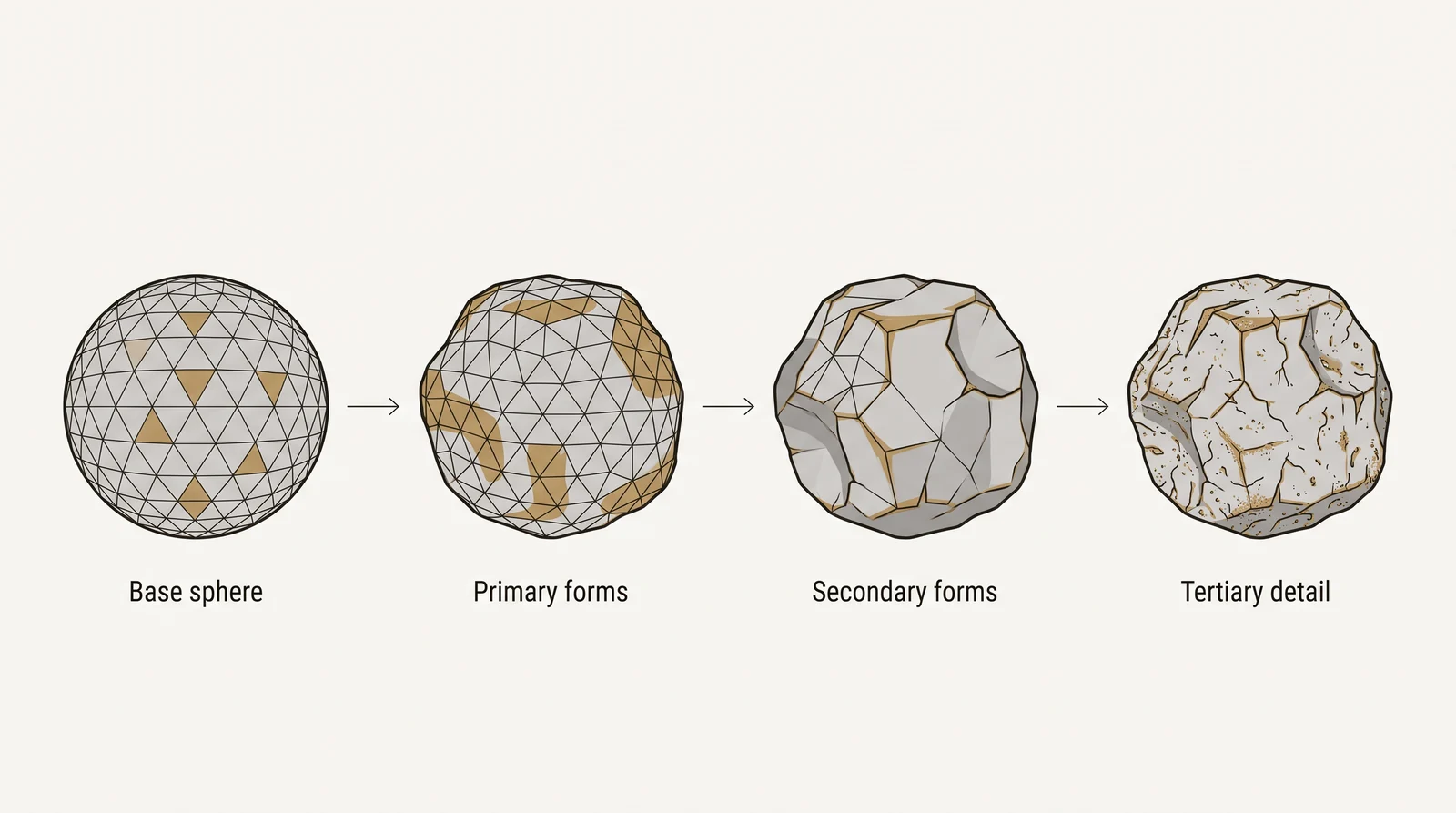
The 3 stages of a sculpt
Most sculpts move from large shapes to small ones:
- Primary forms: the basic masses and proportions, such as the skull, the torso or the overall shape of a boulder.
- Secondary forms: medium features such as the brow, the muscles, a ridge or a cutout.
- Tertiary detail: the smallest surface features, such as pores, cracks, scratches and fabric texture.
At this stage you do not plan edge flow. Clean topology comes later, in retopology. Polygon count still matters for speed, because a very dense mesh slows the program down.
Mesh-based and voxel-based sculpting
In traditional sculpture there are 2 types of work: additive (building up material such as clay) and subtractive (carving material away, such as stone or wood). Digital sculpting has 2 types of its own, based on what the software edits:
- Mesh-based sculpting deforms a polygon surface. It supports several resolution levels of the same model, but the existing polygons limit where detail can go.
- Voxel-based sculpting edits a volume instead of a surface. The topology is free, so you can cut, merge and pull shapes without planning polygons. The result usually needs retopology afterward.
How sculpting software handles mesh resolution
A sculpt needs enough polygons under the brush. Software adds them in 3 main ways. The names differ between programs, but the ideas are the same. The Blender manual page on adaptive resolution describes all 3.
Have a 3D model? Our AI Render Studio turns a screenshot of it into a photoreal image in about 20 seconds. Your first render needs no account.
Render your model free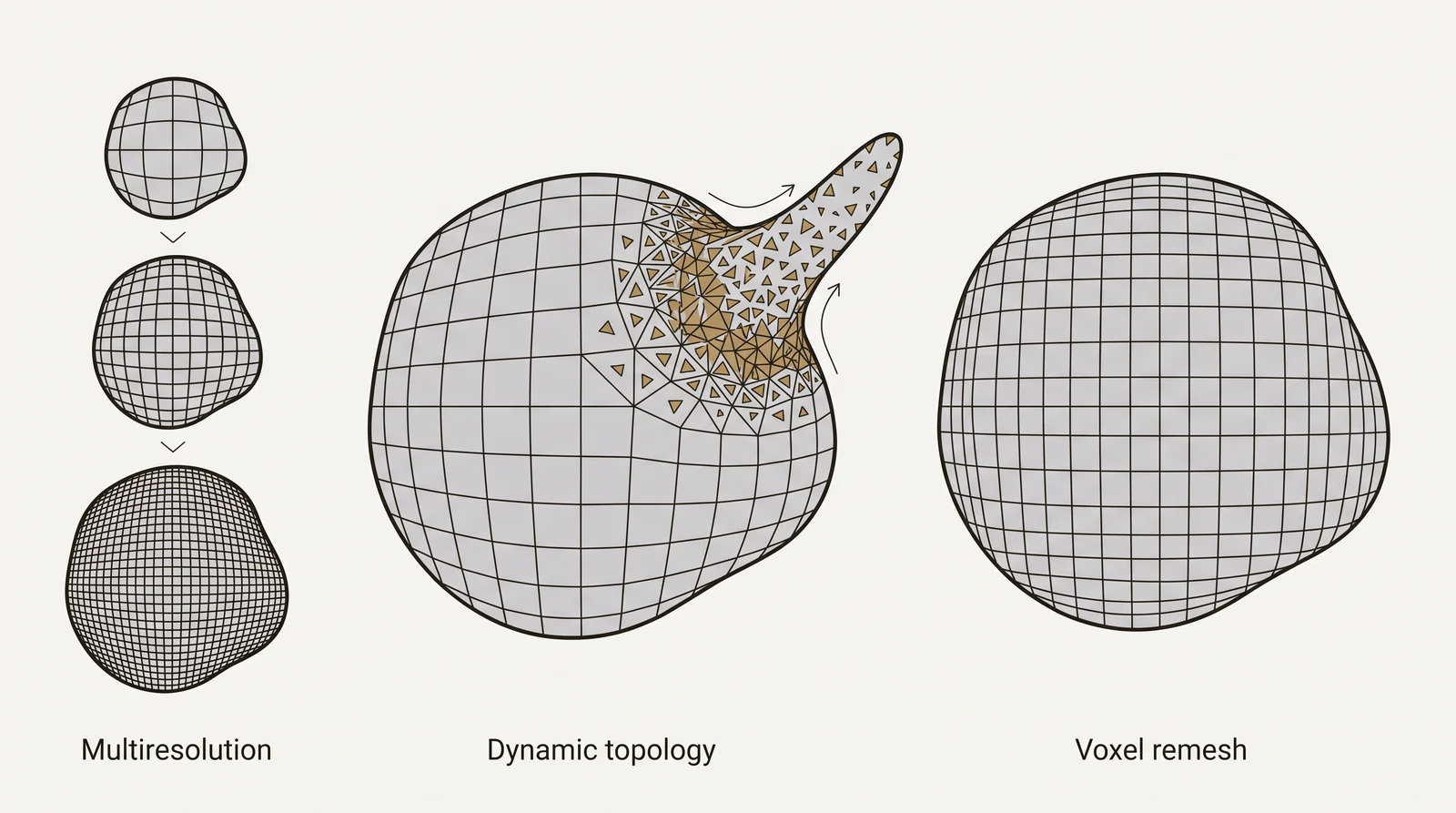
| Method | How it works | Names in common programs | Best stage |
|---|---|---|---|
| Multiresolution | The mesh is subdivided into levels. You sculpt broad changes on a low level and fine detail on a high level, and you can step back down at any time. | Subdivision levels in ZBrush, the Multiresolution modifier in Blender | Detail on a mesh with clean topology |
| Dynamic topology | The software adds and removes triangles only under the brush, so you can pull out a horn or a limb without planning resolution. | Sculptris Pro in ZBrush, Dyntopo in Blender | Free-form early shapes |
| Voxel remeshing | The whole surface is rebuilt as an even mesh. Overlapping parts merge into one closed volume. | DynaMesh in ZBrush, the Voxel Remesher in Blender | Block out and joining parts |
Each method has a cost. Multiresolution works best on a clean base mesh of quads, and changing the base mesh after subdividing corrupts the detail. Dynamic topology is slower and can lose UV maps and color data. Voxel remeshing only works on a closed volume, so holes must be filled first.
Sculpting brushes and controls
Most sculpting programs share a core set of brushes. The names vary between programs, but these 9 do most of the work:
| Brush | What it does |
|---|---|
| Clay or Clay Buildup | Adds material in strokes, so forms build up gradually |
| Draw or Standard | Pushes the surface outward or inward along the stroke |
| Inflate | Swells the surface outward, so a shape gets rounder and fuller |
| Grab or Move | Picks up a whole area and moves it, used for proportions and silhouette |
| Smooth | Averages the surface to remove bumps |
| Flatten or Plane | Pulls the surface toward a flat plane |
| Pinch | Pulls the surface toward the stroke line to sharpen an edge |
| Crease | Cuts a sharp groove, for folds, seams and wrinkles |
| Snake Hook | Drags a strand out of the surface, for horns, tentacles and roots |
3 controls work with most brushes:
- Symmetry mirrors your strokes across an axis, so one side of a face or creature is built once.
- Masking protects an area, so a brush or a move only affects the unmasked part.
- Alphas or stamps repeat a texture pattern with each stroke, such as skin pores or stone grain.
3D modeling vs 3D sculpting
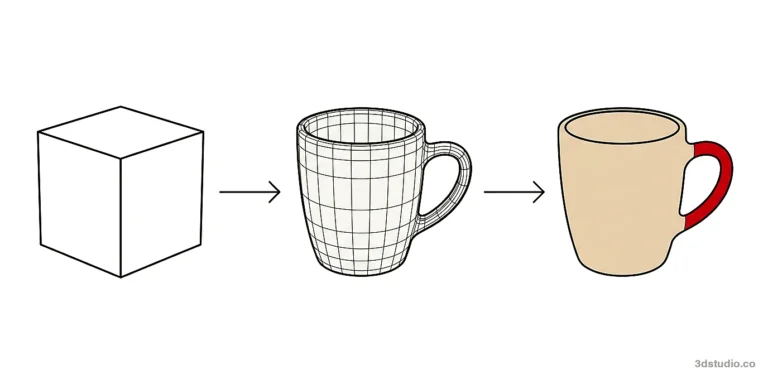
3D modeling is the broader term for building 3D geometry by any method. Sculpting is one technique inside it, alongside polygon modeling, which builds a mesh directly from vertices, edges and faces. The modeling techniques section of our guide on how to 3D model covers the others.
| Digital sculpting | Polygon modeling | |
|---|---|---|
| How you work | With brushes, pushing and pulling a surface | By placing and editing vertices, edges and faces |
| Typical mesh | Very dense, with many uneven triangles | Light and clean, mostly quads |
| Best for | Organic shapes: faces, creatures, rock, fabric folds | Hard surface and measured objects: buildings, furniture, machines |
| Precision | By eye | Exact dimensions |
| Output | High detail for baking, rendering or printing | Ready for UVs, rigging and drawings |
| Typical software | ZBrush, Blender sculpt mode, Nomad Sculpt | 3ds Max, Blender, SketchUp |
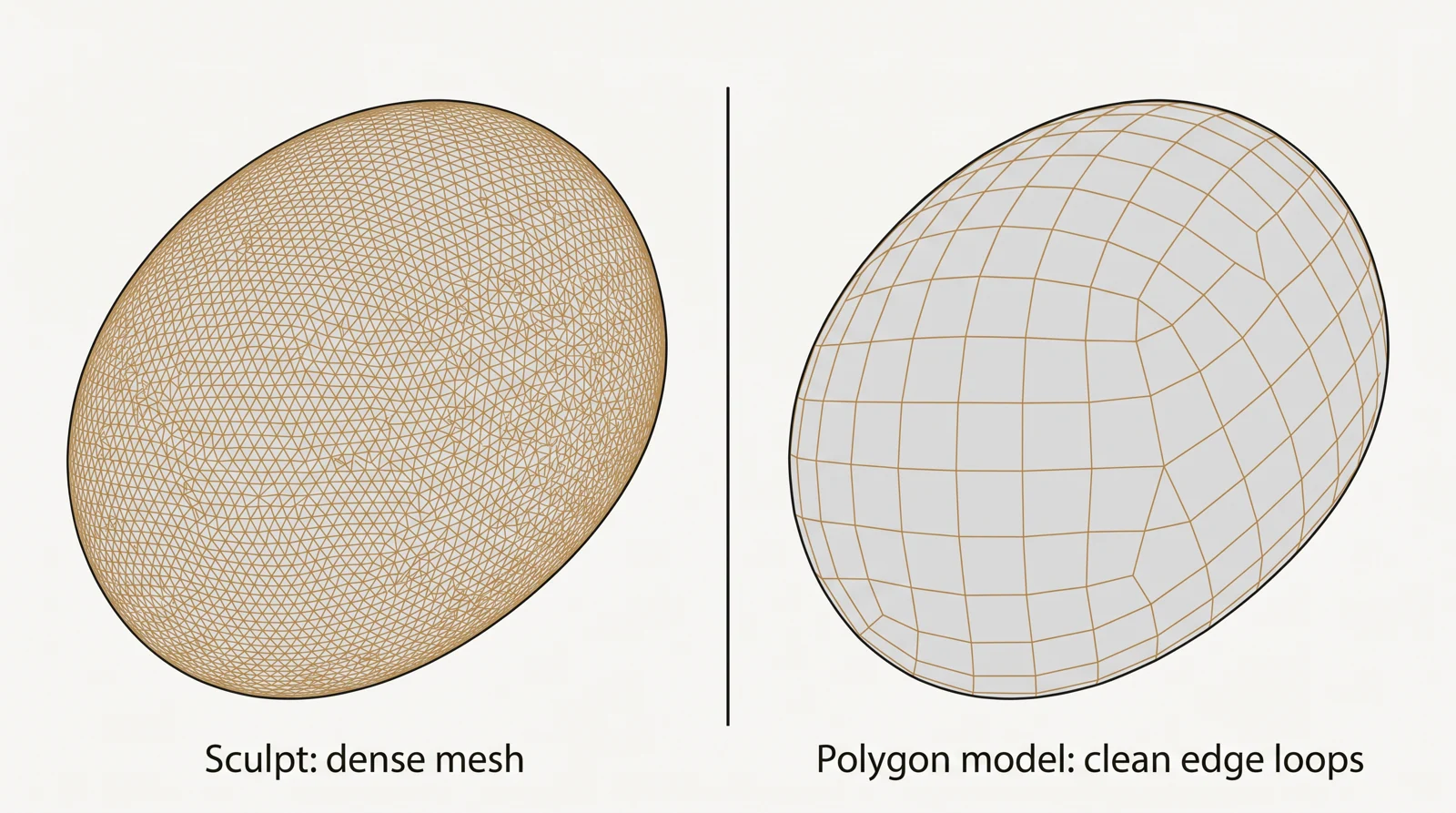
Polygon modeling gives precise, predictable control, which is why it is the standard approach for hard surface objects such as buildings, furniture and machines, where every edge needs to match a real measurement. Sculpting fits irregular shapes, because a brush can add anatomy or natural detail faster than placing vertices by hand.
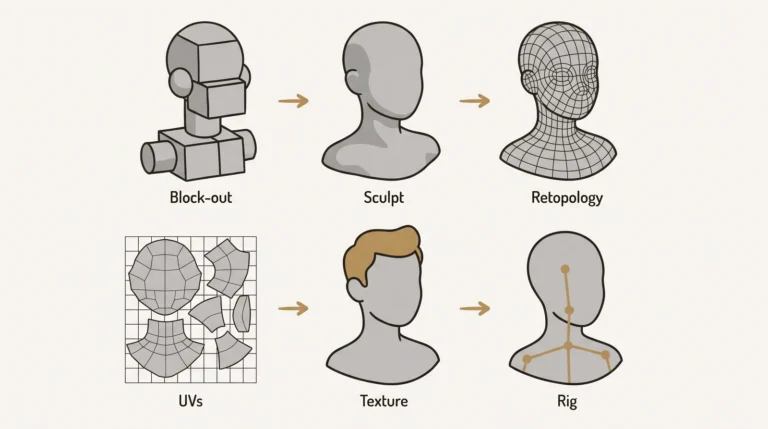
Most pipelines use both. A model is blocked out with polygons, sculpted for detail, then rebuilt into a clean mesh through retopology. Our guide to 3D character modeling covers that process for characters, including anatomy and character-specific software.
From sculpt to finished asset
A sculpt is rarely the final file. For a game or an animation it goes through these steps:
- Block out the primary forms.
- Sculpt the secondary forms and the tertiary detail. This is the high poly model.
- Retopologize the sculpt into a light, clean mesh. The difference between the 2 meshes is explained in our guide to low poly vs high poly models.
- Unwrap the low poly mesh to flat coordinates. See UV unwrapping.
- Bake the detail of the high poly sculpt onto the low poly mesh as texture maps. See normal and displacement maps.
- Texture the model, then rig it or render it.
Baking exists because a game engine cannot draw millions of polygons for every object. The normal map makes the light behave as if the low poly surface still carried the sculpted detail.
Tip: Unwrap after retopology, not before. In Blender, dynamic topology and remeshing can lose or corrupt UV maps, and any UVs made on the dense sculpt would be replaced anyway.
Where digital sculpting is used
- Character and creature design for games and film, where anatomy and skin detail matter.
- Game assets, where a high poly sculpt is baked onto a low poly model.
- Concept and product design, sketching unusual shapes quickly before a final surface is locked down.
- Terrain and natural detail, such as rock, bark or fabric folds, where the surface has no fixed geometry to model against.
- Toys, collectibles and 3D printing, where the sculpt becomes a physical object.
3D sculpting software
3D sculpting software ranges from professional desktop programs to free sculptors that run in a browser. The table compares the main options. Check each vendor’s page for current prices and platforms before you buy.
| Software | Platforms | Price model | Resolution method | Best for |
|---|---|---|---|---|
| ZBrush | Windows, macOS, iPadOS | Subscription | Subdivision levels, DynaMesh, Sculptris Pro | Professional character, creature and collectible sculpting |
| Blender (sculpt mode) | Windows, macOS, Linux | Free, open source | Multiresolution, Dyntopo, Voxel Remesher | Sculpting inside a full 3D suite that also models, textures, rigs and renders |
| Nomad Sculpt | Windows, macOS, iPadOS, iOS, Android | One-time purchase, free to download and try | Multiresolution, dynamic topology, voxel remesher | Sculpting on a tablet or phone, and a lighter desktop option |
| 3DCoat | Windows, macOS, Linux | License, trial available | Voxel sculpting and surface mode | Voxel sculpting with retopology, UV and texture painting in one program |
| Adobe Substance 3D Modeler | Windows, desktop or VR | Subscription | Voxel-based volume | Clay-like sculpting with a mouse, a pen or VR controllers |
| Autodesk Mudbox | Desktop | Being discontinued | Subdivision levels | Existing users only |
| SculptGL | Browser | Free | Multiresolution, dynamic topology, voxel remeshing | Trying sculpting with no install |
General 3D suites such as Maya and 3ds Max also include sculpting brushes, with a smaller toolset than the dedicated programs above.
Free 3D sculpting software
Blender is the free choice for serious work. Its sculpt mode runs on Windows, macOS and Linux, and the same file can go on to modeling, texturing and rendering. For a first try, SculptGL needs nothing but a browser. Nomad Sculpt is free to download and try before you buy it.
Sculpting apps for iPad and Android
Nomad Sculpt runs on iPad, iPhone and Android. ZBrush for iPad has a free plan, and a ZBrush subscription bought from Maxon includes both the desktop and the iPad version. Both work with a stylus, and files export to desktop programs or to printing formats such as OBJ and STL.
Professional desktop software
ZBrush is the long-standing standard for characters, creatures and collectibles. 3DCoat combines voxel and surface sculpting with retopology and texture painting. Adobe Substance 3D Modeler suits a clay-like workflow. Autodesk has stopped selling new Mudbox subscriptions in stages, ending in November 2026, and Mudbox 2027 is the final version. Do not start a new workflow on it.
Which sculpting software should you choose
- Choose Blender if you want one free program for the whole pipeline.
- Choose ZBrush if you sculpt characters or creatures professionally.
- Choose Nomad Sculpt if you work on a tablet, or want a lighter desktop program.
- Choose 3DCoat if you want voxel freedom and retopology in one place.
- Choose Substance 3D Modeler if you prefer a clay-like feel and work on Windows.
- Choose SculptGL if you only want to try the basic moves today.
Sculpting online in your browser
The best-known way to sculpt online is SculptGL, a free sculpting app that runs in a browser. It is by Stephane Ginier, who also makes Nomad Sculpt. There is no download and no account.
It covers the basics:
- Brushes such as Brush, Move, Smooth, Inflate, Pinch, Crease and Flatten, plus masking and painting
- Symmetry
- Multiresolution, dynamic topology and voxel remeshing
- Import and export of OBJ, PLY and STL files
The brush set is smaller than in desktop programs, and a browser has less memory to work with, so very dense meshes slow down. The developer also says he no longer maintains SculptGL beyond small fixes. Use it to learn the moves. When you need layers, higher resolution or a long project, move to Blender or Nomad Sculpt.
To use the result elsewhere, export an OBJ. If you need another format, you can convert OBJ files online with our free converter. It keeps materials in an MTL file and runs in your browser.
Sculpting for 3D printing
A printer needs a solid object, not just a surface that looks right on screen. Before you print a sculpt:
- Make it watertight. The mesh must be closed, with no holes, and manifold, with no edges shared by more than 2 faces.
- Merge separate parts. Voxel remeshing joins overlapping parts into one closed volume.
- Check wall thickness. Thin parts such as fingers, horns and fabric edges can break or fail to print.
- Hollow large resin prints and add drain holes, to save material.
- Reduce the polygon count to a size your slicer can handle.
- Export as STL or OBJ. Check the scale, because STL files carry no units.
Our free online STL converter turns OBJ and other 3D files into STL. It shows the size and the triangle count, and it tells you whether the mesh is watertight. It runs in your browser, so the file is not uploaded.
Getting started with digital sculpting
What you need to start
- A mouse is enough to begin. A pen tablet or a tablet with a stylus is better, because pen pressure controls brush strength and makes fine detail easier.
- An iPad with Apple Pencil runs Nomad Sculpt and ZBrush for iPad. An Android tablet with a stylus runs Nomad Sculpt.
- Memory and a graphics card matter on desktop, because meshes reach millions of polygons. Check the system requirements of each program.
- A VR headset is optional. Adobe says Substance 3D Modeler does not need one, and all its functions work in desktop mode.
First steps
- Start from a simple base mesh or a default sphere, not a finished shape.
- Block in the largest forms first. The Grab or Move, Clay and Smooth brushes do most of this.
- Add resolution only where the sculpt needs it, rather than subdividing the whole mesh at once.
- Save separate versions as you go. Sculpting is easy to overwork past the point where an earlier stage looked better.
- Check the silhouette from several angles before adding fine detail.
- Finish with a retopology pass if the model will be animated, textured cleanly or used in a game engine.
- Export at the resolution the next step needs. A game engine needs far fewer polygons than a still image render.
For practice, start in Blender sculpt mode or SculptGL. Sculpt simple forms first, such as a rock, a pear or a skull study, before characters. Study anatomy and form from real references. The Blender manual explains every sculpt mode tool for free.
Where sculpting fits in architectural visualization
For architectural visualization, 3Dstudio.co models from drawings and CAD files. A building, an interior or a piece of furniture has a fixed, measured shape to match, so polygon modeling is the right tool. A door hinge gains nothing from being pushed and pulled by hand when its dimensions are already on a drawing.
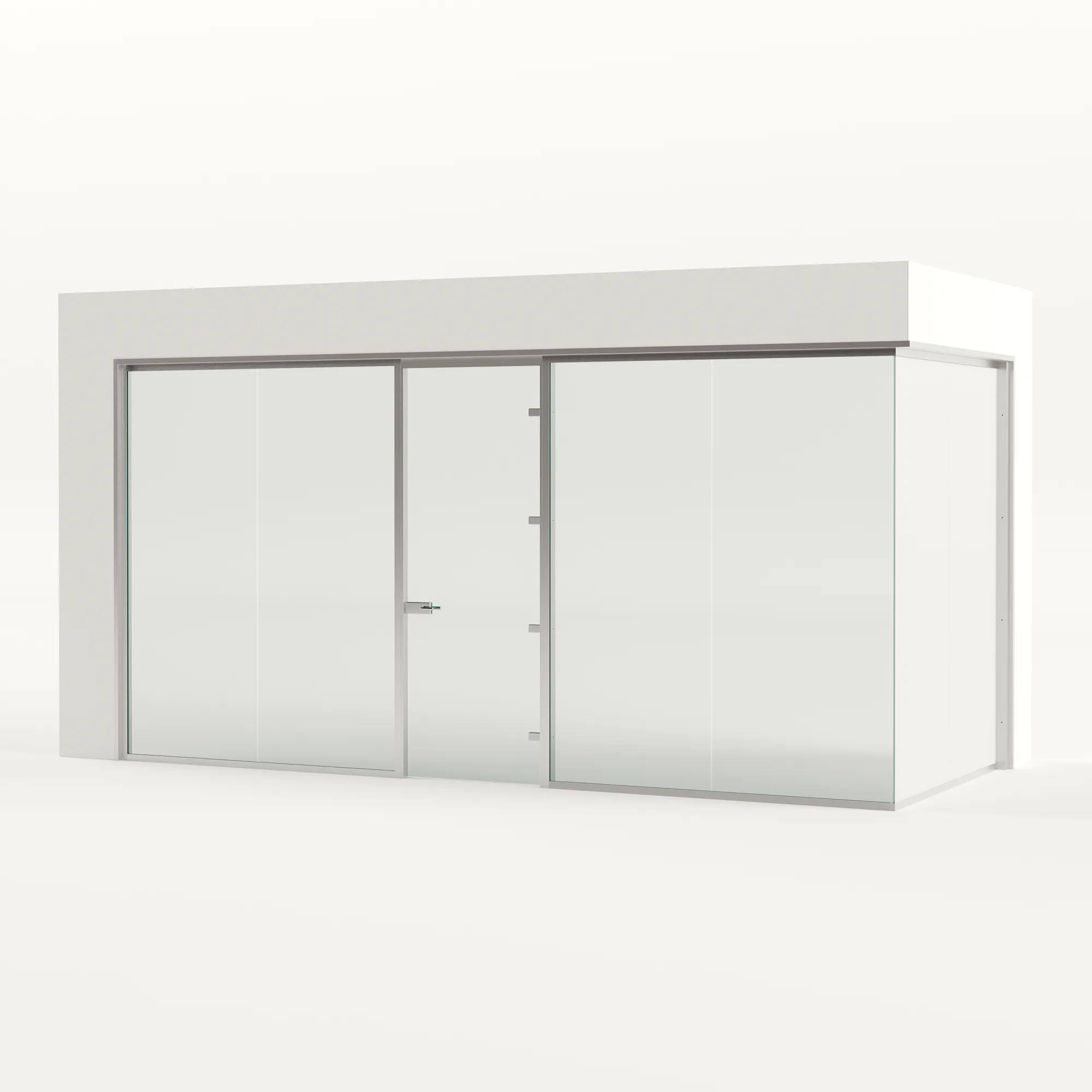
Digital sculpting shows up more on the character and creature side of game art. If you need a building, an interior or a product modeled from drawings, see our 3D modeling service.
Questions about digital sculpting
What is the best free 3D sculpting software?
Blender is the best free option for serious work. Its sculpt mode runs on Windows, macOS and Linux. To try sculpting with no install, use SculptGL in a browser. Nomad Sculpt can also be downloaded and tried before you buy it.
Can you do digital sculpting on an iPad?
Yes. Nomad Sculpt and ZBrush for iPad run on iPadOS and work with Apple Pencil. Files export as OBJ or STL, so you can continue in a desktop program or send them to a printer.
Do you need a drawing tablet for digital sculpting?
Not to start. A mouse works for blocking out forms. Pen pressure controls brush strength, so a pen tablet or a tablet with a stylus makes fine detail much easier.
What are the two types of digital sculpting?
Mesh-based sculpting shapes a polygon surface and supports subdivision levels. Voxel-based sculpting shapes a volume with free topology and usually needs retopology afterward. In traditional sculpture, the 2 types are additive (building up clay) and subtractive (carving away stone or wood).
Does a sculpted model need extra work before it can be animated?
Usually yes. A sculpted mesh is dense and uneven, so it normally goes through retopology, rebuilt into a clean mesh of mostly four-sided polygons, before it is rigged.
Is 3D sculpting harder to learn than polygon modeling?
Not necessarily harder, but different. Sculpting rewards a feel for form and anatomy, closer to traditional sculpture. Polygon modeling rewards precision and reading technical reference.
How much does it cost to have a 3D model made?
3Dstudio.co models buildings, interiors and products from drawings for one fixed price per project, agreed before work starts. Open-ended modeling work, where the scope keeps changing, is billed at €85 per hour. Projects start at €1,000. See our pricing for how a quote is built.
Diagrams in this post are drawn with an AI image tool from our brief and checked by our team.